
Skip to content
new ogbongeblog logo
  • Advertise
  • Blog
  • Contact

Jarida WordPress Theme Tricks That Work

February 20, 2016

·

Uncategorized
jidetheblogger Avatar
jidetheblogger

Jarida is a clean responsive magazine, news and blog theme for WordPress which I like alot simply because it’s very easy to customize with css and some modifications to the template files.

In this post, I’m sharing with you, some customization tricks I have applied on blogs which I’ve set up with Jarida theme.
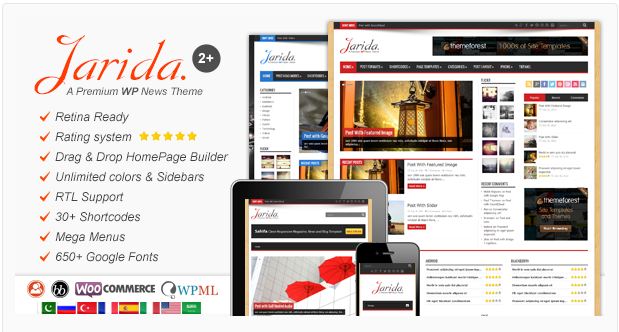
download jarida theme for wordpress

Jarida Post Views

The Jarida theme comes with Post views counter, which if enabled, will display the total number of times each post had been viewed. The number of views are displayed at the backend (admin dashboard) and also at the frontend (blog’s public view).

If you are not interested in the views count, you can disable “views meta” via Jarida Settings in your WordPress admin dashboard. When you do this, views will no longer be counted.

If you would like to continue to count page views but not have them show up publicly, back-end only, you will have to modify some template files as explained below:

To hide the views counts on post pages ,

Sign in to your CPanel, (www.yourdomain.com/cpanel) and use “File Manager” to navigate to “wp-content” > Jarida theme folder > includes/post-meta and delete

<?php echo tie_views(); ?>
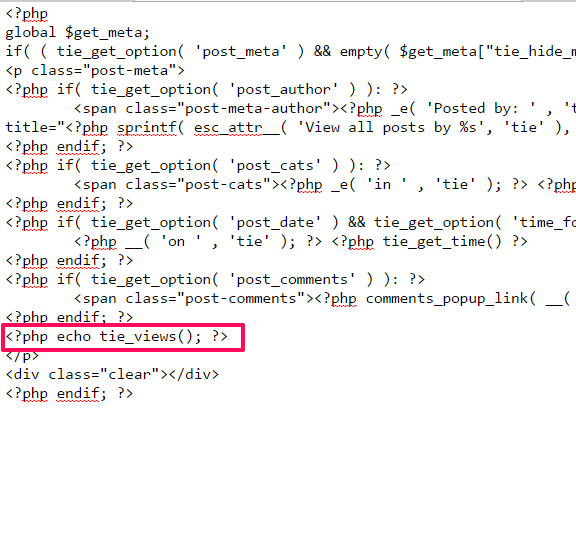
jaridapostsviewsdeletionfrontend

To hide the views counts on archive pages including homepage, 

Navigate as explained above but to includes/archives-meta.php

Find echo tie_views(); and replace tie_views(); with null as seen below :

jaridahomepageviewsdelete

To hide only the “views” word

Navigate to the to Jarida theme folder as explained earlier, edit functions/tie-views.php and search for

 ‘.__( ‘Views’ , ‘tie’ ).’

and delete it. Ensure you save changes.
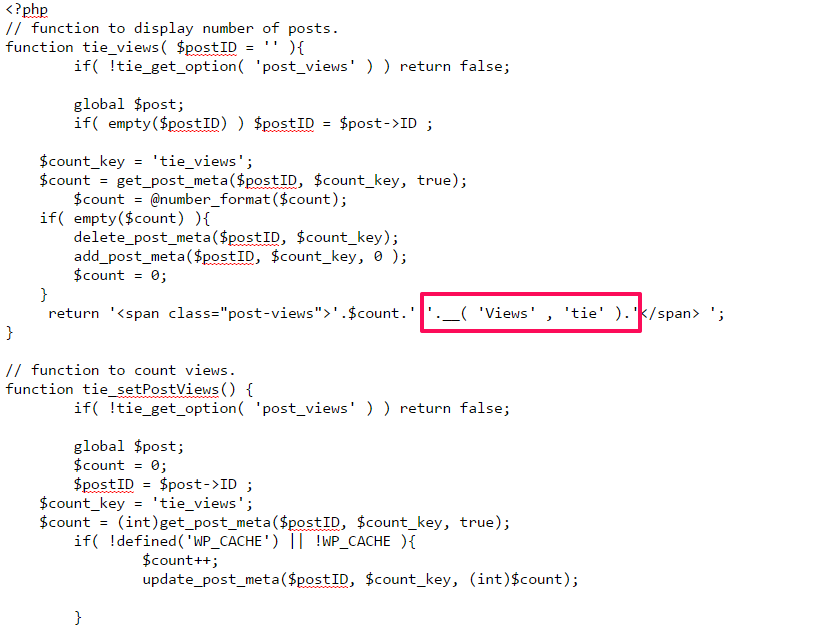
jaridaviewsworddelete

Number of views will keep showing at backend and frontend but the “views” word will stop showing on all pages including homepage.

Force Jarida to Display Full width on Mobile Screen With Boxed Layout Enabled

If you notice that your ads are overlapping on mobile view of your blog, add this code below to phone css : 320px to 479px ( navigate to Jarida settings > Styling)

.wrapper {
width: 100%!important;}
.container, header , #main-nav,  #main-content, .content {width: 320px !important;}

Remove Date From The Jarida Posts List Widget

Sign in to cPanel, navigate to the Jarida theme folder, then functions/theme-functions.php and search for “most recent post”  or wp_popular_posts , wp_random_posts , wp_last_posts and delete the line below :

<span class=”date”><?php tie_get_time(); ?></span>

Display Narrow Sidebar and the AD spaces on Tablets and Mobiles 

By default, the Jarida narrow sidebar and AD spaces don’t display on mobile view.

If you want them to display, add the code below to :: Jarida Settings Tiepanel > Styling > Custom css area

.ads-top, .ads-bottom, .home-ads, .ads-post, .sidebar-narrow {display: block !important;}.ads-top img, .ads-bottom img, .home-ads img , .ads-post img {max-width: 100% !important; height: auto;}

That’s all for now.

I will be adding more codes later.

You can check out the features and download Jarida Respsonsive WordPress Theme .

Please Share :
wordpress

Like What You Read?

Sign Up to get similar articles delivered to your email inbox.

Leave a Reply Cancel reply

Your email address will not be published. Required fields are marked *

13 responses to “Jarida WordPress Theme Tricks That Work”

  1. Ann Chetachukwu Ubah MD Avatar
    Ann Chetachukwu Ubah MD
    February 20, 2016

    Good for wordpress users

    Loading…
    Reply
  2. winblogpress Avatar
    winblogpress
    February 20, 2016

    I just started a new WordPress blog and I found it very easier to use compare to blogger. I know jarida, it is a great template, but if you don't have little CSS or php knowledge, your blog will look like mess with the template.

    Loading…
    Reply
  3. Christopher Akuneme Avatar
    Christopher Akuneme
    February 20, 2016

    Nice post, thanks for sharing…

    Loading…
    Reply
  4. rasaq tech Avatar
    rasaq tech
    February 20, 2016

    Great share Sir, thanks on behalf of WordPress users.

    Loading…
    Reply
  5. okondo peter Avatar
    okondo peter
    February 20, 2016

    Thanks…I will try it.

    Loading…
    Reply
  6. Victor Kachi Avatar
    Victor Kachi
    February 21, 2016

    Thanks for sharing…
    I blog @ Entclass.com

    Loading…
    Reply
  7. Benny Technology Inc Avatar
    Benny Technology Inc
    April 9, 2016

    How will i remove space for website and email in the comment section

    Loading…
    Reply
  8. Anna Avatar
    Anna
    July 27, 2016

    nice

    Loading…
    Reply
  9. Anil Kumar547 Avatar
    Anil Kumar547
    February 10, 2017

    i want change my site to mobile view plz help me ..solution plz with out plugin

    Loading…
    Reply
  10. Anil Kumar547 Avatar
    Anil Kumar547
    February 24, 2017

    how to set jarida theme …mobile view settings ???? plz help me solution

    Loading…
    Reply
  11. samchri Avatar
    samchri
    January 3, 2018

    hello
    .ads-top, .ads-bottom, .home-ads, .ads-post, .sidebar-narrow {display: block !important;}
    .ads-top img, .ads-bottom img, .home-ads img , .ads-post img {max-width: 100% !important; height: auto;} this where should it specifically be added is it the phone wide css or phone css, or global css thank you.

    Loading…
    Reply
    1. jidetheblogger Avatar
      jidetheblogger
      January 16, 2018

      Depends on what you want to achieve. Try each of the options.

      Loading…
      Reply
  12. Zoran Šavrljuga Avatar
    Zoran Šavrljuga
    March 28, 2019

    Is there any way to let us know how to make views column in admin panel sortable? I would like to sort posts by number of views they got, so I could create some content for top posts.

    Loading…
    Reply

WANT TO ADVERTISE?

Chat on WhatsApp

RELATED POSTS

  • How I Add Facebook Comment Form To WordPress Blog Without Plugin
  • How To Turn Off Posts Views Count In Flex Mag WordPress Theme
  • Bimber Theme for WordPress : Features, Documentation, Demos & Download Linkwordpress viral buzz news media theme premium

FEATURED


  • CREDICORP launches C.L.I.C.K.D. Scheme with FG’s 3MTT Programme, expanding affordable consumer credit for locally-assembled laptops and devices for digital workers

    CREDICORP launches C.L.I.C.K.D. Scheme with FG’s 3MTT Programme, expanding affordable consumer credit for locally-assembled laptops and devices for digital workers

  • What Happens to Your Online Accounts When You Die?

    What Happens to Your Online Accounts When You Die?

JOIN AI WEB DESIGN GROUP


  • AI Website Design Training Whatsapp Group by Jidetheblogger

    AI Website Design Training Whatsapp Group by Jidetheblogger

← The Gionee M5 Mini Launch
6 Steps To Help Your Body Recover From Diabetes →

Join 25,000+ subscribers

Receive our latest blog posts in your inbox.

Search

Social

Facebook

Instagram

Twitter

new ogbongeblog logo

Copyright © 2026 | About | Advertise | Featured | Sitemap | Privacy Policy | Powered by WordPress

Your cart (items: 0)

Products in cart

Product
Details
Total
Subtotal ₦0.00
Shipping and discounts calculated at checkout.
View my cart
Go to checkout

Your cart is currently empty!

Start shopping

Notifications

%d

    LIKE My Fan Page

    Privacy Policy | Copyright © 2012,OgbongeBlog.All Rights Reserved. Powered by Blogger .
    Create a Mobile Site
    View Site in Mobile | Classic
    Share by:


