
Skip to content
new ogbongeblog logo
  • Advertise
  • Blog
  • Contact

How To Turn Off Posts Views Count In Flex Mag WordPress Theme

February 4, 2017

·

Uncategorized
jidetheblogger Avatar
jidetheblogger

If you install and activate Flex Mag theme for your WordPress blog, post views count will display by default, on the home page and category pages.

Unfortunately, there is no way to disable this in the theme options. If you don’t want this feature, you can disable it by adding a piece of code to the css section of the theme.

How?

Sign in to your WordPress admin dashboard, navigate to ‘Appearance’ > ‘Flex Mag Options’ > ‘General’ and scroll down to the “Custom CSS” section.
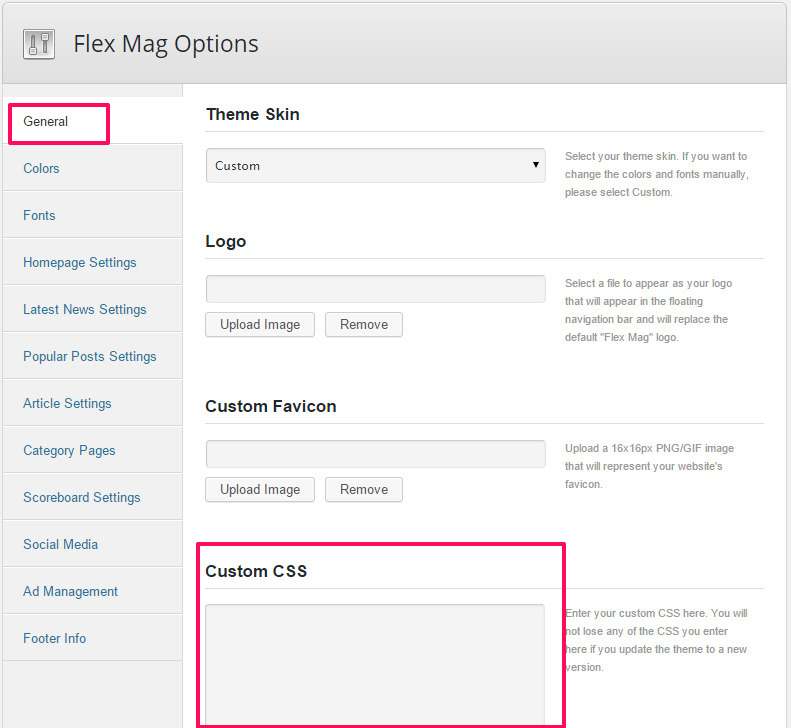
custom css for responsive wordpress magazine theme

Then, copy and paste the code below in it and click “Save all changes”


.feat-info-views, .feat-info-comm {
  display : none;
}

That’s all.

You can buy Flex Mag theme at ThemeForest.

flex mag responsive magazine theme for wordpress

About Flex Mag Theme

Flex Mag theme is a responsive magazine theme for WordPress with options and flexibility that let you set up a WordPress site in a simple, straightforward way that doesn’t overwhelm you.

It comes with a custom Fly-Out Navigation, custom scoreboard, auto-load posts, 4 different pre-set skins, 9 different Featured Posts options, 8 different article templates, 700+ Google Fonts, and so much more!

Please Share :
wordpress

Like What You Read?

Sign Up to get similar articles delivered to your email inbox.

Leave a Reply Cancel reply

Your email address will not be published. Required fields are marked *

4 responses to “How To Turn Off Posts Views Count In Flex Mag WordPress Theme”

  1. Unknown Avatar
    Unknown
    April 27, 2017

    Hi, I want to multiply the count is how to do? Thank you

    Loading…
    Reply
  2. Rupam Chakma Babu Avatar
    Rupam Chakma Babu
    September 7, 2017

    Hello, please tell me how I can remove default header and menu from Flex-Mag, I need support from you.

    Loading…
    Reply
  3. Gurusparrot.com Avatar
    Gurusparrot.com
    January 4, 2018

    Hi jide thanks for this info, can you please tell me more about the static and latest Post pages? And again how can I remove the sticky header?

    Loading…
    Reply
    1. Adimorah Nzube Avatar
      Adimorah Nzube
      October 28, 2020

      I tried adding the code using CSS in General, it didn’t work. If you’re facing the same issue, click on Appearance >> customize >> additional CSS. Paste the code there and save, that’s all.

      Loading…
      Reply

WANT TO ADVERTISE?

Chat on WhatsApp

RELATED POSTS

  • Jarida WordPress Theme Tricks That Work
  • Download Rare Theme For WordPress For Free
  • How To Restore JetPack Custom CSS After Deactivating The Plugin

FEATURED


  • CREDICORP launches C.L.I.C.K.D. Scheme with FG’s 3MTT Programme, expanding affordable consumer credit for locally-assembled laptops and devices for digital workers

    CREDICORP launches C.L.I.C.K.D. Scheme with FG’s 3MTT Programme, expanding affordable consumer credit for locally-assembled laptops and devices for digital workers

  • What Happens to Your Online Accounts When You Die?

    What Happens to Your Online Accounts When You Die?

JOIN AI WEB DESIGN GROUP


  • AI Website Design Training Whatsapp Group by Jidetheblogger

    AI Website Design Training Whatsapp Group by Jidetheblogger

← Konga.com Empowers Franchisees and Merchants in Nigeria
Can’t Find Contact Form DB Plugin In WordPress Repository? Download It Here →

Join 25,000+ subscribers

Receive our latest blog posts in your inbox.

Search

Social

Facebook

Instagram

Twitter

new ogbongeblog logo

Copyright © 2026 | About | Advertise | Featured | Sitemap | Privacy Policy | Powered by WordPress

Your cart (items: 0)

Products in cart

Product
Details
Total
Subtotal ₦0.00
Shipping and discounts calculated at checkout.
View my cart
Go to checkout

Your cart is currently empty!

Start shopping

Notifications

%d

    LIKE My Fan Page

    Privacy Policy | Copyright © 2012,OgbongeBlog.All Rights Reserved. Powered by Blogger .
    Create a Mobile Site
    View Site in Mobile | Classic
    Share by:


