
Skip to content
new ogbongeblog logo
  • Advertise
  • Blog
  • Contact

Link Subdomain Of Blogger Custom Domain To Another Platform

June 26, 2017

·

digital marketing
jidetheblogger Avatar
jidetheblogger

I received an email from one of my blog readers, asking how to use a subdomain with another platform even if using blogger on main domain. Well, it’s not a big deal. If you have access to manage the dns settings of your domain name, you can easily set up a subdomain and link it to anywhere you want.

Recently, I set up planet.ogbongeblog.com subdomain on my blogger custom domain and the subdomain points to a forum hosted on a vps.  I set it up by creating an A record which has “planet” as the ‘host’ and the vps ip address as the ‘value’ as seen in the screenshot below:
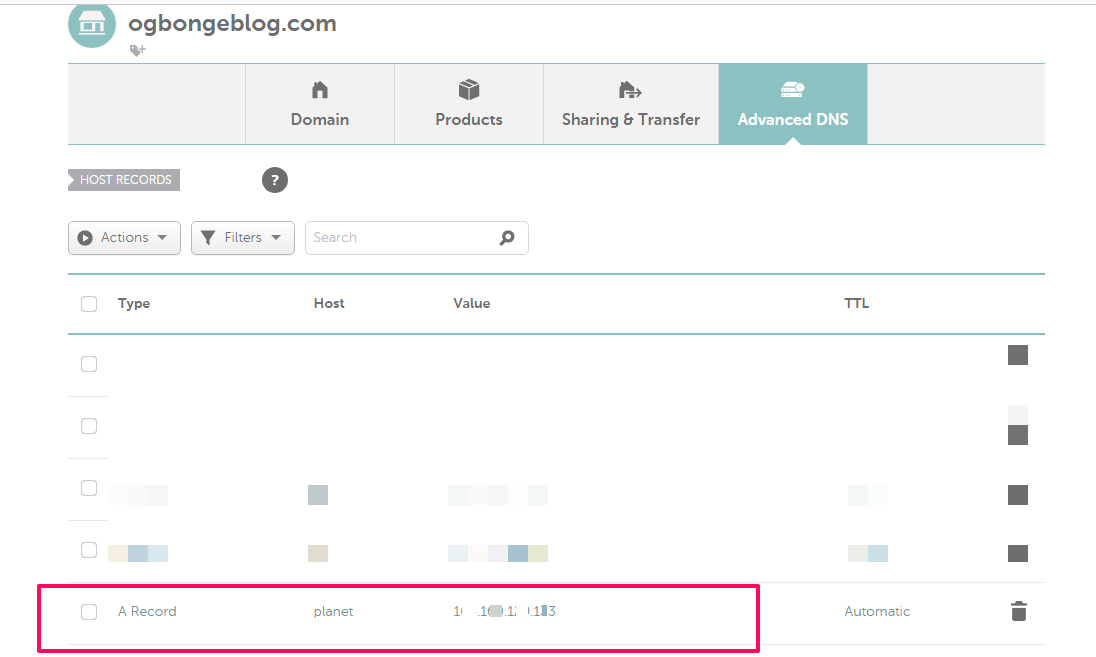
link subdomain to vps ip address

The ogbongeblog.com domain name was registered at Namecheap.com. So, the interface you are seeing above is that of Namecheap dns management tool. If your domain name is registered elsewhere, you might have to ask the domain name registrar how you can add an A record to your domain name.

Kindly note that you have to ensure that you use the subdomain when setting up the other platform you want to link the subdomain to. Very Important!

If you have non-blogger site, you can check out  how to create a subdomain that links to Blogger blog .

Please Share :
domain registration

Like What You Read?

Sign Up to get similar articles delivered to your email inbox.

Leave a Reply Cancel reply

Your email address will not be published. Required fields are marked *

6 responses to “Link Subdomain Of Blogger Custom Domain To Another Platform”

  1. Emmanuel nik Avatar
    Emmanuel nik
    June 27, 2017

    Nice update , thanks much. From Nueltech.com

    Loading…
    Reply
  2. Anonymous Avatar
    Anonymous
    June 28, 2017

    thanks for this tutorial. i was the one who requested this tutorial from the ssl post. i am a bit confused . from the image, you only added the a record for vps. what about shared hosting users. now, lets say i have a shared hosted with godaddy. normally they only give cname to link it to the domain from the domain registrar.

    since i am using blogger blog already on the main domain, where will i find the arecord since shared hosting only gives cname. also, is it only the Arecord Ip i will add or the cname too will be added to the domain dns management.

    you also stated that before purchasing the hosting, we should use the subdomain to add as the domain we already have. you know when purchasing an hosting, they will either ask you to register new domain or use an existing domain. it the use existing domain, are we suppose to use the main domain that is already on blogger or we have to form a subdomain because since there is no hosting to create subdomain, how do we now form the subdomain when it is not created from the hosting cpanel. its some how confusing. please explain in lay terms

    lastly, mobile users using operamini cannot comment on your blog and its not cool. we don't move around with pc, so you may need to do something about it as we make use of operamini to save data

    Loading…
    Reply
    1. Jide Oguns Avatar
      Jide Oguns
      June 30, 2017

      Same process if you want to use a cName instead of the A record, set the value to your cName value and enter whatever you want to use for the subdomain in the "host" field eg 'planet'. Shared hosting do have IP address too.

      Loading…
      Reply
  3. Kanyi Avatar
    Kanyi
    June 30, 2017

    Nice. Was wondering how you set up planet.ogbongeblog.com

    Loading…
    Reply
  4. Don Martins Avatar
    Don Martins
    July 5, 2017

    This is awesome. Jist what I need. I hope it will work on .com.ng domains? http://www.nerdy.com.ng

    Loading…
    Reply
  5. Prince Ooyes Avatar
    Prince Ooyes
    July 10, 2017

    This is really nice

    Loading…
    Reply

WANT TO ADVERTISE?

Chat on WhatsApp

RELATED POSTS

  • How To Change WordPress.com Domain Name To .Com
  • How I Use Mobstac To Create Mobile Custom Domain (m.ogbongeblog.com)
  • How to use Mobstac to create mobile version of blogger blog plus Adsense integration

FEATURED


  • CREDICORP launches C.L.I.C.K.D. Scheme with FG’s 3MTT Programme, expanding affordable consumer credit for locally-assembled laptops and devices for digital workers

    CREDICORP launches C.L.I.C.K.D. Scheme with FG’s 3MTT Programme, expanding affordable consumer credit for locally-assembled laptops and devices for digital workers

  • What Happens to Your Online Accounts When You Die?

    What Happens to Your Online Accounts When You Die?

JOIN AI WEB DESIGN GROUP


  • AI Website Design Training Whatsapp Group by Jidetheblogger

    AI Website Design Training Whatsapp Group by Jidetheblogger

← Buy Domain Name In Nigeria at Garrantor : Step by Step Tutorial
Webmail Error : Your IP address has changed. Please log in again – Solution →

Join 25,000+ subscribers

Receive our latest blog posts in your inbox.

Search

Social

Facebook

Instagram

Twitter

new ogbongeblog logo

Copyright © 2026 | About | Advertise | Featured | Sitemap | Privacy Policy | Powered by WordPress

Your cart (items: 0)

Products in cart

Product
Details
Total
Subtotal ₦0.00
Shipping and discounts calculated at checkout.
View my cart
Go to checkout

Your cart is currently empty!

Start shopping

Notifications

%d

    LIKE My Fan Page

    Privacy Policy | Copyright © 2012,OgbongeBlog.All Rights Reserved. Powered by Blogger .
    Create a Mobile Site
    View Site in Mobile | Classic
    Share by:


