
Skip to content
new ogbongeblog logo
  • Advertise
  • Blog
  • Contact

Webmail Error : Your IP address has changed. Please log in again – Solution

June 30, 2017

·

Uncategorized
jidetheblogger Avatar
jidetheblogger

Whenever I browse the internet with MTN Nigeria data plan, I find it difficult accessing my webmail. Whenever I login to the webmail, it will display login successful but within few seconds, the webmail signs me out, prompting me to login again.
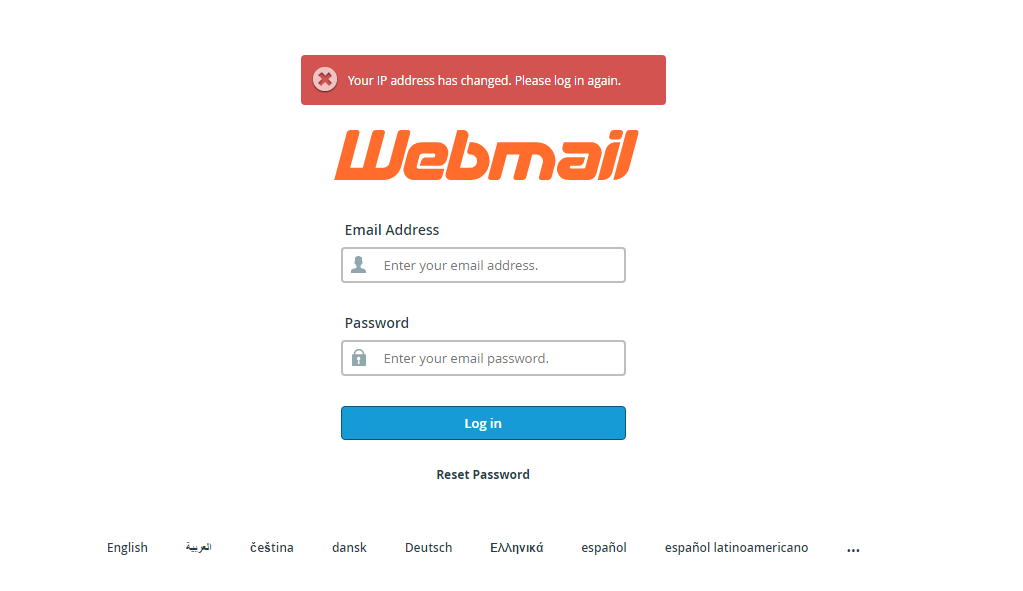
ip address has changed webmail error

There is also this “ Your IP address has changed. Please log in again ”  error message that displays at the top of the login form as seen in the screenshot.

To be honest, the experience is so frustrating – and i don’t experience this at all whenever I connect to the internet with Globacom data plan.

Well, I’ve managed to solve the problem by making use of VPN whenever I want to login to my webmail via MTN data connection.

Turning ON epicproxy of epic browser before accessing my webmail also works.

epic browser proxy vpn

I hope this helps.

About Webmail

Webmail (or web-based email) is any email client implemented as a web application running on a web server. Examples of webmail software are Roundcube and SquirrelMail. As with any web application, webmail’s main advantage over the use of a desktop email client is the ability to send and receive email anywhere from a web browser. Its main disadvantage is the need to be connected to the Internet while using it.

Please Share :
web development

Like What You Read?

Sign Up to get similar articles delivered to your email inbox.

Leave a Reply Cancel reply

Your email address will not be published. Required fields are marked *

4 responses to “Webmail Error : Your IP address has changed. Please log in again – Solution”

  1. Emmanuel nik Avatar
    Emmanuel nik
    July 1, 2017

    Similar problem , i will try it as soon as possible , hope it fixes. Thanks for the info

    Comment From Nueltech.com

    Loading…
    Reply
  2. NaijaLoyalMedia Avatar
    NaijaLoyalMedia
    July 1, 2017

    Thanks, Please Will It Work For cPanel Too?

    Loading…
    Reply
  3. NNAM Avatar
    NNAM
    July 13, 2017

    My Oga thanks for the article i encounter same when i try login in to Cpanel as well, it has kept me on using only Glo for months due to dynamic IP nature of MTN, i never thought of the use of VPN.

    Loading…
    Reply
  4. Ibrahim Avatar
    Ibrahim
    April 13, 2021

    Thanks for this!

    Loading…
    Reply

WANT TO ADVERTISE?

Chat on WhatsApp

RELATED POSTS

  • How I solved the “Unable to validate the email address and password combination ” error in BlackBerry App World
  • Error Facebook: How to bypass the error and login to read your messages
  • How To Login To FRSC Recruitment Portal 2018frsc recruitment portal 2018 login for jobs nigeria

FEATURED


  • CREDICORP launches C.L.I.C.K.D. Scheme with FG’s 3MTT Programme, expanding affordable consumer credit for locally-assembled laptops and devices for digital workers

    CREDICORP launches C.L.I.C.K.D. Scheme with FG’s 3MTT Programme, expanding affordable consumer credit for locally-assembled laptops and devices for digital workers

  • What Happens to Your Online Accounts When You Die?

    What Happens to Your Online Accounts When You Die?

JOIN AI WEB DESIGN GROUP


  • AI Website Design Training Whatsapp Group by Jidetheblogger

    AI Website Design Training Whatsapp Group by Jidetheblogger

← Link Subdomain Of Blogger Custom Domain To Another Platform
How To Add Linda Ikeji Blog Background To Emporio Blogger Theme →

Join 25,000+ subscribers

Receive our latest blog posts in your inbox.

Search

Social

Facebook

Instagram

Twitter

new ogbongeblog logo

Copyright © 2026 | About | Advertise | Featured | Sitemap | Privacy Policy | Powered by WordPress

Your cart (items: 0)

Products in cart

Product
Details
Total
Subtotal ₦0.00
Shipping and discounts calculated at checkout.
View my cart
Go to checkout

Your cart is currently empty!

Start shopping

Notifications

%d

    LIKE My Fan Page

    Privacy Policy | Copyright © 2012,OgbongeBlog.All Rights Reserved. Powered by Blogger .
    Create a Mobile Site
    View Site in Mobile | Classic
    Share by:


