
Skip to content
new ogbongeblog logo
  • Advertise
  • Blog
  • Contact

Litmus Helps You Check Which Tab Your Emails Will Appear For GMail Users

Uncategorized

\

Written by

jidetheblogger Avatar
jidetheblogger

Published :

April 10, 2017

Last Modified :

October 8, 2017

The Gmail inbox is split into multiple tabs (Primary, Social, Promotions, Updates, and Forums) to help users sort out their emails in a way they won’t see all their emails at once, thereby making it easy for them to decide which emails they want to read and when.

When GMail users open their inbox, they see the Primary tab first and that is where they see person-to-person conversations and messages that don’t appear in other tabs. Deals, offers, and other marketing emails are delivered to the GMail promotions tab, while the social tab houses messages from social networks, media-sharing sites, online dating services, and other social websites.

Unfortunately, email marketers have no control over the placement of emails in Gmail, and there is no proven way to “beat” Gmail’s algorithms. Only a subscriber can move emails from the Promotions tab to the Gmail Primary tab.

If you send alot of emails to GMail users but not sure which of the GMail tabs your emails appear, you can check by making use of the service at https://litmus.com/gmail-tabs

The Which Gmail Tab? tool from Litmus simply allows you to test content and preview where Gmail will deliver your message.
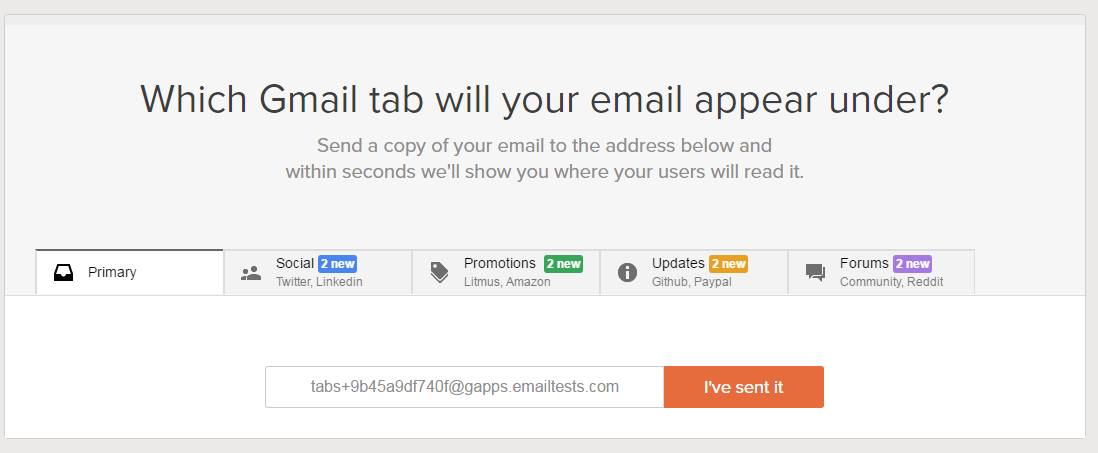
litmus which gmail tab test tool

It’s very simple to use. The service provides a unique email address you can send an email to. Once you have sent the email, click the button ‘I’ve sent it’ and you’ll see a report.

which gmail tab report

Give it a try…

Please Share :
gmail online tools

Like What You Read?

Sign Up to get similar articles delivered to your email inbox.

Leave a Reply Cancel reply

Your email address will not be published. Required fields are marked *

2 responses to “Litmus Helps You Check Which Tab Your Emails Will Appear For GMail Users”

  1. Prosper Noah Avatar
    Prosper Noah
    April 11, 2017

    Such a cool tool. This will definitely ease the stress of having to scroll and scroll looking for a parrticular message.

    Such a handy tool. Thanks for sharing!

    Loading…
    Reply
  2. Nzekwe Godswill Avatar
    Nzekwe Godswill
    September 20, 2017

    I enjoy using Litmus it makes work easy and fast.Thanks for sharing this great tip

    Loading…
    Reply

WANT TO ADVERTISE?

Chat on WhatsApp

RELATED POSTS

  • Gmail reply-to Not Working? Try Thisgmail email marketing
  • Windows 10 Mail App “Add Account” For GMail Not Working? Try This Trickgmail email marketing
  • GSuite Lets You Create Customized eMail Address Using Gmail Platformgsuite business email account

FEATURED


  • CREDICORP launches C.L.I.C.K.D. Scheme with FG’s 3MTT Programme, expanding affordable consumer credit for locally-assembled laptops and devices for digital workers

    CREDICORP launches C.L.I.C.K.D. Scheme with FG’s 3MTT Programme, expanding affordable consumer credit for locally-assembled laptops and devices for digital workers

  • What Happens to Your Online Accounts When You Die?

    What Happens to Your Online Accounts When You Die?

JOIN AI WEB DESIGN GROUP


  • AI Website Design Training Whatsapp Group by Jidetheblogger

    AI Website Design Training Whatsapp Group by Jidetheblogger

← How To Disable GMail Tabs
Blogger Linda Ikeji Set To Dump The Blogspot Platform →

Join 25,000+ subscribers

Receive our latest blog posts in your inbox.

Search

Social

Facebook

Instagram

Twitter

new ogbongeblog logo

Copyright © 2026 | About | Advertise | Featured | Sitemap | Privacy Policy | Powered by WordPress

Your cart (items: 0)

Products in cart

Product
Details
Total
Subtotal ₦0.00
Shipping and discounts calculated at checkout.
View my cart
Go to checkout

Your cart is currently empty!

Start shopping

Notifications

%d

    LIKE My Fan Page

    Privacy Policy | Copyright © 2012,OgbongeBlog.All Rights Reserved. Powered by Blogger .
    Create a Mobile Site
    View Site in Mobile | Classic
    Share by:


