
Skip to content
new ogbongeblog logo
  • Advertise
  • Blog
  • Contact

How To Receive Email Newsletters in Primary Tab of GMail Inbox

June 28, 2015

·

how to
jidetheblogger Avatar
jidetheblogger

GMail Tabs is a filtering system that allows GMail users to sort their mail into categories like Primary, Social, Promotions, Updates and Forums. If you’ve enabled it, you might have noticed that email newsletters you subscribe to, typically arrive in the “Promotions” tab by default instead of the “Primary”inbox.

As a result of this, you’re likely to miss some important newsletters if you don’t always check the “Promotions” tab for new emails.

If you’ve subscribed to an email list and won’t want to miss the newsletters, you can adjust the Gmail Tabs settings to deliver an email newsletter to the primary tab in 2 easy steps.

STEP 1

==> Go to the “ Promotions ” tab, find the email you want to move to the “Primary” tab, right-click on it (without opening the email) and click : “Move to tab > Primary”

gmail tab move

STEP 2

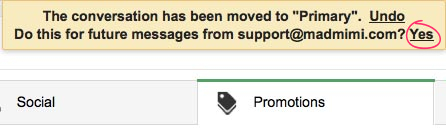
==> Click Yes when offered the option to “always deliver sender@domain.com” to Primary.
gmailtabsstep2

Repeat as needed for other favourite email newsletters that deliver to Gmail Tab’s Promotions tab by default.

Alternatively ,

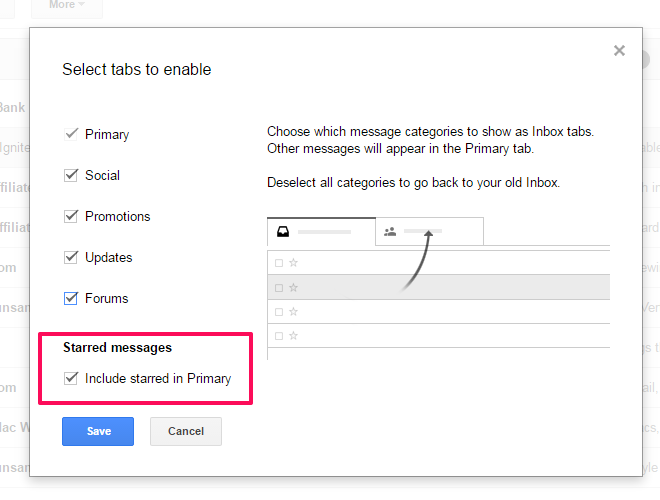
Go to “ Settings ” > “ Configure Inbox ” and select “include starred in primary”.
gmail starred messages

Thereafter, you can always star any message that appears in other tabs that you would want to appear in the primary tab.

That’s all.

Image Credit : MadMimi

Please Share :
digital marketing email marketing gmail

Like What You Read?

Sign Up to get similar articles delivered to your email inbox.

Leave a Reply Cancel reply

Your email address will not be published. Required fields are marked *

One response to “How To Receive Email Newsletters in Primary Tab of GMail Inbox”

  1. James Avatar
    James
    June 28, 2015

    This makes sense. Thanks for sharing Oga Jide

    Loading…
    Reply

WANT TO ADVERTISE?

Chat on WhatsApp

RELATED POSTS

  • How to get Free Google Adsense Account Approved within 24 hours
  • How To Add Tabs to Blogger Blogs Header Section
  • GMail Scam Alert: “Your Account has been Supended”

FEATURED


  • CREDICORP launches C.L.I.C.K.D. Scheme with FG’s 3MTT Programme, expanding affordable consumer credit for locally-assembled laptops and devices for digital workers

    CREDICORP launches C.L.I.C.K.D. Scheme with FG’s 3MTT Programme, expanding affordable consumer credit for locally-assembled laptops and devices for digital workers

  • What Happens to Your Online Accounts When You Die?

    What Happens to Your Online Accounts When You Die?

JOIN AI WEB DESIGN GROUP


  • AI Website Design Training Whatsapp Group by Jidetheblogger

    AI Website Design Training Whatsapp Group by Jidetheblogger

← Free eBook On How To Advertise to Facebook Users A Week To Their Birthday
How Email Marketers Can Appeal To GMail Subscribers For Inbox Delivery To The Primary Folder →

Join 25,000+ subscribers

Receive our latest blog posts in your inbox.

Search

Social

Facebook

Instagram

Twitter

new ogbongeblog logo

Copyright © 2026 | About | Advertise | Featured | Sitemap | Privacy Policy | Powered by WordPress

Your cart (items: 0)

Products in cart

Product
Details
Total
Subtotal ₦0.00
Shipping and discounts calculated at checkout.
View my cart
Go to checkout

Your cart is currently empty!

Start shopping

Notifications

%d

    LIKE My Fan Page

    Privacy Policy | Copyright © 2012,OgbongeBlog.All Rights Reserved. Powered by Blogger .
    Create a Mobile Site
    View Site in Mobile | Classic
    Share by:


