
Skip to content
new ogbongeblog logo
  • Advertise
  • Blog
  • Contact

Recent Posts Widget For Blogger Not Working? Try This

April 16, 2013

·

Uncategorized
jidetheblogger Avatar
jidetheblogger

If the “ Recent Posts ” widget on your Blogger blog has stopped working, it’s obvious you are still using the corrupt “ recent posts widget for blogger “. The widget will probably be displaying “ There was an error in this gadget ” on your blog.

If you remove it from your blog and try adding it again, you will get a message that the gadget is broken, has errors and cannot be used until fixed.
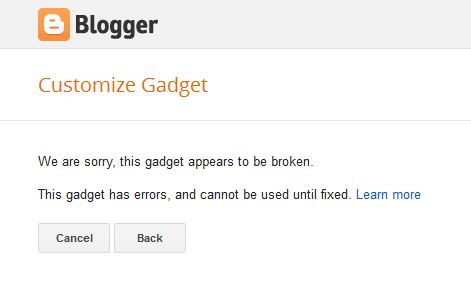
broken widget

The widget is a third-party gadget and not from Blogger. Hence, Blogger cannot control these errors caused by the gadget authors. There are other alternatives you can use which include the recent posts widget for blogger with thumbnails .

I am currently using the Recent Posts Widget by Ziyush and it is working fine for me up till this very moment.

How To Add Recent Posts Widget To Blogger Blog

==> Log in to your Blogger dashboard

==> Go to “ Layout “

==> Right on the sidebar, click on “ Add Gadget “
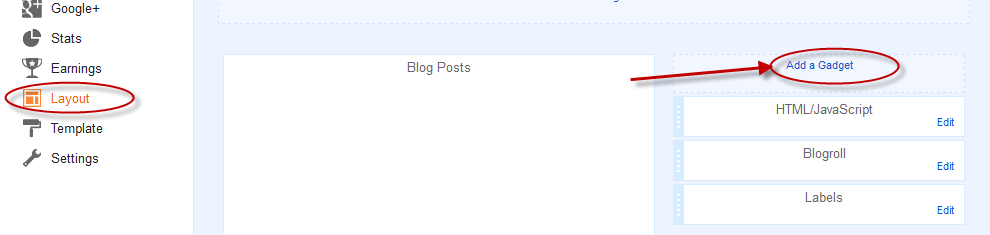
blogger add a gadget how to

==> Click on the “ More Gadget ” link. This will display gadgets contributed by third party developers for Blogger.

More gadget

==> Type “ Recent Posts ” in the search box and hit the ENTER key

==> You will likely see three “Recent Posts” widgets from different third party developers.

==> Simply add the Recent Posts Widget by Ziyush

==> Customize it the way you want and SAVE .

View your blog and you should now see your recent posts displayed on the sidebar.

I hope it works for you.

You can also consider adding the floating share bar for Blogger blogs .

Please Share :
blogger tips

Like What You Read?

Sign Up to get similar articles delivered to your email inbox.

Leave a Reply Cancel reply

Your email address will not be published. Required fields are marked *

2 responses to “Recent Posts Widget For Blogger Not Working? Try This”

  1. Akpene Jacob Avatar
    Akpene Jacob
    October 15, 2014

    That one too still break so i used the second one….thanks Jide

    Loading…
    Reply
  2. Osundare Toheeb Avatar
    Osundare Toheeb
    September 16, 2015

    i tried it. see what it brings: We are sorry, this gadget appears to be broken.

    This gadget has errors and cannot be used until fixed".The ziyush recent post has fault, pls what help can you render?

    Loading…
    Reply

WANT TO ADVERTISE?

Chat on WhatsApp

RELATED POSTS

  • How to add Google Plus Widget to Blogger/Blogspot Blogs
  • How To Change Template of Blogger/Blogspot Blog via the New Blogger Dashboard
  • How To Add “Follow Me On Twitter” to Blogger Blog

FEATURED


  • CREDICORP launches C.L.I.C.K.D. Scheme with FG’s 3MTT Programme, expanding affordable consumer credit for locally-assembled laptops and devices for digital workers

    CREDICORP launches C.L.I.C.K.D. Scheme with FG’s 3MTT Programme, expanding affordable consumer credit for locally-assembled laptops and devices for digital workers

  • What Happens to Your Online Accounts When You Die?

    What Happens to Your Online Accounts When You Die?

JOIN AI WEB DESIGN GROUP


  • AI Website Design Training Whatsapp Group by Jidetheblogger

    AI Website Design Training Whatsapp Group by Jidetheblogger

← BitPay: Bitcoins Payment Processor For Merchants Worldwide
E-TopUp.com.ng: Fund/Sell LR, Pay for DSTV and Buy Recharge Cards Online →

Join 25,000+ subscribers

Receive our latest blog posts in your inbox.

Search

Social

Facebook

Instagram

Twitter

new ogbongeblog logo

Copyright © 2026 | About | Advertise | Featured | Sitemap | Privacy Policy | Powered by WordPress

Your cart (items: 0)

Products in cart

Product
Details
Total
Subtotal ₦0.00
Shipping and discounts calculated at checkout.
View my cart
Go to checkout

Your cart is currently empty!

Start shopping

Notifications

%d

    LIKE My Fan Page

    Privacy Policy | Copyright © 2012,OgbongeBlog.All Rights Reserved. Powered by Blogger .
    Create a Mobile Site
    View Site in Mobile | Classic
    Share by:


