
Skip to content
new ogbongeblog logo
  • Advertise
  • Blog
  • Contact

How To Send Summary Of Your Latest Blog Posts To Your Feedburner Email Subscribers

February 14, 2017

·

Uncategorized
jidetheblogger Avatar
jidetheblogger

If you are using Feedburner to send your latest blog posts to the inbox of your email subscribers, you can offer a short summary that will include links that can redirect subscribers to read the full posts on your blog. This can easily be done, by activating the Feedburner “Summary Burner” feature.

The Summary Burner simply allows Feedburner users to offer a short summary of their content and direct subscribers to their websites for the rest of the story. It allows users to append an optional “Teaser” message to each content item – and it works for WordPress and Blogger blogs.

Below is a sample of a recent post delivered to my Feedburner email subscribers:

blog post summary for email newsletters subscribers

How To Activate Feedburner Summary Burner

Sign in to Feedburner . If you are new to feedburner, burn your feed and activate email subscription.

Click on “Optimize”

Click on “Summary Burner”

Click “Activate”

You can edit the “maximum length” and “teaser” as desired. Below is a sample.
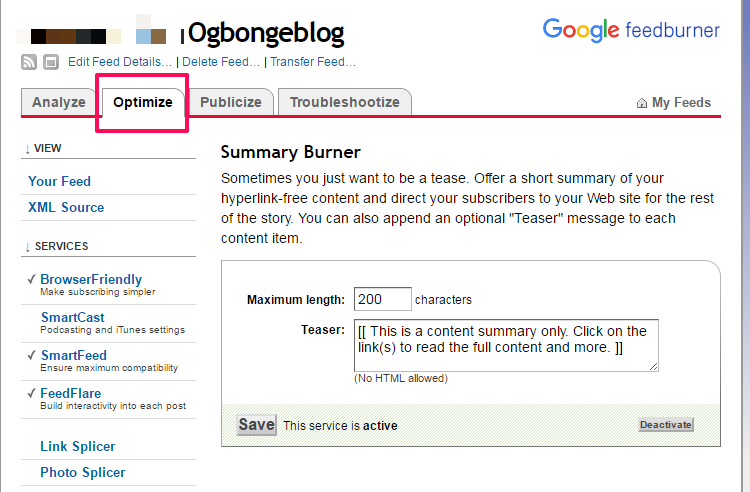
feedburner summary burner

That’s all.

If you are using Blogger blog, you can also check out  how to add read more to feedburner email newsletters .

Recommended 

>>  How To Set FeedBurner To Display POST Titles To Email Subscribers Instead of Blog Title

Please Share :
email marketing feedburner

Like What You Read?

Sign Up to get similar articles delivered to your email inbox.

Leave a Reply Cancel reply

Your email address will not be published. Required fields are marked *

5 responses to “How To Send Summary Of Your Latest Blog Posts To Your Feedburner Email Subscribers”

  1. HowWriter Blog Avatar
    HowWriter Blog
    February 14, 2017

    I just tried it. But my question is this, "Will there me a link in this summary to direct my subscriber to the particular post on my blog?

    Commenting from HowWriter

    Loading…
    Reply
  2. David Ukpeha Avatar
    David Ukpeha
    February 17, 2017

    Thanks bro this your post is helpful

    Loading…
    Reply
  3. Nzekwe Chukwuebuka Avatar
    Nzekwe Chukwuebuka
    February 17, 2017

    I just tried it and it worked. Thanks for the post. Get online tutorial

    Loading…
    Reply
  4. Johnpaul Onwueme Avatar
    Johnpaul Onwueme
    March 2, 2017

    how will I add the image of we love comments in my blog

    Loading…
    Reply
  5. Doronize Avatar
    Doronize
    April 12, 2018

    Thanks for the feedburner tutorial. But i don’t if there is a way someone can be re-posting on feedburner – comment by CEO doronize.com.ng/about

    Loading…
    Reply

WANT TO ADVERTISE?

Chat on WhatsApp

RELATED POSTS

  • How To Add Read More To Feedburner Blog Posts Feed
  • How To Set FeedBurner To Display POST Titles To Email Subscribers Instead of Blog Title
  • How I Use Feedburner To Auto Post From My Blog To Twitter

FEATURED


  • CREDICORP launches C.L.I.C.K.D. Scheme with FG’s 3MTT Programme, expanding affordable consumer credit for locally-assembled laptops and devices for digital workers

    CREDICORP launches C.L.I.C.K.D. Scheme with FG’s 3MTT Programme, expanding affordable consumer credit for locally-assembled laptops and devices for digital workers

  • What Happens to Your Online Accounts When You Die?

    What Happens to Your Online Accounts When You Die?

JOIN AI WEB DESIGN GROUP


  • AI Website Design Training Whatsapp Group by Jidetheblogger

    AI Website Design Training Whatsapp Group by Jidetheblogger

← How To Stop Facebook From Posting Automatically To Your Twitter
AlterCam Software Lets You Change Voice, Add Effects and Record Webcam Video →

Join 25,000+ subscribers

Receive our latest blog posts in your inbox.

Search

Social

Facebook

Instagram

Twitter

new ogbongeblog logo

Copyright © 2026 | About | Advertise | Featured | Sitemap | Privacy Policy | Powered by WordPress

Your cart (items: 0)

Products in cart

Product
Details
Total
Subtotal ₦0.00
Shipping and discounts calculated at checkout.
View my cart
Go to checkout

Your cart is currently empty!

Start shopping

Notifications

%d

    LIKE My Fan Page

    Privacy Policy | Copyright © 2012,OgbongeBlog.All Rights Reserved. Powered by Blogger .
    Create a Mobile Site
    View Site in Mobile | Classic
    Share by:


