
Skip to content
new ogbongeblog logo
  • Advertise
  • Blog
  • Contact

How To Set FeedBurner To Display POST Titles To Email Subscribers Instead of Blog Title

October 29, 2011

·

Uncategorized
jidetheblogger Avatar
jidetheblogger

If you are a blogger and you are using FeedBurner to feed your subscribers, you might have noticed that when when your email subscribers receive your latest post, they only see your Blog title and not your Post titles. This makes some subscribers to be thinking you keep sending them the same post, without knowing that the email messages use to contain different content, though same title. This might bore them and might even force some to unsubscribe to your feed.

If you are not sure if your subscribers are experiencing such, just subscribe to your blog with your email address and wait till the next time you publish a post to your blog. By then, you should be able to see if it displays your blog title or your post title.

With some tweaks in your Feedburner account, you can set the email been received by your subscribers to be displaying the POST titles instead of your blog title .

How To Get Started


1) Sign in to Feedburner
2) Click on the feed you want to configure ( if you have more than one feed in your account)
3) Click Publicize on the navigation bar.
4) Click Email Subscription link on the sidebar.
5) Under Email subscription, click Email Branding
6) In the first box, Copy and paste this code =>  ${latestItem Title}
7) Tick the  “Change Subject when an email has 2 or more items” box
8) In the box below it, enter  =>    ${latestItemTitle} plus ${m} more

If you follow the steps carefully, your post title should be displayed in the next post your feedburner subscribers will receive.

NOTE:

‘${latestItemTitle}’ will display your Post Title

‘${latestItemTitle} & ${m} more’ will be useful if you have published more than one post on a single day.
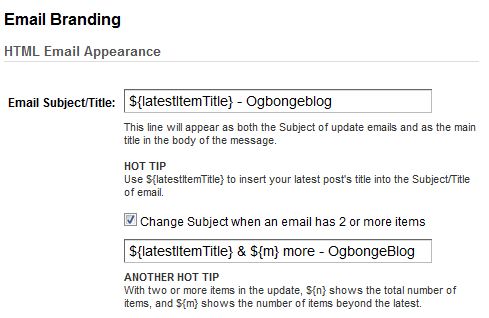

You can even rebrand it more like mine, using :   ${latestItem Title} – OgbongeBlog as seen in the picture below:
Fb

Just replace ogbongeblog with your blog title.

I hope this helps…

You might be interested in : How to retrieve email addresses of Feedburner Email Subscribers


Cheers!

Please Share :
blogger tips blogging tips feedburner

Like What You Read?

Sign Up to get similar articles delivered to your email inbox.

Leave a Reply Cancel reply

Your email address will not be published. Required fields are marked *

5 responses to “How To Set FeedBurner To Display POST Titles To Email Subscribers Instead of Blog Title”

  1. Dadamac ago are Avatar
    Dadamac ago are
    December 30, 2011

    i am following every bit of your tutorial so my blog can look pretty much like yours so my earnings can increase

    Loading…
    Reply
    1. Jide Oguns Avatar
      Jide Oguns
      February 16, 2012

      Just keep following my tutorials bro. If you need extra help, you can always let me know.

      Loading…
      Reply
  2. Nwosu Desmond Avatar
    Nwosu Desmond
    February 16, 2012

    Quite a nice piece…..i always learn one new thing whenever i visit here…..already subscribed to your rss.

    Loading…
    Reply
    1. Jide Oguns Avatar
      Jide Oguns
      February 16, 2012

      Thanks for been a follower of my blog bro. I so much appreciate this. Stay blessed

      Loading…
      Reply
  3. harzeeyz Avatar
    harzeeyz
    September 23, 2012

    The problem with mine is that it sends †ђξ whole content to my subscribers. What can i do?

    Loading…
    Reply

WANT TO ADVERTISE?

Chat on WhatsApp

RELATED POSTS

  • How I Use Feedburner To Auto Post From My Blog To Twitter
  • How To Add Read More To Feedburner Blog Posts Feed
  • How To Add FeedBurner Email Subscription Form To Blogger/Blogspot (Pictoral Tutorial)

FEATURED


  • CREDICORP launches C.L.I.C.K.D. Scheme with FG’s 3MTT Programme, expanding affordable consumer credit for locally-assembled laptops and devices for digital workers

    CREDICORP launches C.L.I.C.K.D. Scheme with FG’s 3MTT Programme, expanding affordable consumer credit for locally-assembled laptops and devices for digital workers

  • What Happens to Your Online Accounts When You Die?

    What Happens to Your Online Accounts When You Die?

JOIN AI WEB DESIGN GROUP


  • AI Website Design Training Whatsapp Group by Jidetheblogger

    AI Website Design Training Whatsapp Group by Jidetheblogger

← Fuel Subsidy Explained
BookBoon: Download free Textbooks + No registration + No catch →

Join 25,000+ subscribers

Receive our latest blog posts in your inbox.

Search

Social

Facebook

Instagram

Twitter

new ogbongeblog logo

Copyright © 2026 | About | Advertise | Featured | Sitemap | Privacy Policy | Powered by WordPress

Your cart (items: 0)

Products in cart

Product
Details
Total
Subtotal ₦0.00
Shipping and discounts calculated at checkout.
View my cart
Go to checkout

Your cart is currently empty!

Start shopping

Notifications

%d

    LIKE My Fan Page

    Privacy Policy | Copyright © 2012,OgbongeBlog.All Rights Reserved. Powered by Blogger .
    Create a Mobile Site
    View Site in Mobile | Classic
    Share by:


