
Skip to content
new ogbongeblog logo
  • Advertise
  • Blog
  • Contact

SSL : Why HTTP to HTTPS Migration Is Important

June 21, 2017

·

Uncategorized
jidetheblogger Avatar
jidetheblogger

SSL (Secure Sockets Layer) also called TLS (Transport Layer Security) is one of the most widely reviewed and adopted security tools on the Internet today. It is a security protocol that allows for information – such as passwords and credit card numbers – to be kept private (encrypted) when it is sent from a web browser to a web server. Without SSL, any information that a user gives to a web site is generally sent in plain text, making it easier for malicious third parties to monitor and tamper with that data.

Basically, SSL is what allows you to enable secure HTTPS web pages. In order to establish a secure connection using SSL between the web browser and the server where your web site lives, an SSL certificate needs to be installed on the web server. Once the certificate has been set up properly, you can update your site to use the HTTPS protocol so that whenever users visit an HTTPS-enabled page they’ll see a padlock, indicating that page is secure.

Before now, only membership and ecommerce sites are required to install SSL certificate and have an HTTPS-enabled site to protect their customers’ sensitive information. This is no longer the case. Millions of websites now protect all their websites with HTTPS, even if they don’t handle sensitive communications.
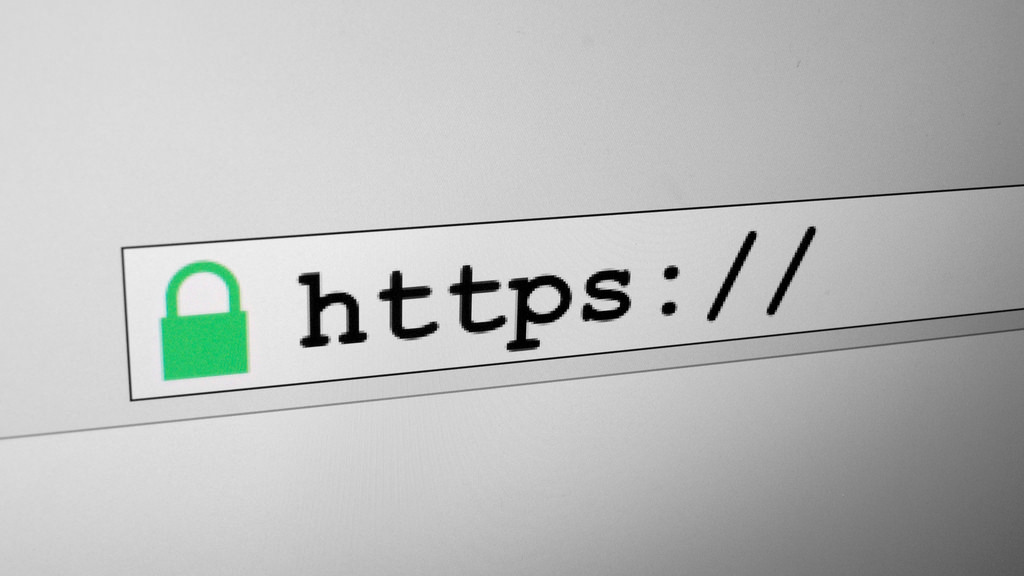
ssl https secure connection sign

Benefits of SSL HTTPS  Encryption

1 . HTTPS helps prevent intruders from tampering with the communications between your websites and your users’ browsers. Intruders include intentionally malicious attackers, and legitimate but intrusive companies, such as ISPs or hotels that inject ads into pages.

Intrusions can occur at any point in the network, including a user’s machine, a Wi-Fi hotspot, or a compromised ISP, just to name a few. Intruders exploit unprotected communications to trick your users into giving up sensitive information or installing malware, or to insert their own advertisements into your resources.

2 . SSL adds extra layer of security that ensures all data transferred between browser and web server remains private thereby securing users info from prying eyes i.e HTTPS prevents intruders from being able to passively listen to communications between your websites and your users.

3. Most modern browsers display a green padlock image next to the web address of https websites. Some even mark such sites as “secure connection”.
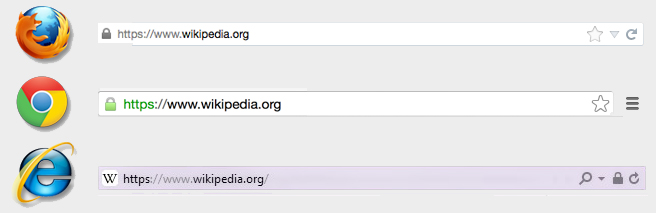
ssl https padlock in web browsers

Some visitors associate this with security and as such, will trust your site more. Others who are more security-conscious may navigate away from your site if their browser mark your site as “not secure” or “unprotected”.

Kindly note that since January 2017 Chrome 56 marks HTTP pages that collect passwords or credit cards as non-secure, as part of a long-term plan to mark all HTTP sites as non-secure.
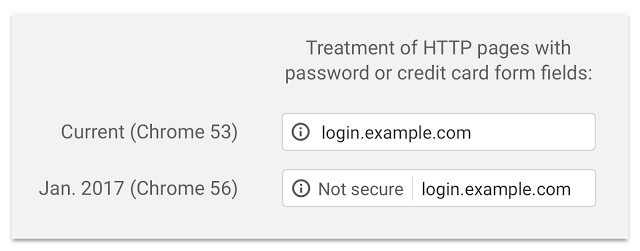
chrome browser https warning

4. Https is now a ranking signal. Google announced this in 2014 in a post published at on Google webmaster central blog. What this simply means, is that if you switch from http to https, it might increase your search engine rankings.

5. HTTPS is the future of the web. HTTPS is a key component to the permission workflows for new web platform features that require explicit permission from the user before executing, particularly those required for progressive web apps .

Now that you know the benefits of https ssl encryption, don’t hesitate to start planning your HTTPS migration today!

HTTPS is easier and cheaper than ever before, and enables both the best performance the web offers and powerful new features that are too sensitive for HTTP. Check out our Google set-up guides to get started.

How Do I Set Up HTTPS (SSL) for Blogger and WordPress Sites?

If you’re not using custom domain for your Blogger blog, you can turn on https via your blog settings. If you are using custom domain, you can as well, try cloudflare ssl .

If you’re using WordPress to power your site, you can install free letsencrypt ssl certificate as explained here and here . If you don’t like free certs, you can as well buy ssl certificates online.

If you need help with migrating from http to https, you can hire me.

Please Share :
ssl

Like What You Read?

Sign Up to get similar articles delivered to your email inbox.

Leave a Reply Cancel reply

Your email address will not be published. Required fields are marked *

12 responses to “SSL : Why HTTP to HTTPS Migration Is Important”

  1. Anonymous Avatar
    Anonymous
    June 21, 2017

    You are promoting SSL, and your website doesnt have SSL

    Loading…
    Reply
    1. James Avatar
      James
      June 22, 2017

      Seems you are blind. Cant you see what he wrote above about his website ssl?

      Loading…
      Reply
    2. Victor Kachi Avatar
      Victor Kachi
      June 23, 2017

      James lol easy brah

      Loading…
      Reply
    3. Anonymous Avatar
      Anonymous
      June 24, 2017

      its obvious he did not read the article

      Loading…
      Reply
  2. Ella Avatar
    Ella
    June 23, 2017

    God Bless sir for this been thinking of how to install it on my blog

    Loading…
    Reply
  3. IfiokObong Denis Avatar
    IfiokObong Denis
    June 23, 2017

    Am having issues setting up my https from cloudflare ssl, after setting it up it only redirects to the home with https and other pages remains http

    Loading…
    Reply
  4. Victor Kachi Avatar
    Victor Kachi
    June 23, 2017

    I will wait till when Google adds the feature to custom domain on Blogger.

    Commenting from Entclass Blog

    Loading…
    Reply
    1. iGeekNg Avatar
      iGeekNg
      August 8, 2017

      you don't need to keep waiting for this, you can activate SSL on your blogger blog by follow the steps narrated on this post: http://www.igeekng.com/2017/07/how-to-activate-https-on-blogspot-blog.html

      Loading…
      Reply
  5. mike Avatar
    mike
    June 23, 2017

    nce

    Loading…
    Reply
  6. Anonymous Avatar
    Anonymous
    June 24, 2017

    hi, i have been trying to make comment using mobile but could not see the comment as option. this prompted me to use cyber cafe. please i will like you to share a tutorial on how you created a subdomain and use a forum even when the main domain is using blogger because i know the forum is self hosted with a webhosting. i want to do something like this. i am confused as to how to get this done with changing name server without affecting my blogger blog. i don't know how to go about this. i will like you to share a tutorial on this. how to use a subdomain with wordpress or other platform even when using blogger on main domain. this would really be of help to me.

    ubagroup is using blogger blog in subdomain too but have their main website. i want you to share tutorial on this please.

    i had to pay for cyber cafe to comment as mobile device did not bring the comment as option. will be waiting for your response

    Loading…
    Reply
  7. Austine Charles Avatar
    Austine Charles
    June 26, 2017

    ssl is very important these days google so much value it and i recomems it for every blog

    Loading…
    Reply
  8. Helen Avatar
    Helen
    August 28, 2017

    please does https helps in anyway via seo?

    Loading…
    Reply

WANT TO ADVERTISE?

Chat on WhatsApp

RELATED POSTS

  • Remove Expired Comodo SSL Certificate From WordPress Site And Replace With Free LetsEncryptsiteground let's encrypt tool for ssl
  • How I Renew Namecheap Positive SSL Certificatesnamecheap positive ssl generate csr
  • A2Hosting Letsencrypt Free SSL Works!a2hosting web hosting

FEATURED


  • CREDICORP launches C.L.I.C.K.D. Scheme with FG’s 3MTT Programme, expanding affordable consumer credit for locally-assembled laptops and devices for digital workers

    CREDICORP launches C.L.I.C.K.D. Scheme with FG’s 3MTT Programme, expanding affordable consumer credit for locally-assembled laptops and devices for digital workers

  • What Happens to Your Online Accounts When You Die?

    What Happens to Your Online Accounts When You Die?

JOIN AI WEB DESIGN GROUP


  • AI Website Design Training Whatsapp Group by Jidetheblogger

    AI Website Design Training Whatsapp Group by Jidetheblogger

← Favicon Validator That Previews and Tests Icons
SSL Promo : Get PositiveSSL at Namecheap for $1.99 instead of $9 →

Join 25,000+ subscribers

Receive our latest blog posts in your inbox.

Search

Social

Facebook

Instagram

Twitter

new ogbongeblog logo

Copyright © 2026 | About | Advertise | Featured | Sitemap | Privacy Policy | Powered by WordPress

Your cart (items: 0)

Products in cart

Product
Details
Total
Subtotal ₦0.00
Shipping and discounts calculated at checkout.
View my cart
Go to checkout

Your cart is currently empty!

Start shopping

Notifications

%d

    LIKE My Fan Page

    Privacy Policy | Copyright © 2012,OgbongeBlog.All Rights Reserved. Powered by Blogger .
    Create a Mobile Site
    View Site in Mobile | Classic
    Share by:


