



2021年10月の記事
全2件 (2件中 1-2件目)
1
-
powershellでpdfsharpをいじってみる(2)PDF分割
今回はPDFの分割。元のPDFファイル名に枝番を付して、指定フォルダ(無指定:デスクトップ)に生成する。使用している関数 set-PdfSharpAssembly は前回のやつ。split-pdffunction split-pdf{ param( [parameter(mandatory)][string]$pdfpath, [parameter(mandatory=$false)][string]$outfolder="$env:userprofile\desktop" ) if ( !( Test-Path $pdfpath ) ){ throw "pdfのパスが見つかりません:$pdfpath" } set-PdfSharpAssembly $inputpdf = [PdfSharp.Pdf.IO.PdfReader]::Open( $pdfpath, [PdfSharp.Pdf.IO.PdfDocumentOpenMode]::Import ) $totalpages = $inputpdf.pagecount $NombreWidth = [math]::Floor([math]::Log10( $totalpages )) + 1 $NameStem = [io.path]::GetFileNameWithoutExtension( $pdfpath ) for ( $Nombre = 0; $Nombre -lt $totalpages; $Nombre++ ){ $outname = "${NameStem}_" + ([string]$Nombre).PadLeft( $NombreWidth, "0" ) + ".pdf" $outpath = Join-Path $outfolder $outname $pdfdoc = New-Object PdfSharp.Pdf.PdfDocument $pdfdoc.AddPage( $inputpdf.pages[ $Nombre ] )|Out-Null $pdfdoc.Save( $outpath ) }}
2021.10.29
コメント(0)
-
powershellでpdfsharpをいじってみる(1)Hello World
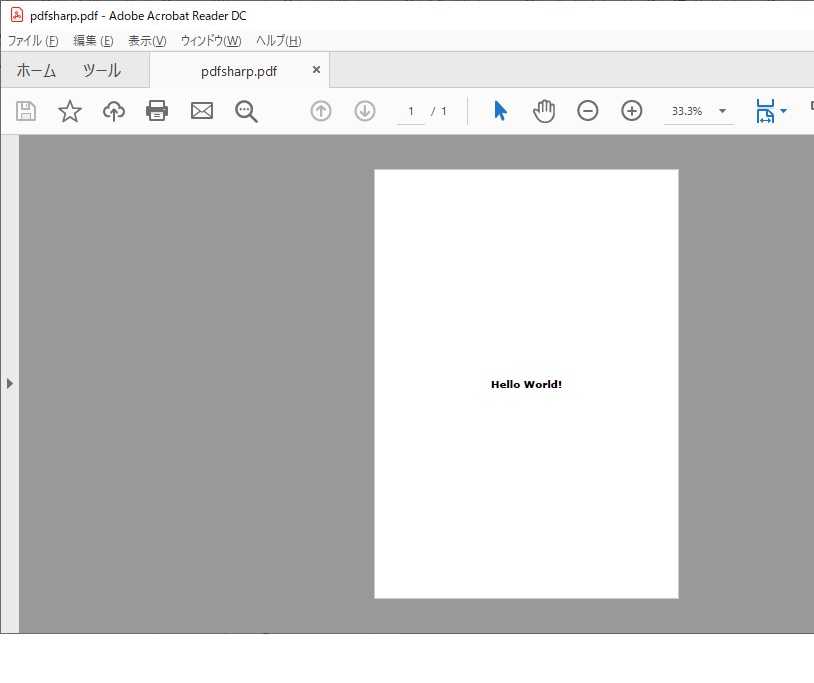
powershellでpdfを操作するっていうと、定番はitextsharpでした。今でも、フリーのPDFツールにdllが同梱されていたりしますね。 でも、いつの間にかライセンスがややこしく、自由に(無料で)使おうとすると苦労するようになったみたいです。これ、元のitextのライセンスが変更されたからで、古いバージョンを使えば今でも利用は可能なようですが、メンテされていないライブラリをいつまでも使うってのはどうもね。 何か手はないかと探したら、いいのを見つけました。名前は「pdfsharp」。ウェブサイトはこちら。同サイトの更新状況は2015年が最新ですが、nuget galleryのlast updateは2019年なので、そこそこ新しいようです。 なんといっても、「PDFsharp and MigraDoc Foundation is Open Source and free to use even in commercial applications. See Licensing.」というのがうれしい。おっと、こんなことも書いてあった。「PDFsharp and MigraDoc Foundation will remain Open Source and free to use even in the far future」。even in the far futureですよ。 これは使わない手はない。ちょこちょこっと触ってみよう。インストールしたくないので、強引なことをやってます。これで、カレントフォルダに「Hello World」と印刷された pdfが生成されます。function set-PdfSharpAssembly{ #Prepare pdfsharp.dll $tmpdll = "$Env:Temp\pdfsharp.dll" $tmpzip = "$Env:Temp\pdfsharp.zip" $tmpfolder = join-path "$Env:temp" ([io.path]::GetFileNameWithoutExtension( $tmpzip )) if (!( test-path $tmpdll )){ #dllがない if ( !( test-path $tmpzip ) ){ #zipもない $nugetURL = "https://www.nuget.org/packages/PdfSharp" $response -or ( $response = Invoke-WebRequest -Uri $nugetURL )|out-null $nupkgURL = ($response.Links|?{$_.innerText -match "Download package"})[0].href Invoke-WebRequest -Uri $nupkgURL -OutFile $tmpzip #"Has Got Zip" } #zipを解凍 Expand-Archive -Force -Path $tmpzip -DestinationPath $tmpfolder $dllToCopy = Get-ChildItem -Include "pdfsharp.dll" -Recurse "$tmpfolder\*" $dllToCopy.CopyTo( $tmpdll )|Out-Null #"Has Got DLL" }else{ #"Has DLL" } Add-Type -Path $tmpdll}<#確認 set-PdfSharpAssembly[appdomain]::CurrentDomain.GetAssemblies()|?{$_.location -like "*pdfsharp*"}|%{$_.exportedtypes}|%{$_.fullname}#>#PDFsharp - Getting Started http://www.pdfsharp.net/wiki/PDFsharpFirstSteps.ashxset-PdfSharpAssembly$Document = new-object PdfSharp.Pdf.PdfDocument$page = $Document.AddPage()$gfx = [PdfSharp.Drawing.XGraphics]::FromPdfPage( $page )$font = New-Object PdfSharp.Drawing.XFont("Verdana", 20, [PdfSharp.Drawing.XFontStyle]::Bold)$gfx.DrawString( "Hello World!", $font,[PdfSharp.Drawing.XBrushes]::Black, ( New-Object PdfSharp.Drawing.XRect( 0, 0, $page.Width, $page.Height ) ), [PdfSharp.Drawing.XStringFormat]::Center)$Document.Save( "./pdfsharp.pdf" )
2021.10.22
コメント(0)
全2件 (2件中 1-2件目)
1


-
-
- ジャンクパーツ
- 秋原他でのお買い物250111ハーフその…
- (2025-02-15 18:03:22)
-
-
-

- アイフォン・アイポッドの必需品
- スティーブ・ジョブズの死に際に発し…
- (2025-07-14 03:41:24)
-
-
-

- ブロックチェーン
- 先端技術情報20260819
- (2026-08-20 17:08:36)
-


