2019
2018
2017
2016
2015
2014
2013
2023年10月の記事
全5件 (5件中 1-5件目)
1
-
【Word VBA/マクロ】蛍光マーカー(ハイライト)リスト作成
追記:2023年12月4日マクロの記事は下記のサイトで書くことにしました。Word VBA/マクロ 備忘録Sub GetMarkerList()'蛍光マーカー(ハイライト)の一覧を作成します。 Dim rng As Range, mkrList As String, dcNew As Document Set rng = ActiveDocument.Range(0, 0) With rng.Find .Highlight = True End With With rng Do While .Find.Execute = True mkrList = mkrList & rng.Information(wdActiveEndPageNumber) _ & vbTab & rng.Text & vbCrLf .SetRange .End, .End Loop End With If mkrList = "" Then MsgBox "ハイライトはありませんでした。" Exit Sub End If Set dcNew = Documents.Add With dcNew.PageSetup .TopMargin = MillimetersToPoints(30) .BottomMargin = MillimetersToPoints(30) .LeftMargin = MillimetersToPoints(30) .RightMargin = MillimetersToPoints(30) End With dcNew.Range(0, 0).InsertBefore mkrList With Selection .WholeStory .ConvertToTable Separator:=wdSeparateByTabs, NumColumns:=2, _ AutoFitBehavior:=wdAutoFitFixed .InsertRowsAbove 1 .TypeText Text:="ページ" .MoveRight Unit:=wdCell .TypeText Text:="ハイライト" With .Tables(1) .Style = "表 (格子)" .ApplyStyleHeadingRows = True .PreferredWidthType = wdPreferredWidthPercent .PreferredWidth = 100 .Columns(1).PreferredWidth = 10 .Columns(2).PreferredWidth = 90 End With End WithEnd Sub
Oct 24, 2023
コメント(0)
-
【Word VBA/マクロ】本文、ヘッダーフッター、オートシェイプ置換
追記:2023年12月4日マクロの記事は下記のサイトで書くことにしました。Word VBA/マクロ 備忘録Sub 本文、ヘッダーフッター、オートシェイプ置換() Dim mae As String Dim ato As String Dim sec As Section Dim hdr As HeaderFooter Dim ftr As HeaderFooter Dim rng As Range Dim shp As Shape, gShp As Shape, inlShp As InlineShape, satNode As SmartArtNode mae = "■" '検索するキーワード ato = "□" '検索後のキーワード '本文置換' On Error Resume Next Set rng = ActiveDocument.Range(0, 0) With rng.Find .Text = mae .Replacement.Text = ato .Execute Replace:=wdReplaceAll End With 'ヘッダーフッター内置換 For Each sec In ActiveDocument.Sections For Each hdr In sec.Headers With hdr.Range.Find .Text = mae .Replacement.Text = ato .Execute Replace:=wdReplaceAll End With Next For Each ftr In sec.Footers With ftr.Range.Find .Text = mae .Replacement.Text = ato .Execute Replace:=wdReplaceAll End With Next Next 'オートシェイプ内置換 For Each shp In ActiveDocument.Shapes If shp.Type = msoGroup Then For Each gShp In shp.GroupItems If gShp.TextFrame.HasText Then With gShp.TextFrame.TextRange.Find .Text = mae .Replacement.Text = ato .Execute Replace:=wdReplaceAll End With End If Next End If If shp.TextFrame.HasText Then Set rng = shp.TextFrame.TextRange With rng.Find .Text = mae .Replacement.Text = ato .Execute Replace:=wdReplaceAll End With End If NextEnd Sub
Oct 23, 2023
コメント(0)
-
【Word VBA/マクロ】ハイパーリンク一覧作成
追記:2023年12月4日マクロの記事は下記のサイトで書くことにしました。Word VBA/マクロ 備忘録ハイパーリンクの一覧(ページ、表示文字列、アドレス)を作成します。Sub GetHyperlinkList() Dim hpLink As Hyperlink, hprList As String Dim dcNew As Document If ActiveDocument.Hyperlinks.Count = 0 Then MsgBox "ハイパーリンクはありません" Exit Sub End If For Each hpLink In ActiveDocument.Hyperlinks hprList = hprList & hpLink.Range.Information(wdActiveEndPageNumber) & vbTab & _ hpLink.TextToDisplay & vbTab & hpLink.Address & vbCrLf Next Set dcNew = Documents.Add With dcNew.PageSetup .TopMargin = MillimetersToPoints(20) .BottomMargin = MillimetersToPoints(20) .LeftMargin = MillimetersToPoints(20) .RightMargin = MillimetersToPoints(20) End With dcNew.Range(0, 0).InsertBefore hprList With Selection .WholeStory .ConvertToTable Separator:=wdSeparateByTabs, NumColumns:=3, _ NumRows:=3, AutoFitBehavior:=wdAutoFitFixed .InsertRowsAbove 1 .TypeText Text:="ページ" .MoveRight Unit:=wdCell .TypeText Text:="表示文字列" .MoveRight Unit:=wdCell .TypeText Text:="アドレス" With .Tables(1) .Style = "表 (格子)" .PreferredWidthType = wdPreferredWidthPercent .PreferredWidth = 100 .Columns(1).PreferredWidth = 5 .Columns(2).PreferredWidth = 35 .Columns(3).PreferredWidth = 60 End With .Font.Size = 9 End WithEnd Sub
Oct 23, 2023
コメント(0)
-
【Word VBA/マクロ】スマートアート内の置換
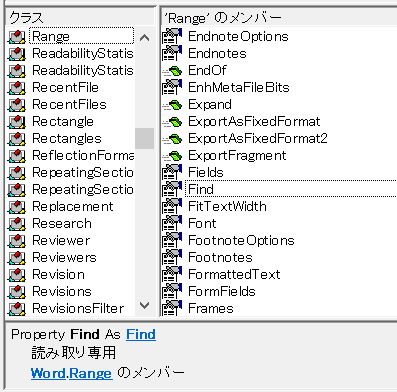
追記:2023年12月4日マクロの記事は下記のサイトで書くことにしました。Word VBA/マクロ 備忘録本文やオートシェイプの置換は、「Range.Find.Replacement」を使用します。スマートアートでは、RangeのメンバーのFindは使用できませんでした。選択する方法(Selection.Find)もうまくいかず…。TestRange2のメンバーの「Find」は使えそうですが、戻り値が「TextRange2」なんですよね。他のFindと全然違うので、難しくて分かりませんでした。やむを得ずInStrで置換することにしました。スマートアートは初期設定では行内なので、前面などShape型には対応しておりません。Sub スマートアート置換() Dim shp As Shape, gShp As Shape, inlShp As InlineShape, satNode As SmartArtNode Dim rng As TextRange2, satRng As TextRange2 Dim mae As String, ato As String, txt As String Dim cntMae As Long, cntAto As Long, nagasa As Long, c As Long mae = "■■" '検索キーワード ato = "□□" '置換キーワード nagasa = Len(mae) For Each inlShp In ActiveDocument.InlineShapes If inlShp.Type = wdInlineShapeSmartArt Then For Each satNode In inlShp.SmartArt.AllNodes Set rng = satNode.TextFrame2.TextRange txt = rng.Text cntMae = 1 Do While InStr(cntMae, txt, mae) > 0 txt = rng.Text cntMae = InStr(txt, mae) If cntMae = 0 Then GoTo Continue rng.Characters(cntMae, nagasa).Text = ato LoopContinue: Next End If NextEnd Sub
Oct 23, 2023
コメント(0)
-
【Word VBA/マクロ】選択範囲で置換
追記:2023年12月4日マクロの記事は下記のサイトで書くことにしました。Word VBA/マクロ 備忘録選択範囲内で置換を行います。Sub ReplaceTabToSpace()'選択した範囲のタブを全角スペースに置換します Dim mae As String Dim ato As String mae = vbTab '検索するキーワード ato = " " '置換後のキーワード On Error Resume Next With Selection.Find .Format = False .Text = mae .Replacement.Text = ato .MatchAllWordForms = False .MatchSoundsLike = False .MatchFuzzy = False .MatchWildcards = False .MatchByte = True .Wrap = wdFindStop .Execute Replace:=wdReplaceAll End WithEnd Sub
Oct 23, 2023
コメント(0)
全5件 (5件中 1-5件目)
1