


2026/01/25

カテゴリ: VBA
Excelファイルの複数シート操作をする専用の画面機能を
エクセルVBAでつくったら便利だろうと思いまして
Excelファイルの複数シート操作をするVBAフォームをAIに依頼して作ってみましたよ
実際のフォームの動作はこんな感じ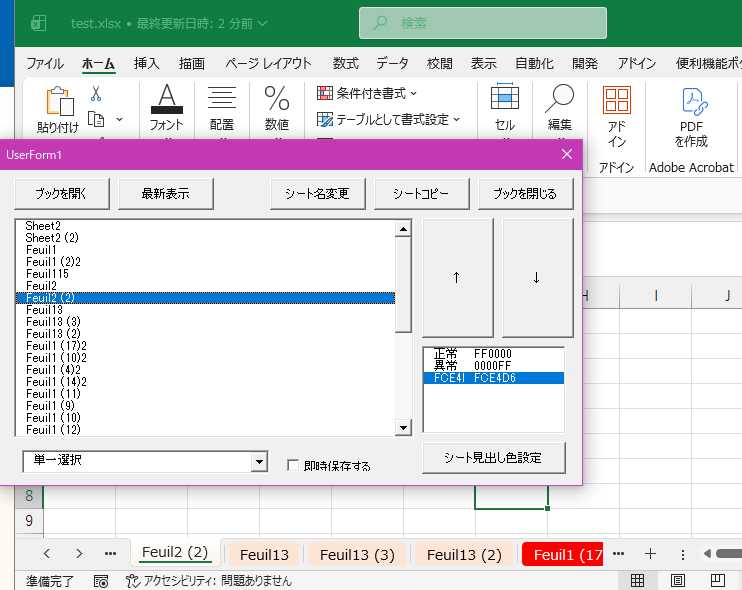 このフォームにExcelファイルを読み込ませると
そのファイルが普通にエクセルで表示されて
このフォームにもシートの一覧が表示されますよ
フォームからシート操作することでエクセルにも即反映されますよ
即保存もするかど
シートの操作の機能はいろいろ組み込みたいのですが
とりあえず必要性に迫られていた以下を実装しましたよ
1.シート一覧表示(リストボックス)
2.選択シートをアクティブにする(リストボックス)
3.シートの位置の操作(↑↓ボタン)
4.シート名の変更(変更ボタン)
5.シートコピー(コピーボタン)
6.シート見出し色の表示、変更(リストボックス2)
リストは単一選択、複数選択、shift /ctrl を使う選択 を切替可能
他にもいろいろ考えられるのですがとりあえずということで。
後でこのマクロExcelファイルをダウンロードできるようにしますが
エクセルVBAでつくったら便利だろうと思いまして
Excelファイルの複数シート操作をするVBAフォームをAIに依頼して作ってみましたよ
実際のフォームの動作はこんな感じ
このフォームにExcelファイルを読み込ませるとそのファイルが普通にエクセルで表示されて
このフォームにもシートの一覧が表示されますよ
フォームからシート操作することでエクセルにも即反映されますよ
即保存もするかど
シートの操作の機能はいろいろ組み込みたいのですが
とりあえず必要性に迫られていた以下を実装しましたよ
1.シート一覧表示(リストボックス)
2.選択シートをアクティブにする(リストボックス)
3.シートの位置の操作(↑↓ボタン)
4.シート名の変更(変更ボタン)
5.シートコピー(コピーボタン)
6.シート見出し色の表示、変更(リストボックス2)
リストは単一選択、複数選択、shift /ctrl を使う選択 を切替可能
他にもいろいろ考えられるのですがとりあえずということで。
| コントロール名 | 種類 | 機能 |
|---|---|---|
|
ListBox1
|
ListBox | 外部ブックのシート一覧 |
|
ListBox2
|
ListBox | シート見出し色名+HEX値 の一覧( 2列の定義
) |
|
cmbSelectMode
|
ComboBox | ListBox1 の選択モード切替(単一/複数/拡張) |
|
cmdOpenBook
|
commandButton | Excelファイルを開く |
|
cmdRenameSheet
|
commandButton | 選択シートの名前変更(単一選択のみ) |
|
cmdCopySheet
|
commandButton | 選択シートのコピー(複数選択対応) |
|
cmdMoveUp
|
commandButton | 選択シートを上へ移動(複数選択対応) |
|
cmdMoveDown
|
commandButton | 選択シートを下へ移動(複数選択対応) |
|
cmdRefresh
|
commandButton | シート一覧の最新化(外部ブックの状態を再取得) |
|
cmdCloseBook
|
cmd | 外部ブックを閉じて画面初期化 |
|
chkSave
|
checkbox | シート操作のあとファイル保存するかどうか |
Sub シート操作form()
UserForm1.Show vbModeless

End Sub
 'UserForm
Dim targetWb As Workbook
Dim targetPath As String

Private Sub CommandButton1_Click()

End Sub


Private Sub UserForm_Initialize()

Dim ws As Worksheet
Dim lastRow As Long
Dim i As Long
Dim colorName As String
Dim hexVal As String

'-----------------------------------------
' 見出し色定義シートの存在チェック
'-----------------------------------------
On Error Resume Next
Set ws = ThisWorkbook.Worksheets("見出し色定義")
On Error GoTo 0

' なければ作成
If ws Is Nothing Then
Set ws = ThisWorkbook.Worksheets.Add(After:=ThisWorkbook.Sheets(ThisWorkbook.Sheets.Count))
ws.name = "見出し色定義"

' 初期ヘッダー行
ws.Range("A1").Value = "色名"
ws.Range("B1").Value = "HEX"

' 必要なら初期色を入れておく(任意)
ws.Range("A2").Value = "赤"
ws.Range("B2").Value = "FF0000"

ws.Range("A3").Value = "青"
ws.Range("B3").Value = "0000FF"
End If


'-----------------------------------------
' シートから色名とHEXを読み込む
'-----------------------------------------
lastRow = ws.Cells(ws.Rows.Count, "A").End(xlUp).Row

For i = 2 To lastRow   ' 1行目は見出し
colorName = Trim(ws.Cells(i, "A").Value)
hexVal = UCase$(Trim(ws.Cells(i, "B").Value))

' HEX は必ず6桁
If Len(hexVal) = 6 Then
Me.ListBox2.AddItem colorName
Me.ListBox2.List(Me.ListBox2.ListCount - 1, 1) = hexVal
End If
Next i


' --- コンボボックスに選択モードを追加 ---
With Me.cmbSelectMode
.Clear
.AddItem "単一選択"      ' MultiSelect = 0
.AddItem "複数選択"      ' MultiSelect = 1
.AddItem "拡張選択"      ' MultiSelect = 2
.ListIndex = 0           ' 初期値:単一選択
End With

End Sub


Private Sub cmdRefresh_Click()

If targetWb Is Nothing Then Exit Sub

' シート一覧を最新化
RefreshSheetList

' ついでに現在アクティブなシートを選択状態にする
Dim ws As Worksheet
Set ws = targetWb.ActiveSheet

Dim i As Long
For i = 0 To Me.ListBox1.ListCount - 1
If Me.ListBox1.List(i) = ws.name Then
Me.ListBox1.ListIndex = i
Exit For
End If
Next i

End Sub

Private Sub cmdOpenBook_Click()

Dim fd As FileDialog
Dim sh As Worksheet
Dim backupPath As String

' ファイル選択
Set fd = Application.FileDialog(msoFileDialogFilePicker)
With fd
.Title = "編集するブックを選択してください"
.Filters.Clear
.Filters.Add "Excel ブック", "*.xlsx; *.xlsm; *.xls"
If .Show <> -1 Then Exit Sub
targetPath = .SelectedItems(1)
End With

'    ' バックアップ作成(可逆性の確保)
'    backupPath = targetPath & ".bak_" & Format(Now, "yyyymmdd_hhnnss")
'    FileCopy targetPath, backupPath

' 書き込み可能で開く
Set targetWb = Workbooks.Open(Filename:=targetPath, ReadOnly:=False)

' ListBox 初期化
Me.ListBox1.Clear

' シート名を追加
For Each sh In targetWb.Worksheets
Me.ListBox1.AddItem sh.name
Next sh


End Sub


Private Sub RefreshSheetList()

Dim sh As Worksheet

Me.ListBox1.Clear
For Each sh In targetWb.Worksheets
Me.ListBox1.AddItem sh.name
Next sh

End Sub

Private Sub cmdCopySheet_Click()

Dim shName As String
Dim ws As Worksheet

If Me.ListBox1.ListIndex = -1 Then
MsgBox "シートを選択してください", vbExclamation
Exit Sub
End If

CopySelectedSheets

If chkSave.Value = True Then
' 自動保存
targetWb.Save
End If


End Sub

Private Sub cmdDown_Click()

Dim idx As Long
Dim ws As Worksheet
Dim last As Long

If Me.ListBox1.ListIndex = -1 Then
MsgBox "シートを選択してください", vbExclamation
Exit Sub
End If

MoveDown

If chkSave.Value = True Then
' 自動保存
targetWb.Save
End If


End Sub

Private Sub cmdRename_Click()

Dim idx As Long
Dim ws As Worksheet
Dim newName As String

If Me.ListBox1.ListIndex = -1 Then Exit Sub

idx = Me.ListBox1.ListIndex + 1
Set ws = targetWb.Worksheets(idx)

' InputBox で新しいシート名を取得
newName = InputBox("新しいシート名を入力してください", "シート名変更", ws.name)

' キャンセル or 空文字なら何もしない
If newName = "" Then Exit Sub

' シート名変更
On Error Resume Next
ws.name = newName
If Err Then
MsgBox "既に使用されている名前です", vbCritical + vbOKOnly
Exit Sub

End If

If chkSave.Value = True Then
' 自動保存
targetWb.Save
End If

' シート一覧更新
RefreshSheetList

' 変更後のシートを再選択
Me.ListBox1.ListIndex = idx - 1

End Sub

Private Sub cmdUp_Click()

Dim idx As Long
Dim ws As Worksheet

If Me.ListBox1.ListIndex = -1 Then
MsgBox "シートを選択してください", vbExclamation
Exit Sub
End If


MoveUp

If chkSave.Value = True Then
' 自動保存
targetWb.Save
End If


End Sub

Private Sub cmdCloseBook_Click()

' targetWb がセットされていなければ何もしない
If targetWb Is Nothing Then Exit Sub

' 保存して閉じる(保存不要なら Save を削除)
targetWb.Close SaveChanges:=True

' 参照を破棄
Set targetWb = Nothing

' フォームの表示内容をクリア
Me.ListBox1.Clear
Me.ListBox2.ListIndex = -1

' 必要なら他の UI も初期化
' 例:ラベルやテキストボックスを空にする
' Me.lblSheetName.Caption = ""

End Sub

Private Sub ListBox1_Change()

Dim idx As Long
Dim ws As Worksheet
Dim c As Variant
Dim hexVal As String
Dim i As Long
Dim found As Boolean

If targetWb Is Nothing Then Exit Sub
If Me.ListBox1.ListIndex = -1 Then Exit Sub

idx = Me.ListBox1.ListIndex + 1
Set ws = targetWb.Worksheets(idx)

ws.Activate

c = ws.Tab.Color

If IsNull(c) Then
Me.ListBox2.ListIndex = -1
Exit Sub
End If


hexVal = RGBToHex6(c)


found = False
For i = 0 To Me.ListBox2.ListCount - 1
If Me.ListBox2.List(i, 1) = hexVal Then   ' 2列目のHEXと比較
Me.ListBox2.ListIndex = i
found = True
Exit For
End If
Next i

If Not found Then
Me.ListBox2.AddItem hexVal
Me.ListBox2.List(Me.ListBox2.ListCount - 1, 1) = hexVal
Me.ListBox2.ListIndex = Me.ListBox2.ListCount - 1
End If

End Sub

Private Sub cmdColorChange_Click()

Dim idx As Long
Dim ws As Worksheet
Dim hexVal As String
Dim c As Long

If targetWb Is Nothing Then Exit Sub
If Me.ListBox1.ListIndex = -1 Then Exit Sub
If Me.ListBox2.ListIndex = -1 Then Exit Sub

hexVal = Me.ListBox2.List(Me.ListBox2.ListIndex, 1)
Call ChangeSheetColor(hexVal)

If chkSave.Value = True Then
' 自動保存
targetWb.Save
End If

End Sub

Private Sub cmbSelectMode_Change()

Select Case Me.cmbSelectMode.ListIndex
Case 0
Me.ListBox1.MultiSelect = 0   ' 単一選択
Case 1
Me.ListBox1.MultiSelect = 1   ' 複数選択(チェックボックス風)
Case 2
Me.ListBox1.MultiSelect = 2   ' 拡張選択(Ctrl/Shift)
End Select

End Sub

Private Function GetSelectedSheets() As Collection
Dim Col As New Collection
Dim i As Long

For i = 0 To Me.ListBox1.ListCount - 1
If Me.ListBox1.Selected(i) Then
Col.Add Me.ListBox1.List(i)
End If
Next i

Set GetSelectedSheets = Col
End Function


Private Function SetSelectedSheets(Col As Collection)
Dim n As String

For i = 0 To Me.ListBox1.ListCount - 1
n = ListBox1.List(i)
For j = 1 To Col.Count
If Col(j) = n Then
Me.ListBox1.Selected(i) = True

End If
Next
Next

End Function

Private Sub ChangeSheetColor(hexVal As String)

If targetWb Is Nothing Then Exit Sub

Dim Col As Collection
Dim name As Variant
Dim c As Long

Set Col = GetSelectedSheets()
If Col.Count = 0 Then Exit Sub

c = Hex6ToRGB(hexVal)

For Each name In Col
targetWb.Worksheets(name).Tab.Color = c
Next name

SetSelectedSheets Col


End Sub

Private Sub CopySelectedSheets()

If targetWb Is Nothing Then Exit Sub

Dim Col As Collection
Dim name As Variant

Set Col = GetSelectedSheets()
If Col.Count = 0 Then Exit Sub

For Each name In Col
targetWb.Worksheets(name).Copy After:=targetWb.Worksheets(name)
Next name
' シート一覧更新
RefreshSheetList

SetSelectedSheets Col

End Sub

Private Sub MoveUp()

If targetWb Is Nothing Then Exit Sub

Dim Col As Collection
Dim name As Variant
Dim ws As Worksheet

Set Col = GetSelectedSheets()
If Col.Count = 0 Then Exit Sub

Dim i As Long
For i = 1 To Col.Count
Set ws = targetWb.Worksheets(Col(i))
If ws.Index > 1 Then
ws.Move Before:=targetWb.Worksheets(ws.Index - 1)
End If
Next i

' シート一覧更新
RefreshSheetList

SetSelectedSheets Col

End Sub

Private Sub MoveDown()

If targetWb Is Nothing Then Exit Sub

Dim Col As Collection
Dim name As Variant
Dim ws As Worksheet

Set Col = GetSelectedSheets()
If Col.Count = 0 Then Exit Sub

Dim i As Long
For i = Col.Count To 1 Step -1
Set ws = targetWb.Worksheets(Col(i))
If ws.Index < targetWb.Worksheets.Count Then
ws.Move After:=targetWb.Worksheets(ws.Index + 1)
End If
Next i

' シート一覧更新
RefreshSheetList

SetSelectedSheets Col

End Sub

Private Function RGBToHex6(c As Variant) As String
Dim r As Long, g As Long, b As Long

r = c Mod 256
g = (c \ 256) Mod 256
b = (c \ 65536) Mod 256

RGBToHex6 = Right$("0" & Hex(r), 2) & Right$("0" & Hex(g), 2) & Right$("0" & Hex(b), 2)
End Function

Private Function Hex6ToRGB(hexStr As String) As Long
Dim r As Long, g As Long, b As Long

hexStr = Replace(hexStr, "#", "")
hexStr = UCase$(hexStr)

r = CLng("&H" & Mid$(hexStr, 1, 2))
g = CLng("&H" & Mid$(hexStr, 3, 2))
b = CLng("&H" & Mid$(hexStr, 5, 2))

Hex6ToRGB = RGB(r, g, b)
End Function
後でこのマクロExcelファイルをダウンロードできるようにしますが
お気に入りの記事を「いいね!」で応援しよう

[VBA] カテゴリの最新記事
-
Excelで範囲指定してhtml テーブルとしてh… 2026/02/04


【毎日開催】
15記事にいいね!で1ポイント


PR
キーワードサーチ
▼キーワード検索
フリーページ

便利なリンク

☗毎日ポイント獲得
☖ EC サイト
☗ オークションサイト
☖ 動画コンテンツ
☗ DVDレンタル
☖ TV配信
☗ 電子書籍
☖ 電子書籍 読み放題
☗ クーポンサイト
☖ 将棋
☗ 楽天ポイント
☖ 電子マネー
☗ 銀行
☖ POINT運用
☗ PG言語
☖ ネットスピードテスト
☗ ベンチマーク
☖ 表計算
☗ オンライン実行環境
☖ ソフトウェア販売サイト
☗ オープンソース
☖ Webページ作成支援
☗ 無料メールアドレス
☖ wiki
☗ ブログ記事作成支援
☖ 楽天ブログ管理
☗メール関連
☖ 楽天
☗数学
☖検索
☗地球温暖化関連
☖ギフトカード
☗ネット・セキュリティ
☖オンラインメモ帳・サービス
☗クレジットカード

☖クラウド・ストレージ・サービス
楽天購入履歴を公開致します↓↓↓リンク先記事にコメント頂ければご回答いたしますぞ
ひできちの購入履歴公開ページ
ひできちの楽天購入商品レビュー
カテゴリ
カテゴリ未分類
(41)楽天サービス
(45)ポイント生活
(51)電子書籍
(30)yahoo
(3)クレジットカード
(36)楽天Edy
(35)楽天銀行デビットカード
(14)nanacoカード
(8)WAON
(2)ジャパンネット銀行
(4)ECサイト比較
(17)majica カード
(5)Tポイント
(3)動画配信
(81)デビットカード
(10)PASMO
(2)電気自由化
(2)音楽配信
(9)楽天ブックス
(9)au WALLET
(9)年末商戦
(4)ふるさと納税
(2)Yahooプレミアム会員特典
(7)楽天ポイント獲得数報告
(5)ポイント交換
(2)クレカ入会特典
(6)楽天市場
(7)電子マネー
(12)福袋・初売り
(2)BABYMETAL
(7)Yahooショッピング
(30)Yahooクレジットカード
(6)税金対策
(2)楽天銀行プリペイドカード
(3)楽天ペイ
(5)ゾンビ
(4)銀行カード
(2)ヤフオク!
(1)ポイント・キャンペーン
(23)Amazon
(3)Ponta
(2)ギタリスト
(3)プリペイドカード
(1)クーポン・キャンペーン
(18)暗号・分割・隠蔽
(2)ガジェット
(43)プログラミング
(15)ネット銀行
(7)Chrome 機能拡張
(1)リアル銀行
(1)数学と算数
(14)格安SIM
(5)将棋
(89)クラウド
(14)国語
(3)ニュース
(26)社会
(2)電子決済
(2)割引券
(0)日記
(1)TIPS
(4)ソフトウェア
(18)商品レビュー
(1)映画視聴
(7)洋楽
(2)マンガ
(0)お買い物パンダ
(1)3Gケータイ3Gスマホ
(3)互換オフィス
(4)IT用語
(0)地球温暖化
(53)植民地時代
(0)古代史
(1)楽天ポイントビットコイン
(11)ITの仕事
(1)楽天購入品リスト
(0)ご挨拶
(0)楽天リワード
(1)Visual Studio
(4)wikipedia
(1)コロナ
(1)python
(4)地球温暖化懐疑/否定論者
(14)youtubeライブカメラ
(1)自然災害
(4)SNS
(1)動物
(1)楽天ブログ
(4)藤岡幹大
(1)グレタ
(2)HTML
(1)AIの活用
(0)令和のコメ騒動
(2)xEV
(2)スポーツ
(1)EV
(2)VSCode
(0)エネルギー
(1)snowflake
(4)Microsoft Copilot
(2)VBA
(2)Excel計算式
(1)Windows
(1) 【楽天ポイントモー…
New!
楽天ポイントモールさん
【キャンペーン】楽… 楽天家計簿スタッフさん
【重要】楽天写真館 … 楽天写真館スタッフさん
7/19(日) メンテナン… 楽天ブログスタッフさん
[お知らせ]楽天アフ… ROOM編集部さん
Google検索で楽天Inf… infoseeknewsさん
楽天レシピスタッフB… 楽天レシピスタッフさん
楽天アフィリエイト… 楽天アフィリエイト事務局スタッフさん
インフォメーション… 楽天 ブックスさん
楽天モバイルからの… モバタロウさん
【キャンペーン】楽… 楽天家計簿スタッフさん
【重要】楽天写真館 … 楽天写真館スタッフさん
7/19(日) メンテナン… 楽天ブログスタッフさん
[お知らせ]楽天アフ… ROOM編集部さん
Google検索で楽天Inf… infoseeknewsさん
楽天レシピスタッフB… 楽天レシピスタッフさん
楽天アフィリエイト… 楽天アフィリエイト事務局スタッフさん
インフォメーション… 楽天 ブックスさん
楽天モバイルからの… モバタロウさん
コメント新着

ひできち(hidekichi45)
楽天とかYahooとかいろいろなネットのサービスについてのブログになります。 左上の「ひできちの楽天ブログ」をクリックしてください! https://plaza.rakuten.co.jp/hidekichi45/ https://plaza.rakuten.co.jp/hidekichi45/2000/
© Rakuten Group, Inc.
