



2024.11.11

カテゴリ: プラモ道
⭐️ プラモデルを作った時、どこに飾っていますか?作ったプラモデルを見える場所に飾っておけると毎日が楽しくなる気がします。ちょっとした隙間にプラモデルを飾る場所を作るアイデアを紹介します。
⭐️ When you build a plastic model, where do you display it? I feel that every day becomes more enjoyable if you can display the plastic models you have made in a visible place. Here are some ideas for creating a place to display your plastic models in a small space.
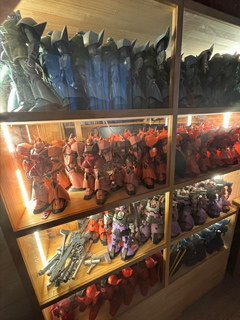
⭐️ 今のベッドの下にパソコン作業スペースを作ったので、ベッドの強度を上げるために、隔壁を作りました。すると奥にもう一つスペースができます。 当初は未組立プラモの置き場でしたが、それらがなくなると、 細い通り道を抜けると静かに本を読んだり、酒を飲んだりできるスペースとなりました。そして、その秘密の部屋を隠すためにスライド移動する扉を作製しました。もちろんこの扉にもMSが展示格納できるので、ここに第3格納庫を作製しました。最上段は外側にだけ窓がありますが、2段目〜4段目は両側に窓があります。内側には、Web会議時に参加者に見せたいMSを飾ったり、奥の部屋にこもった時に眺めたいMSを飾ることができます。また、外側は、塗装や造形の作業スペースと隣接しているので、作業途中のMSを並べておくと完成までの作業効率が上がるかもしれません。ちなみに奥の部屋の中に、第6格納庫を作製しました。
⭐️ I built a computer workspace under my current bed, so I built a bulkhead to make the bed stronger. This will create another space at the back. At first it was a place for unassembled plastic models, but once those were gone, it became a space where I could hide, read books and have a drink through a narrow passageway. And to hide the secret room, we made a door that slides and moves. Of course, MS can also be displayed and stored in this door, so a third hangar was built here. The top level has windows only on the outside, but the second to fourth levels have windows on both sides. On the inside, you can display the MS you want to show to participants during web conferencing, or the MS you want to view when you are cooped up in the back room. The outside is also adjacent to the work space for painting and modelling, so you may be able to improve the efficiency of your work until completion by arranging MS in the process of being worked on. Incidentally, Hangar 6 was created inside the back room.
【ガ】自室情報_20 [My Room_20] ←第5格納庫MS配置変更
【ガ】自室情報_19 [My Room_19] ←第4格納庫MS配置変更
【ガ】自室情報_18 [My Room_18] ←第3格納庫MS配置初期
【ガ】自室情報_17 [My Room_17] ←第1格納庫MS配置初期
【ガ】自室情報_16 [My Room_16] ←第5格納庫MS配置初期
【ガ】自室情報_15 [My Room_15] ←第4格納庫MS配置初期
【ガ】自室情報_14 [My Room_14] ←南机改修
【ガ】自室情報_13 [My Room_13] ←カーテンボックス作成
【ガ】自室情報_12 [My Room_12] ←3Dプリンタ置場作成
【ガ】自室情報_11 [My Room_11] ←第3格納庫(本記事)
【ガ】自室情報_10 [My Room_10] ←第2格納庫
【ガ】自室情報_9 [My Room_9] ←第1格納庫
【ガ】自室情報_8 [My Room_8] ←第5格納庫
【ガ】自室情報_7 [My Room_7] ←第7格納庫改修
【ガ】自室情報_6 [My Room_6] ←第4格納庫
【ガ】自室情報_5 [My Room_5] ←第6格納庫
【ガ】自室情報_4 [My Room_4] ←ミニカー 格納庫
【ガ】自室情報_3 [My Room_3] ←第7格納庫MGハイザック投入
【ガ】自室情報_2 [My Room_2] ←第7格納庫電飾完了
【ガ】自室情報_1 [My Room_1] ←第7格納庫作成開始
👋では今日はここまでにします。
👋Well, that's all for today.
⭐️ When you build a plastic model, where do you display it? I feel that every day becomes more enjoyable if you can display the plastic models you have made in a visible place. Here are some ideas for creating a place to display your plastic models in a small space.
⭐️ 今のベッドの下にパソコン作業スペースを作ったので、ベッドの強度を上げるために、隔壁を作りました。すると奥にもう一つスペースができます。 当初は未組立プラモの置き場でしたが、それらがなくなると、 細い通り道を抜けると静かに本を読んだり、酒を飲んだりできるスペースとなりました。そして、その秘密の部屋を隠すためにスライド移動する扉を作製しました。もちろんこの扉にもMSが展示格納できるので、ここに第3格納庫を作製しました。最上段は外側にだけ窓がありますが、2段目〜4段目は両側に窓があります。内側には、Web会議時に参加者に見せたいMSを飾ったり、奥の部屋にこもった時に眺めたいMSを飾ることができます。また、外側は、塗装や造形の作業スペースと隣接しているので、作業途中のMSを並べておくと完成までの作業効率が上がるかもしれません。ちなみに奥の部屋の中に、第6格納庫を作製しました。
⭐️ I built a computer workspace under my current bed, so I built a bulkhead to make the bed stronger. This will create another space at the back. At first it was a place for unassembled plastic models, but once those were gone, it became a space where I could hide, read books and have a drink through a narrow passageway. And to hide the secret room, we made a door that slides and moves. Of course, MS can also be displayed and stored in this door, so a third hangar was built here. The top level has windows only on the outside, but the second to fourth levels have windows on both sides. On the inside, you can display the MS you want to show to participants during web conferencing, or the MS you want to view when you are cooped up in the back room. The outside is also adjacent to the work space for painting and modelling, so you may be able to improve the efficiency of your work until completion by arranging MS in the process of being worked on. Incidentally, Hangar 6 was created inside the back room.
【ガ】自室情報_20 [My Room_20] ←第5格納庫MS配置変更
【ガ】自室情報_19 [My Room_19] ←第4格納庫MS配置変更
【ガ】自室情報_18 [My Room_18] ←第3格納庫MS配置初期
【ガ】自室情報_17 [My Room_17] ←第1格納庫MS配置初期
【ガ】自室情報_16 [My Room_16] ←第5格納庫MS配置初期
【ガ】自室情報_15 [My Room_15] ←第4格納庫MS配置初期
【ガ】自室情報_14 [My Room_14] ←南机改修
【ガ】自室情報_13 [My Room_13] ←カーテンボックス作成
【ガ】自室情報_12 [My Room_12] ←3Dプリンタ置場作成
【ガ】自室情報_11 [My Room_11] ←第3格納庫(本記事)
【ガ】自室情報_10 [My Room_10] ←第2格納庫
【ガ】自室情報_9 [My Room_9] ←第1格納庫
【ガ】自室情報_8 [My Room_8] ←第5格納庫
【ガ】自室情報_7 [My Room_7] ←第7格納庫改修
【ガ】自室情報_6 [My Room_6] ←第4格納庫
【ガ】自室情報_5 [My Room_5] ←第6格納庫
【ガ】自室情報_4 [My Room_4] ←ミニカー 格納庫
【ガ】自室情報_3 [My Room_3] ←第7格納庫MGハイザック投入
【ガ】自室情報_2 [My Room_2] ←第7格納庫電飾完了
【ガ】自室情報_1 [My Room_1] ←第7格納庫作成開始
👋では今日はここまでにします。
👋Well, that's all for today.
お気に入りの記事を「いいね!」で応援しよう

[プラモ道] カテゴリの最新記事
-
【ガ】1/100MG ゲルググ_11 [1/100MG MS-1… 2026.05.20
-
【ガ】1/100MG ゲルググ_10 [1/100MG MS-1… 2026.05.19
-
【ガ】1/144 ジオング_22 [1/144 MSN-02 Z… 2026.05.18


【毎日開催】
15記事にいいね!で1ポイント


PR
© Rakuten Group, Inc.
