


Course Selection
Course catalogs, selection sheets, pacing, sequencing, process guides, and more
2026-2027 Course Selection Information
Rising 7th Grade Course Selection Process
Rising 7th Grade Course Selection Timeline
| Rising 7 th Grade: Course Request Information |
Location |
Date |
| Cooper MS Curriculum and Course Selection and FCPS Program Materials |
Video | Transcript | Slides |
Available by Jan 27 |
| Rising 7 th Grade Feeder Elementary Field Trips to visit Cooper MS |
Cooper MS |
Varies by feeder school |
| Cooper MS Core and Elective Curriculum Night |
Cooper MS (Enter Door 1 or 2) |
Updated! Feb 3 @ 5:30 |
| Course Requests due in SIS StudentVue *Search by course codeand not course title *Must be in a web browser and not the SIS app |
Due Feb 4 |
|
| Course Request Sheet due to your 6th grade teacher |
Feeder Elementary School |
Due Feb 4 |
Rising 7th Grade Course Catalogs and Selection Sheets
Course Catalogs
Course Selection Sheets
These documents do not meet FCPS accessibility guidelines. Please see your school counselor if you need additional support reading or accessing this information.
Cooper School Counselors
FCPS Graduation Requirements & General Academic Advising Information
The links below were mentioned in the Curriculum Overview Video
Advanced Academic Programs (AAP) Information
How to Register for Courses in SIS
Register for Your Class in 10 Easy Steps!
- Log into SIS StudentVUE on your laptop by going to https://sisstudent.fcps.edu/ . This process will not work on your phone.
- Click on the " Course Request" tab in the menu to the left.
- Click the blue " Click here to change course requests" button.
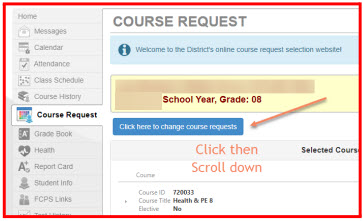
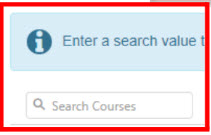
- Using your Course Selection sheet, type in the course ID for the first class you would like to take into the " Search Courses" box.
- Click the " + Add Request" button.
- Repeat this process for the other six courses you have selected.
- Add two alternate courses in preference order by clicking the " * Add Alternate" button.
- Review your list of seven classes and two alternate electives.
- If necessary, remove any incorrect courses by clicking the " X Remove" button.
- Once all seven classes and two alternative electives are listed under "Selected Course Requests," click " Click here to return to course request summary."
StudentVue Course Request Directions : A downloadable version of the above directions.
Rising 8th Grade Course Selection Process
Rising 8th Grade Course Selection Timeline
| Rising 8 th Grade: Course Request Information |
Location |
Date |
| Cooper MS Curriculum and Course Selection and FCPS Program Materials |
Video | Transcript | Slides |
Available by Jan 27 |
| Cooper MS Core and Elective Curriculum Night |
Cooper MS (Enter Door 1 or 2) |
Updated! Feb 3 @ 5:30 |
| Lessons on the Course Request Process |
Block 4 Advisory |
Jan 27 & Feb 2 |
| Course Requests due in SIS StudentVue *Search by course codeand not course title *Must be in a web browser and not the SIS app |
Due Feb 4 |
|
| Course Request Sheet due to your CMS Counselor |
Counselor Offices |
Due Feb 4 |
| Individual student/counselor meetings |
Science Classes |
Varies Feb 4-13 |
Rising 8th Grade Course Catalogs and Selection Sheets
Course Catalogs
Course Selection Sheets
These documents do not meet FCPS accessibility guidelines. Please see your school counselor if you need additional support reading or accessing this information.
Cooper School Counselors
FCPS Graduation Requirements & General Academic Advising Information
The links below were mentioned in the Curriculum Overview Video
Advance Academic Programs (AAP) Information
How to Register for Courses in SIS
Register for Your Class in 10 Easy Steps!
- Log into SIS StudentVUE on your laptop by going to https://sisstudent.fcps.edu/ . This process will not work on your phone.
- Click on the " Course Request" tab in the menu to the left.
- Click the blue " Click here to change course requests" button.
- Using your Course Selection sheet, type in the course ID for the first class you would like to take into the " Search Courses" box.
- Click the " + Add Request" button.
- Repeat this process for the other six courses you have selected.
- Add two alternate courses in preference order by clicking the " * Add Alternate" button.
- Review your list of seven classes and two alternate electives.
- If necessary, remove any incorrect courses by clicking the " X Remove" button.
- Once all seven classes and two alternative electives are listed under "Selected Course Requests," click " Click here to return to course request summary."
StudentVue Course Request Directions : A downloadable version of the above directions.
Rising 9th Grade Course Selection Process
Rising 9th Grade Course Selection Timeline
| Rising 9 th Grade: Course Request Information |
Location |
Date |
| LHS Academic Advising Videos |
Available by Jan 5 |
|
| Cooper PTO Meeting: (Langley Transition) w/Director of Student Services Braden Peterson and Principal Lawrence Stroud |
Cooper MS Lecture Hall |
Jan. 7 @ 9am |
| Rising 9th Grade Curriculum Night for Parents |
Langley Auditorium |
Updated! Feb. 2 @ 7pm |
| Lessons on the Course Request Process |
Block 4 Advisory |
Jan. 27 & Feb 2 |
| Course Request Sheet due to your Cooper Counselor |
Cooper MS Counselor Offices |
By Feb. 2 |
| Individual student/ Cooper & LHS counselormeetings |
Science Classes |
Varies Feb. 4-13 |
Rising 9th Grade Course Selection Information
Information on the course selection process for rising 9th graders can be found on Langley's Rising 9th Grade Academic Advising .
Questions?
If you have any questions or need any assistance related to academic advising during this time you are welcome to contact your school counselor or the appropriate department chair/teacher/content area administrator . Please also bookmark this site to refer to it for necessary information.

