
UPDATE (5/20/26 @ 7:30am AZ time):
The GCU Library's updated version of LopeCat, the library’s online catalog, is live! For more details on what has changed, visit the What's New Guide .
Health Care Administration: Empirical/Research Articles
What Are Empirical/Research Articles?
At various points in your educational journey, you will need to find empirical articles for many class assignments, capstones, and research projects, including doctoral DNP projects and dissertations.
Some of the databases have specific filters to help you narrow your results to empirical articles or labels to identify them quickly. These are outlined in the section below, as well as how to find articles in databases without these filters.
An empirical article reports on the outcome of a study based on observation or experiment carried out by the author(s).
These can also be called primary or researcharticles. They contain original data and the conclusions of the researchers involved in an experiment or study.
The two main sections of an empirical article are the methodology (sometimes called the design) which describes how the study was carried out, and the results (sometimes called the findings) which lays out and analyzes the data or observations which were found. Both quantitativeand qualitativearticles are empirical.
Qualitative Research
Qualitative research includes all modes of inquiry that do not rely on numbers or statistical methods. (Encyclopedia of Nursing Research, 2012, Springer). Qualitative research typically involves interviews, surveys, or questionnaires.
Quantitative Research
Quantitative research consists of the collection, tabulation, summarization, and analysis of numerical data for the purpose of answering research questions or hypotheses. (Encyclopedia of Nursing Research, 2012, Springer).
It would be great if all empirical articles were labeled with the words "Empirical" or "Research Article." Unfortunately, most of them aren't. Instead, the article has to be read and analyzed to determine if it is empirical. Empirical articles have certain features that identify it as empirical. Look for these features to decide whether an article is empirical.
Introduction- This section introduces the article. It gives an overview of the problem, and the rationale for the study. The research hypothesis or research question is provided.
Literature Review- In this section, the authors review previous research that is relevant to their study. This may include key concepts, theories, or similar studies.
Method- This section describes the original research study conducted by the authors. It includes the research methods used, the population sample, and the data collection process.
Results- Also called discussionor findings. In this section, the authors discuss the results of the study. This includes analyzing the data, drawing conclusions based on the data, and determining whether their hypothesis/research question was correct.
Conclusion- This section summarizes the research study and provides suggestions for future research. Looking at the suggestions for future research is a great place to find the gap in the literature.
References- A list of all the sources the authors used in conducting their research and writing the paper.
To begin working with empirical/research articles, the Library recommends viewing the video How to Read and Understand a Research Study from Sage and reading Evaluating Research Studies from the Handbook of Research Design & Social Measurement .
- When beginning to read in a new discipline, you will need to build knowledge of terminology.
- Course readings, textbooks, and reference databases like Credo below are an excellent way to develop discipline specific vocabulary.
- Is the journal one you are familiar with?
- If not, check Cabell's Directories to ensure it is not on the list of predatory journals.
Most research articles follow the same basic layout, with the same general sections.

Abstract
The brief summary or recap of the article.
- Read the abstract before the article!
- The abstract will tell you an overview of what they did and what the results were.
 Introduction
This section introduces the article. It gives an overview of the problem, and the rationale for the study.
- Read the intro first.
-
Look for:
- Why was this study necessary?
- What question were they trying to answer?
- What's the point of this research?
- What's the bigger context for why research in this area is being done?
- A good research objective is measurable, realistic, and timely.
-
Look for:
Pause.
Check your understanding here.
- If the abstract and introduction aren't making sense, do more background research before reading the rest.

Results
Also called Discussion or Findings.
The results of the study. This includes analyzing the data, drawing conclusions based on the data, and determining if the hypothesis/research question was correct.
- Read Results second. This allows you to immediately compare the question with the answer.
-
Look for:
- Are the conclusions in line with the research questions?
- Do they discuss limitations or flaws in the results?
-
Look for:
Conclusion
Summarizes the research study and explains what conclusions the results support.
- Read after the results. Make sure to compare the conclusion to the introduction.
-
Look for:
- A clear answer to the research question established in the introduction.
- Why the findings matter.
- What additional research needs to be done in this area.
-
Look for:
 Method
The research methods used, the population sample, and the data collection process. The actual study part of a study.
- Read the methods last.
- The methods section will generally be the most technical section, so reading and understanding the other parts will make understanding it easier.
- Compare the methods to the conclusion.
- Look up methods in Sage Research Methods if you aren't familiar with them.
-
Look for:
- Does the design make sense? Especially given the conclusions.
- Do they identify the analysis and scales clearly? Are these validated scales that have been used in other studies?
- Does the sample size match the conclusions made?
- Watch out for claims of significance or absolute findings when dealing with a small number of subjects.
- Be aware of p -hacking.
References
A list of all the sources the authors used in conducting their research and writing the paper.
- Check the references if you want to follow up on a study mentioned in the paper, for the full information to locate it.
Some articles may also include a section reviewing other studies that did the same or similar research, called a literature review.
- If there is one, look for:
- Are they in line with or contradicting prior research?
Two types of review articles will sometimes appear in searches for empirical articles, including when using database filters. While they are secondary sources and do not represent primary research, they are important overviews of the current state of research. A recent review or analysis can be a useful source of articles. They can also point towards gaps in research or areas for further study.
Meta Analysis
Meta-analysis is a quantitative approach that permits the synthesis and integration of results from multiple individual studies focused on a specific research question. (Encyclopedia of Nursing Research, 2012, Springer).
Systematic Reviews
Systematic reviews are overviews of research evidence that address a specific clinical question. The purpose of the systematic review is to provide a more comprehensive synthesis and evaluation of the state of the science in the area of interest. (Dictionary of Nursing Theory and Research, 2010, Springer).
These books are recommended for an in depth look at how to read and use empirical/research articles:
-
 Understanding and Evaluating Research
by
ISBN: 9781506350950
Understanding and Evaluating Research
by
ISBN: 9781506350950 -
-
 Using and Interpreting Statistics in the Social, Behavioral, and Health Sciences
by
ISBN: 9781526402493Publication Date: 2018-04-05
Using and Interpreting Statistics in the Social, Behavioral, and Health Sciences
by
ISBN: 9781526402493Publication Date: 2018-04-05 -


Credo Reference, Sage Reference, and Sage Research Methods are both excellent sources of background knowledge, definitions, and explanations of experimental methods, to help with understanding research articles.
- Credo Reference This link opens in a new window Full Text With regular updates, this collection includes 3 million entries from notable subject encyclopedias, handbooks, guides, companions, and readers covering 80 major subject disciplines and more than 6 million research concepts. In addition to full text content, Credo Reference provides access to more than 1,000 videos and animations, as well as 500,000 contextual visual aids, images, photographs, and maps.

- Sage Reference & Academic Books This link opens in a new window
- Sage Research Methods This link opens in a new window Full Text Sage Research Methods is the essential online resource for anyone doing research or learning how to do research. With more than 800 books, reference works, journal articles, and videos from Sage's world-renowned research methods list, Sage Research Methods provides information on writing a research question, conducting a literature review, choosing a research method, collecting and analyzing data, and writing up the findings. Sage Research Methods' coverage spans the full range of research methods used in science, technology, medicine, and the humanities.
How to Refine to Research Articles in the Databases
You can watch the video tutorial or view the instructions below.
The CINAHL Ultimate database has a Research Article check box which will limit the results to empirical articles. If your topic is related to nursing or health sciences, CINAHL may be relevant.
Type your keywords into the search boxes and then under Filters, check the Research Article box. Click Search and the results will be empirical research articles.

One limitation is that the Research Article filter sometimes allows systematic reviews into your results.
These are articles where the authors don’t actually carry out an observational or experimental study, but they search the literature for previously published research studies on a specific topic and then evaluate the results. These can sometimes look like original research articles because they might describe a method (what databases the authors searched and what keywords they used) and the results (a summary of the findings of the previously published research), but they aren’t empirical research.
To exclude some of these, you can type the phrase “systematic review” in the last search box and change the menu to the left from AND to NOT.

In the PsycINFO and PsycARTICLES databases there are two ways to limit results to empirical articles. If your topic is related to psychology, business (industrial/organizational psychology), or education (educational psychology), these databases may be relevant.
1) Check the Research Article box
Type your keywords into the search boxes and then scroll down to the search options. Under the Limit Your Results section, locate and check the Research Article box. Click search to view your results.
2) Use the Methodology filter
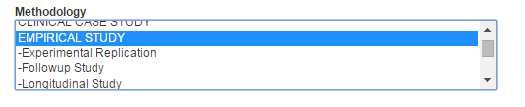
Type your keywords into the search boxes and then scroll down to the bottom of the page. In the Methodology menu, highlight EMPIRICAL STUDY. If desired, you can narrow the search even further to a specific type of empirical study such as a replication study or a longitudinal study. Click Search and all the results will be empirical articles.
The Emerald Insight database covers topics in business, management, and leadership.
- When you run a search in Emerald the results can be filtered down to research articles.
- Find "Type" on the "Update search" menu and select "Research Article".

- On each article page, the type is declared at the top.

- On the search results, you can also view the abstract. For research articles, the abstract will show the Design/methodology/approach and Findings.
- Design/methodology/approach will describe the research study conducted by the authors.
- Findings will describe the results of the study.

Sage Journals includes health sciences, social sciences, and many other topics.
- When you run a search in Sage there is a filter for "Research article" in the filters menu under "Article type".

- Research articles will also be labelled as such in the search results.

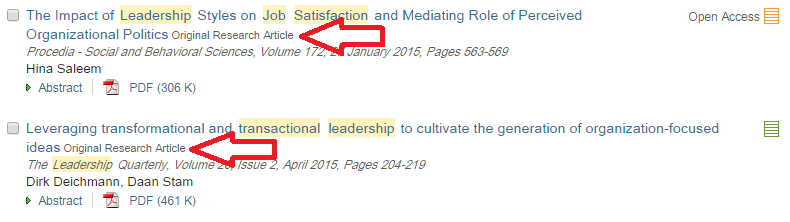
The ScienceDirect College Edition database covers science, business, economics, nursing, health sciences, and psychology. Run a search and after many of the titles in the results will be a label for the type of article. Ones that say “Original Research Article” are empirical.
Other databases don’t have either filters or labels for picking out empirical articles, but you can limit your search to articles that contain the words method (or methodology) and results. This will help narrow your results to empirical articles since these all have sections on the method and results. However, non-empirical articles can still have these words in a different context so some of the results may not be empirical.
Type your keywords for your topic and then in a separate search box type:
Method* and results
In the menu to the right, choose "TX All Text"(or the equivalent, for instance, “Document Text – FT” in ProQuest databases).
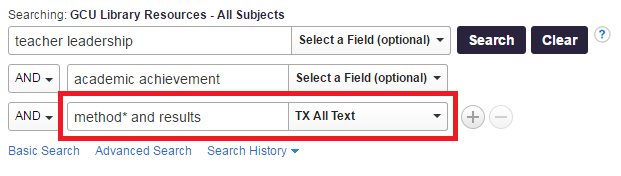
Also be sure to check the Scholarly/Peer-Reviewed limiter box. Click Search and all the results will have method and results in the text. Many of these should be empirical but not necessarily all, so you’ll need to make sure the article is empirical by skimming it for the method and results section.
You may also want to take a look at the empirical articles video tutorial .
Limiting Research to the United States
For many research proposals you will need most or all of your research to come from within the United States.
- Some databases, including the LopeSearch, have a geography limiter. In LopeSearch, after searching click Geography on the Limit To menu on the left.

- Limiters are not perfect, as not all articles are marked with the necessary data to catch the filter.
- Ensure you have a large number of articles in your search before applying a geography limiter.
- Alternatively, and for those databases that do not have a geography limiter, add the following keywords to your search:
- United States OR America OR USA OR U.S.
-
Searching for Specific Databases
Using the Find Journal Articles page you can locate specific databases or find a list of databases by subject. Choosing a subject focused database is a good way to narrow your search from the start.
- Find Journal Articles--All GCU Library Databases This link opens in a new windowA complete listing of GCU Library's subscription databases.
How to Use the Subject Menu on Find Journal Articles
To display different subsets of databases, use the menu bar in the middle of the page.
Browse by Subject will allow you to choose a subject by which to filter the databases that display.

When you choose a subject, only relevant databases will be listed.
To return to the full list, click on Clear Filters/Browse All Databases:

You can also browse through the databases by title by clicking the letter on the alphabet list that the title begins with.
