
UPDATE (5/20/26 @ 7:30am AZ time):
The GCU Library's updated version of LopeCat, the library’s online catalog, is live! For more details on what has changed, visit the What's New Guide .
Nursing & Health Sciences: NRS-430 Professional Dynamics
Overview

Welcome to the Research Guide for the course Professional Dynamics(NRS-430)!
Review this guide to learn research techniques on completing your Educational Preparation assignment in Week 2.
Search Techniques
In order to discuss the differences in competencies between nurses prepared at the associate-degree level versus the baccalaureate-degree level, you'll need to find current articles. A great place to do this is in the library database called CINAHL .
Click on the instruction boxes below to see an example of how to turn the research question " differences between ADN and BSN nurses" into a search that will return useable results.
- CINAHL Ultimate This link opens in a new windowFull Text
CINAHL Ultimate is the definitive resource for nursing and allied health research, providing full text for more of the most used journals in the CINAHL index than any other database. It covers more than 50 nursing specialties, from ambulatory care and gerontologic nursing to physical therapy and psychiatric nursing. Also included are quick lessons, evidence-based care sheets, CEU modules, and research instruments.
You will need to enter search terms. Choosing effective search terms will provide you with the best results. For this assignment ADN, BSN and nurses are the three main concepts you will want to utilize.
If you were to put in your research question " difference between the ADN and BSN nurses"into the search box and click search you will only retrieve one result.
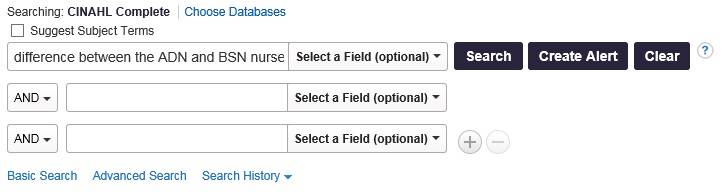
To make this search more effective, you will separate out the concepts into the separate search boxes.
- 1st box: ADN
- 2nd box: BSN
- 3rd box: nurse
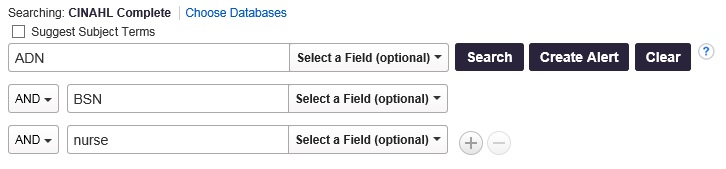
In this search, you utilized the Boolean operator AND to tell the computer to search for all those terms in the same article. However, if you use the Boolean operator OR you can significantly increase the number of results you retrieve.
For instance, there are similar terms for the concept ADN such as associate.
- 1st box: ADN OR associate*
The database now knows to search for ADN or associate. By adding the asterisk you have told it to search for multiple versions of associate including the plural associates.
- 2nd box: BSN OR Bachelor* OR baccalaureate*
- 3rd box: nurs*
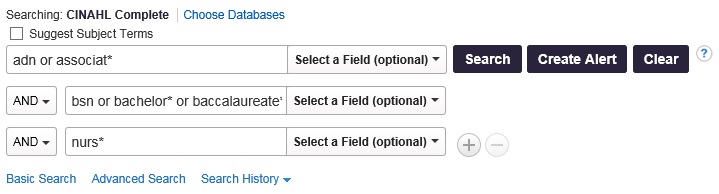
Word of caution - Check the dates of the articles!
Many of the articles retrieved may be too old for your research. An article from before 2000 will have very different competencies than an article from 2018. You can change the date range on the Advanced Search page as well as the Results page.
For current articles (within the last five years), use the Publication Datelimiter. Click in the first year box and enter the earliest year you want to include in the search.
| Advanced Search | Results Page |
|---|---|
 |
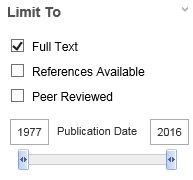 |
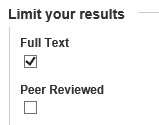
These options can be found on the advanced search page or in the Limit Your Results column on the left of your search results.
|
|
Peer Reviewedarticles: A publication in which articles go through an official editorial process that involves review and approval by the author's peers (people who are experts in the same subject area). (ProQuest, 2016) |
 |
Research Article: This option will allow to focus the results to only articles that contain research with original data. Evidence based research will be found this way, including qualitative and quantitative research studies. |
|
Publication Date: By setting the date, you can narrow down the publication years of your results. |
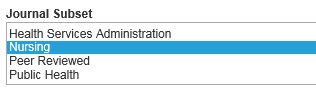 |
Journal Subset:This option allows you to choose the type of results you'll retrieve based on the type of journal. To focus on research in nursing journals only, select nursing and core nursing subsets. |
Personal Accounts: Many databases allow you to create a free personal account. When logged into your personal account, you can:
- Save and retrieve your search history
- Create bookshelves
- Save preferences
- Organize your research with folders
- Email and export saved citations
Creating a personal EBSCO account
- Locate the Sign In link in the purple bar at the top of the EBSCO search screen.

- Click on the "Create One Now"after "Don't Have an Account?".
- Do not use 'Sign In With Google'. This option can cause errors.
- Fill out the form.
- You can use any email address that you would like.
- You do not need to use your GCU username and password.
- Click on Continue.
Additional Nursing Databases
While CINAHL is our recommended starting point for nursing research, the GCU Library has a number of nursing databases. Each database has access to different journals, so you will see different results in each.
- PubMed This link opens in a new windowPubMed is a free database of more than 30 million citations for published articles in the fields of biomedicine and health. PubMed includes the MEDLINE® database; citations for articles in the PubMed Central (PMC) free full text archive, including articles that report on research funded by the National Institutes of Health (NIH); and citations for books from the NCBI online Bookshelf. Citations may include links to full-text content from PubMed Central, publisher websites, and the Library's subscriptions.
- Nursing & Allied Health Database This link opens in a new windowFull Text
ProQuest's Nursing & Allied Health Database supports students, instructors, researchers, and nurses around the world with its diverse mix of scholarly literature, clinical training videos, reference materials, and evidence-based resources, including dissertations and systematic reviews. - Ovid Nursing Essential Collection This link opens in a new windowFull Text
Access to over 125 full-text nursing journal titles covering a wide range of nursing topics and including premier titles from the highly respected Lippincott Williams & Wilkins.

