
Skip to content
new ogbongeblog logo
  • Advertise
  • Blog
  • Contact

How To Add Facebook JavaScript SDK To Blogger Themes Without XML Error

April 3, 2017

·

Uncategorized
jidetheblogger Avatar
jidetheblogger

The Facebook JavaScript SDK is a rich set of client-side functionality for adding Social Plugins, Facebook Login and Graph API calls to desktop or mobile web. If you are a blogger, it will also enable you to use the Facebook like button and other Facebook social plugins on your blog.

Below is the default Facebook JavaScript SDK code, with the appid of my blog in it :

<div id=”fb-root”></div>
<script>(function(d, s, id) {
  var js, fjs = d.getElementsByTagName(s)[0];
  if (d.getElementById(id)) return;
  js = d.createElement(s); js.id = id;
  js.src = “//connect.facebook.net/en_US/sdk.js#xfbml=1&version=v2.8&appId= 150436614997987 “;
  fjs.parentNode.insertBefore(js, fjs);
}(document, ‘script’, ‘facebook-jssdk’));</script>

Facebook requires that you add the code right after the opening <body> tag in your blog’s html to enable Facebook social plugins work on your blog.

Unfortunately, adding the code to your Blogger blog might throw some xml error. So, in this post, I want to share with you, how to add the Facebook JavaScript SDK to Blogger themes without throwing xml error.

Steps

Sign in to your Blogger dashboard , click on “Theme”
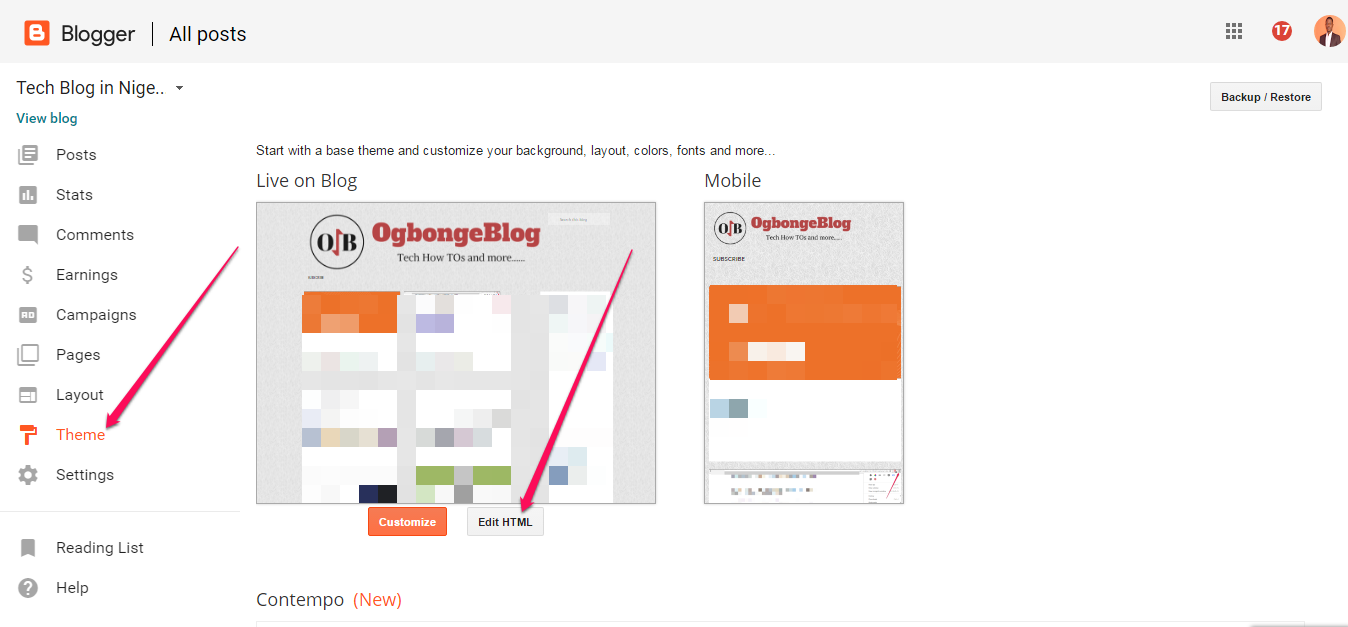
edit html in blogger themes

Click on “Edit HTML”

Use “CTRL F” to find the opening <body tag

Right below it, paste this code :

<div id=’fb-root’/>
&lt;script&gt;(function(d, s, id) {
  var js, fjs = d.getElementsByTagName(s)[0];
  if (d.getElementById(id)) return;
  js = d.createElement(s); js.id = id;
  js.src = &quot;//connect.facebook.net/en_US/sdk.js#xfbml=1&amp;version=v2.8&amp;appId= 150436614997987 &quot;;
  fjs.parentNode.insertBefore(js, fjs);
}(document, &#39;script&#39;, &#39;facebook-jssdk&#39;));&lt;/script&gt;

Change the highlighted appid to the application id of your blog.Click “Save Theme”.

If saved successfully, it will look like this:
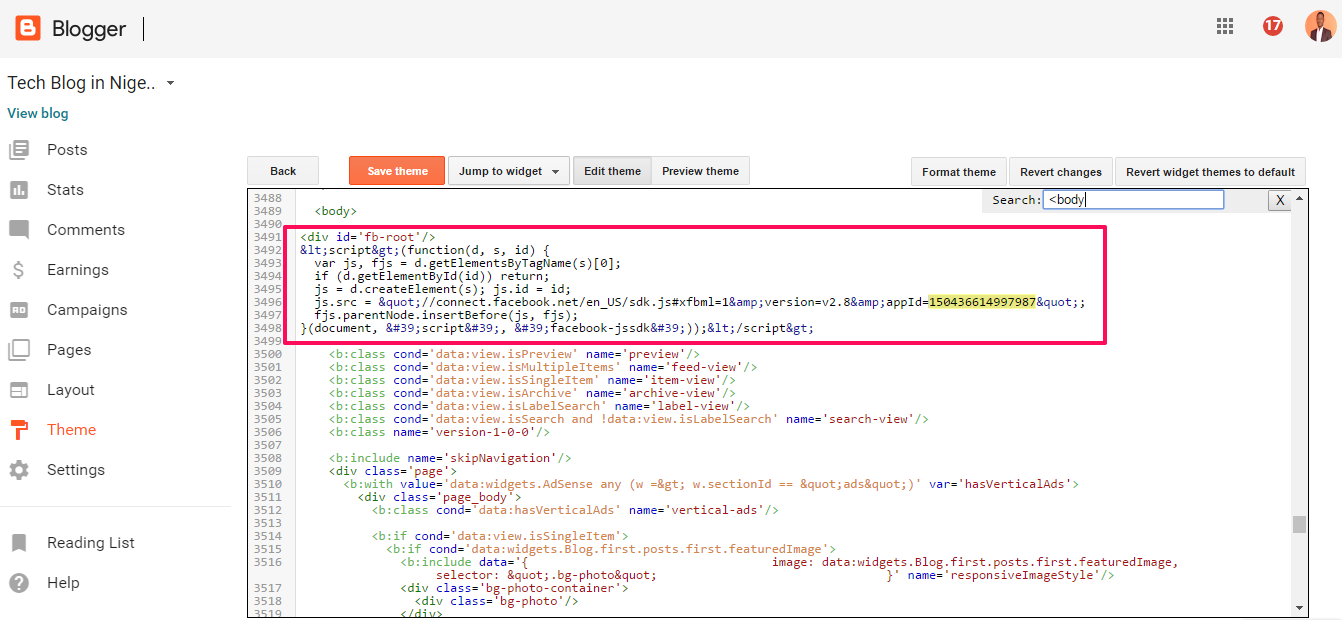
opening body tag in blogger theme

Recommended : How To Generate Facebook appid For Your Blog

If you don’t know your blog app id, use the code below:

<div id=’fb-root’/>
&lt;script&gt;(function(d, s, id) {
  var js, fjs = d.getElementsByTagName(s)[0];
  if (d.getElementById(id)) return;
  js = d.createElement(s); js.id = id;
  js.src = &quot;//connect.facebook.net/en_US/sdk.js#xfbml=1&amp;version=v2.8&amp;appId=&quot;;
  fjs.parentNode.insertBefore(js, fjs);
}(document, &#39;script&#39;, &#39;facebook-jssdk&#39;));&lt;/script&gt;

Alternatively ,

Add <div id=’fb-root’/> below the opening <body tag

Copy the script part of the default code and parse it .

After parsing it, paste it directly below the <div id=’fb-root’/>

Click “ Save Theme “

I hope this helps.

Please Share :
blogger tips facebook social plugins

Like What You Read?

Sign Up to get similar articles delivered to your email inbox.

Leave a Reply Cancel reply

Your email address will not be published. Required fields are marked *

6 responses to “How To Add Facebook JavaScript SDK To Blogger Themes Without XML Error”

  1. olushollay adio Avatar
    olushollay adio
    April 3, 2017

    nice one mr jide check me at http://www.nobleshub.com

    Loading…
    Reply
  2. BelieveAll Avatar
    BelieveAll
    April 4, 2017

    Thank you boss

    Check out my design

    Loading…
    Reply
  3. Ayeni Emmanuel Oluwasina Avatar
    Ayeni Emmanuel Oluwasina
    April 9, 2017

    nice write up. it really help my my blog. you can check it [url=www.eaglegist.com] HERE [/url]

    Loading…
    Reply
  4. oluwa busiayomi Avatar
    oluwa busiayomi
    June 27, 2017

    please how do i get the application id of my blog

    Loading…
    Reply
  5. Excellence Technology Avatar
    Excellence Technology
    April 15, 2019

    Nice blog of java script thanks for sharing this informative blog.

    Loading…
    Reply
  6. Mcsowhustle Avatar
    Mcsowhustle
    March 26, 2022

    I really appreciate your time I used this and it worked fine

    Loading…
    Reply

WANT TO ADVERTISE?

Chat on WhatsApp

RELATED POSTS

  • How I Add Facebook Comment Form To WordPress Blog Without Plugin
  • How to add Facebook Share & Like buttons, Digg and Tweet Button to the side of blogger/blogspot blogs
  • Codes for Google+, Twitter and Facebook Follow Buttons

FEATURED


  • CREDICORP launches C.L.I.C.K.D. Scheme with FG’s 3MTT Programme, expanding affordable consumer credit for locally-assembled laptops and devices for digital workers

    CREDICORP launches C.L.I.C.K.D. Scheme with FG’s 3MTT Programme, expanding affordable consumer credit for locally-assembled laptops and devices for digital workers

  • What Happens to Your Online Accounts When You Die?

    What Happens to Your Online Accounts When You Die?

JOIN AI WEB DESIGN GROUP


  • AI Website Design Training Whatsapp Group by Jidetheblogger

    AI Website Design Training Whatsapp Group by Jidetheblogger

← DealDey Nigeria Job Vacancy for Software Developer
Floating Facebook Like Button For Blogger Blogs →

Join 25,000+ subscribers

Receive our latest blog posts in your inbox.

Search

Social

Facebook

Instagram

Twitter

new ogbongeblog logo

Copyright © 2026 | About | Advertise | Featured | Sitemap | Privacy Policy | Powered by WordPress

Your cart (items: 0)

Products in cart

Product
Details
Total
Subtotal ₦0.00
Shipping and discounts calculated at checkout.
View my cart
Go to checkout

Your cart is currently empty!

Start shopping

Notifications

%d

    LIKE My Fan Page

    Privacy Policy | Copyright © 2012,OgbongeBlog.All Rights Reserved. Powered by Blogger .
    Create a Mobile Site
    View Site in Mobile | Classic
    Share by:


