
Skip to content
new ogbongeblog logo
  • Advertise
  • Blog
  • Contact

Floating Facebook Like Button For Blogger Blogs

April 3, 2017

·

Uncategorized
jidetheblogger Avatar
jidetheblogger

In this tutorial, I want to share with you, how to add floating Facebook like button to your Blogger blog, thereby making it easy for your blog visitors to “like” your post while scrolling through your blog. This no doubt, is one of the ways you can increase traffic to your blog .

A single click on the Like button will ‘like’ your blog post and if a user that clicked on it clicks on it again, it will ‘unlike’ the blog post. The “like” button will also display the number of “likes” – and this will also include the “likes” garnered when you promote the post with a Facebook ad .
add floating facebook like button to blogger blog

Adding the floating Facebook like button to blogspot blog is easy.

All you have to do is to ensure you’ve added the  Facebook JavaScript SDK  to your blog. Thereafter, you will be required to add the floating Facebook like button’s code to your blog’s html.

If you’ve not added the Facebook JavaScript SDK to your blogger blog, read how to add it  here .

Once you confirmed that the Facebook JavaScript SDK has been added to your blog’s html, proceed with the steps below:

  • Sign in to your Blogger dashboard .
  • Go to Layout
  • Click “ Add A Gadget “
  • In “Add A Gadget” window, select HTML/Javascript
  • Copy the code highlighted below and paste it inside the HTML/Javascript box

<!– floating facebook like button starts–>
<style>
#pageshare {position:fixed; bottom:20%; right:10px; float:left; border-radius:5px;-moz-border-radius:5px;-webkit-border-radius:5px;background-color:#fff;padding:0 0 2px 
0;z-index:10;}
#pageshare .sbutton {float:left;clear:both;margin:5px 5px 0 5px;}
.fb_share_count_top {width:48px !important;}
.fb_share_count_top, .fb_share_count_inner {-moz-border-radius:3px;-webkit-border-radius:3px;}
.FBConnectButton_Small, .FBConnectButton_RTL_Small {width:49px !important; -moz-border-radius:3px;-webkit-border-radius:3px;}
.FBConnectButton_Small .FBConnectButton_Text {padding:2px 2px 3px !important;-moz-border-radius:3px;-webkit-border-radius:3px;font-size:8px;}
</style>
<div id=’pageshare’ title=”Share This With Your Friends”>
<div class=’sbutton’ id=’fb’>
<div class=”fb-like”data-layout=”box_count” data-action=”like” data-size=”small” data-show-faces=”false” data-share=”true”> </div>
</div>
<div style=”clear: both;font-size: 9px;text-align:center;”> Share</div>
</div>
<!– floating facebook like button end –>

That’s all.

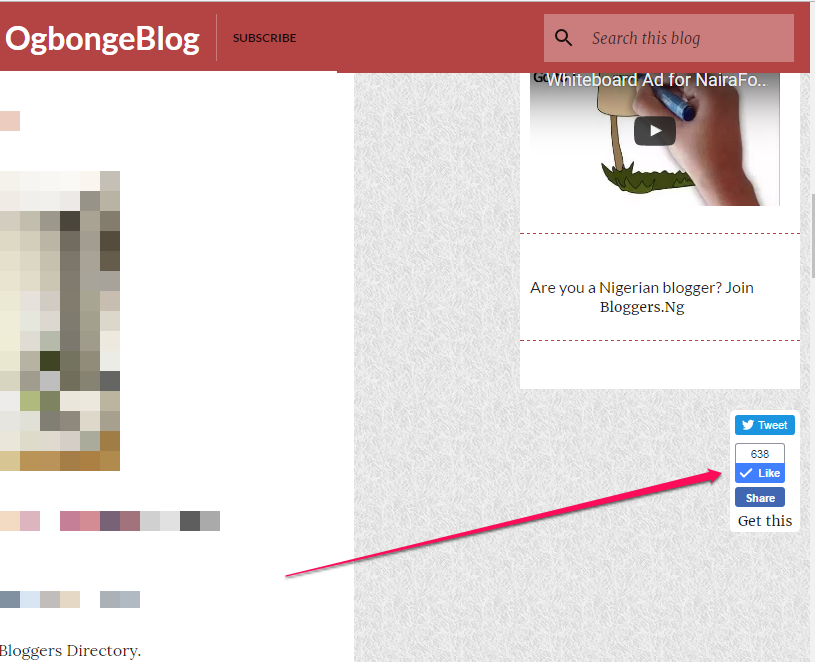
You should now see a floating Facebook like button similar to this screenshot:
floating facebook like button for blogger blog

Kindly note that it will display as floating vertical buttons that will also include a Facebook share button which will allow users to add a personal message and customize who they share the blog post with.

If you would like it to include tweet button and Google plus1 button, kindly read how to add floating share bar to blogspot blogs .

I hope this works for you.

Please Share :
blogger tips facebook social plugins

Like What You Read?

Sign Up to get similar articles delivered to your email inbox.

Leave a Reply Cancel reply

Your email address will not be published. Required fields are marked *

9 responses to “Floating Facebook Like Button For Blogger Blogs”

  1. ejiro agambi Avatar
    ejiro agambi
    April 3, 2017

    Didn't work for me oDisplaying error 400

    Loading…
    Reply
    1. Jide Oguns Avatar
      Jide Oguns
      April 3, 2017

      You must ensure that you've added the Facebook Sdk to your blog as mentioned in the post.

      Loading…
      Reply
  2. Denison Tsekohol Avatar
    Denison Tsekohol
    April 3, 2017

    Did not work on my blog http://www.denisonsblog.blogspot.com

    Loading…
    Reply
    1. Jide Oguns Avatar
      Jide Oguns
      April 3, 2017

      If you've added the Facebook javascript sdk to your blog's html, it will work. Try again…

      Loading…
      Reply
  3. Bloggers Prof Avatar
    Bloggers Prof
    April 4, 2017

    Hello sir ogbonge please I would like you to do a post in how to convert asp.net Cs file to php…
    Please it would be helpful to me please sir help me and do it.
    Thank you.

    Loading…
    Reply
  4. BelieveAll Avatar
    BelieveAll
    April 4, 2017

    Thank you boss is working for me

    Check out my design

    Loading…
    Reply
  5. osman dzu-nuraini Avatar
    osman dzu-nuraini
    April 4, 2017

    man you redesign dis blog ow, shebi you done move from blogger to WordPress

    Loading…
    Reply
    1. Jide Oguns Avatar
      Jide Oguns
      April 5, 2017

      lol. when did I move to WordPress?

      Loading…
      Reply
  6. Desiigner Avatar
    Desiigner
    April 4, 2017

    Honestly; your blog is the number tech blog in africa. Gosh always updated. Facebook floating plugin; mhen applying this now

    Loading…
    Reply

WANT TO ADVERTISE?

Chat on WhatsApp

RELATED POSTS

  • How To Add Facebook LIKE Button To Your Blog(Blogger/Blogspot)
  • How to add Facebook Share & Like buttons, Digg and Tweet Button to the side of blogger/blogspot blogs
  • Add Facebook Send Button plus Like Button to Blogspot Blogs

FEATURED


  • CREDICORP launches C.L.I.C.K.D. Scheme with FG’s 3MTT Programme, expanding affordable consumer credit for locally-assembled laptops and devices for digital workers

    CREDICORP launches C.L.I.C.K.D. Scheme with FG’s 3MTT Programme, expanding affordable consumer credit for locally-assembled laptops and devices for digital workers

  • What Happens to Your Online Accounts When You Die?

    What Happens to Your Online Accounts When You Die?

JOIN AI WEB DESIGN GROUP


  • AI Website Design Training Whatsapp Group by Jidetheblogger

    AI Website Design Training Whatsapp Group by Jidetheblogger

← How To Add Facebook JavaScript SDK To Blogger Themes Without XML Error
Glitz Meets Style as Timekeepers Unveils New Store and Brands →

Join 25,000+ subscribers

Receive our latest blog posts in your inbox.

Search

Social

Facebook

Instagram

Twitter

new ogbongeblog logo

Copyright © 2026 | About | Advertise | Featured | Sitemap | Privacy Policy | Powered by WordPress

Your cart (items: 0)

Products in cart

Product
Details
Total
Subtotal ₦0.00
Shipping and discounts calculated at checkout.
View my cart
Go to checkout

Your cart is currently empty!

Start shopping

Notifications

%d

    LIKE My Fan Page

    Privacy Policy | Copyright © 2012,OgbongeBlog.All Rights Reserved. Powered by Blogger .
    Create a Mobile Site
    View Site in Mobile | Classic
    Share by:


