
Skip to content
new ogbongeblog logo
  • Advertise
  • Blog
  • Contact

Add Facebook Share, Like and Twitter Tweet Button To Blogger Mobile View

October 17, 2015

·

Uncategorized
jidetheblogger Avatar
jidetheblogger

Today, I’m sharing with you, how to add Facebook Share, like buttons as well as Twitter tweet button to the mobile view of Blogger blogs. This will make it easy for your blog readers to easily share and tweet your blog posts while accessing your blog on their mobile phones browsers.

By default, you should notice a SHARE button with a Google+ button on the mobile view of your blog. If not, you should activate it by following the steps below:

==> Sign in to www.blogger.com
==> Click on your blog and go to “Layout”
==> Click on the “edit” link on the “Blog Posts” section

blogger main section

==> Scroll down and tick the “Show share buttons” option as seen in the screenshot below:

facebook share mobile

==> Click “Save”

Once it starts displaying on the mobile view of your blog, if you click on SHARE, a new window should pop up, where you can select where you want to share the post.

To be honest, most of your blog visitors might not know they can also share to Facebook, etc using that default share button. Hence, the need to add a separate Facebook share and Twitter button below it.
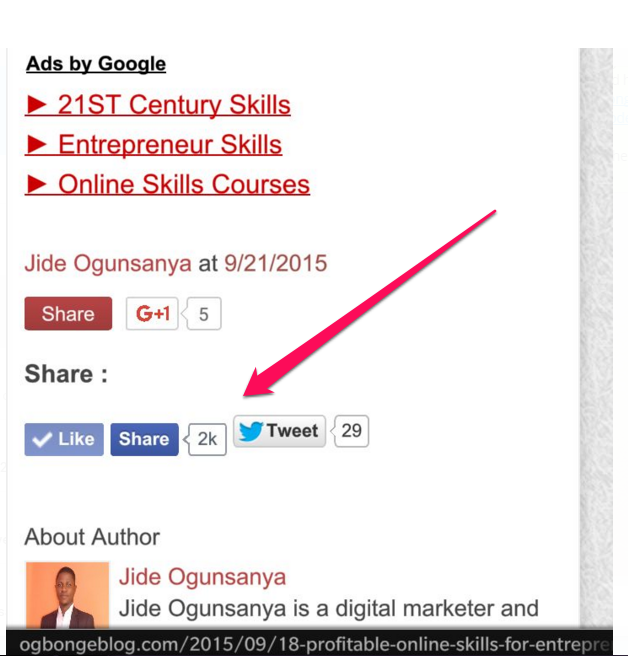
facebook like share blogger mobile

To do that, go to “Template” > “Edit “HTML”

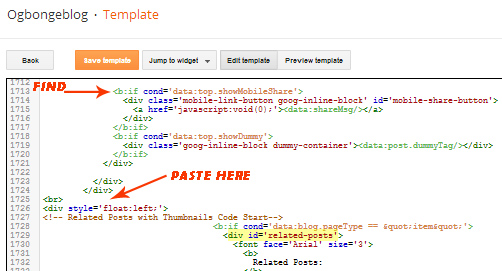
==> Click inside the HTML and use CTRL F to find <b:if cond=’data:top.showMobileShare’>

==> Carefully find the ending </div> as seen in the screenshot below:
relatedposts widget mobile

==> There are three ending </div> as seen in the screenshot above==> Directly below the third one, copy and paste the code below:

<b:if cond=’data:blog.pageType == &quot;item&quot;’>
 <span style=’font-size: 15px;font-weight:bold;’>Share : </span>
<p align=’center’>
<div class=’fb-like’ data-action=’like’ data-layout=’button_count’ data-share=’true’ data-show-faces=’false’/>
<a href=”http://twitter.com/share” class=”twitter-share-button” data-count-value=”horizontal”>Tweet</a>
<script src=’http://platform.twitter.com/widgets.js’ type=”text/javascript”></script>
      </p>
</b:if>

==> Save your template.

Check out the posts on the mobile view of your Blogger blog and you should notice the share and tweet buttons been displayed below the posts.

I hope this works for you.

Check out other tips here on how to customize the mobile view of your blogger blog.

NB : I can fix this for you FREE if you’re one of those that have purchased my blog template. Buy my template here .

Please Share :
blogger mobile template tips blogger tips

Like What You Read?

Sign Up to get similar articles delivered to your email inbox.

Leave a Reply Cancel reply

Your email address will not be published. Required fields are marked *

21 responses to “Add Facebook Share, Like and Twitter Tweet Button To Blogger Mobile View”

  1. Vivian Gist Avatar
    Vivian Gist
    October 17, 2015

    H m m m w h a t a g o o d o n e t h e i love that , Nice Blog and a Good writer , Keep on Blogging Things Like this

    Loading…
    Reply
  2. Anonymous Avatar
    Anonymous
    October 18, 2015

    Pls how can I get ride of this error code on my pc this error usually pop up each time I try to extract zip file on my pc "Error 0x80004005". Pls help me I know that this is off topic

    Loading…
    Reply
    1. Jide Oguns Avatar
      Jide Oguns
      October 23, 2015

      Use Universal Extractor. Download it from filehippo.com

      Loading…
      Reply
  3. Victor Nwankpa Avatar
    Victor Nwankpa
    October 18, 2015

    Nice one. Just done that. http://WWW.VICTORNWANKPA.COM

    Loading…
    Reply
  4. Prosper Utobivbi Avatar
    Prosper Utobivbi
    October 19, 2015

    thanks a lot Jide

    Loading…
    Reply
  5. Idam Ijeoma Avatar
    Idam Ijeoma
    October 22, 2015

    i am reading your step by step guide on how to set up a blog and i must say you nailed it, although i still need a lot of help

    Loading…
    Reply
    1. Jide Oguns Avatar
      Jide Oguns
      October 23, 2015

      what help Ijeoma?

      Loading…
      Reply
  6. June Jacobs Avatar
    June Jacobs
    November 1, 2015

    Thanks a lot.. Really enjoy reading your posts..It's helping me a lot..

    Loading…
    Reply
  7. Paul Damy Avatar
    Paul Damy
    November 21, 2015

    good job.. check http://www.damytechs.blogspot.com

    Loading…
    Reply
  8. AWARENESS TV Avatar
    AWARENESS TV
    November 28, 2015

    Please,how can i enable comment in my blog cus my readers need to be heard

    Loading…
    Reply
  9. david kachikwu Avatar
    david kachikwu
    January 16, 2016

    it not saving

    Loading…
    Reply
  10. The Wacky Duo Avatar
    The Wacky Duo
    May 24, 2016

    Can Get Tweet but no facebook like and share button.Any solution?

    Loading…
    Reply
  11. Ay Danzee Avatar
    Ay Danzee
    July 8, 2016

    it works but only tweet button showing

    Loading…
    Reply
  12. Akinbola Ilyas Avatar
    Akinbola Ilyas
    July 29, 2016

    I've tried all my possible bests to get this thing done, all to no avail. What should I do?

    Loading…
    Reply
  13. Racheal Avatar
    Racheal
    August 22, 2016

    Thanks for this info i will put this to work immediately

    Loading…
    Reply
  14. Katherine Altares Avatar
    Katherine Altares
    September 13, 2016

    Thank you for this post. It helps!

    Loading…
    Reply
  15. ogunlade sodiq Avatar
    ogunlade sodiq
    October 3, 2016

    boss, i only get tweet button, its not showing facebook button.

    Loading…
    Reply
  16. Gucci Mane Avatar
    Gucci Mane
    December 27, 2016

    Thanks Boss; right away. I am adding this to my new blog

    Loading…
    Reply
  17. Bisola Avatar
    Bisola
    March 7, 2017

    Omo ur blog na ogbonge jhor…

    Loading…
    Reply
  18. entin Avatar
    entin
    October 26, 2017

    Tq this is awesome!it works on my blog!

    Loading…
    Reply
  19. deji Avatar
    deji
    March 30, 2019

    Amazing personality, amazing work always. But there’s something I want to acheive on my blog dejiolaluweblog.com namely split in two posts stack on blogger desktop like it is on Linda Ikeji Blog. Off topic, right? It’s however dear to me n I’d love to hear from you on this as soon as possible.

    Secondly, I’ve also not been able to get google ads to work on my blog since I implemented a third domain. Is there a way to get around that too?

    Loading…
    Reply

WANT TO ADVERTISE?

Chat on WhatsApp

RELATED POSTS

  • How to add Facebook Share & Like buttons, Digg and Tweet Button to the side of blogger/blogspot blogs
  • How To Create Mobile Edition of Blogger Blog with BloggerTouch App
  • How To Display Adsense On Mobile Templates of Blogger/Blogspot blogs

FEATURED


  • CREDICORP launches C.L.I.C.K.D. Scheme with FG’s 3MTT Programme, expanding affordable consumer credit for locally-assembled laptops and devices for digital workers

    CREDICORP launches C.L.I.C.K.D. Scheme with FG’s 3MTT Programme, expanding affordable consumer credit for locally-assembled laptops and devices for digital workers

  • What Happens to Your Online Accounts When You Die?

    What Happens to Your Online Accounts When You Die?

JOIN AI WEB DESIGN GROUP


  • AI Website Design Training Whatsapp Group by Jidetheblogger

    AI Website Design Training Whatsapp Group by Jidetheblogger

← Introducing Blogger Interview Series With JideTheBlogger
Existing Google+ Comments Disappears After Changing Your Blog’s URL. Take Note! →

Join 25,000+ subscribers

Receive our latest blog posts in your inbox.

Search

Social

Facebook

Instagram

Twitter

new ogbongeblog logo

Copyright © 2026 | About | Advertise | Featured | Sitemap | Privacy Policy | Powered by WordPress

Your cart (items: 0)

Products in cart

Product
Details
Total
Subtotal ₦0.00
Shipping and discounts calculated at checkout.
View my cart
Go to checkout

Your cart is currently empty!

Start shopping

Notifications

%d

    LIKE My Fan Page

    Privacy Policy | Copyright © 2012,OgbongeBlog.All Rights Reserved. Powered by Blogger .
    Create a Mobile Site
    View Site in Mobile | Classic
    Share by:


