
Skip to content
new ogbongeblog logo
  • Advertise
  • Blog
  • Contact

How to Add Sticky Adsense Page Level Ads To Blogspot Blogs

January 13, 2016

·

Uncategorized
jidetheblogger Avatar
jidetheblogger

If Page-level ads are enabled on your Adsense account, you can start displaying Anchor/overlay and vignette ads on your blog.

Anchor/overlay ads   are mobile ads that stick to the edge of the user’s screen and are easily dismissable.

Vignette ads  are mobile full-screen ads that appear between page loads on your site and can be easily dismissed by your users.

Below is an example of an overlay ad :

overlay adsense ad

Feature of Page-level ads

  • Don’t count towards your 3 ads per page limit
  • Only display on mobile-optimized sites
  • You can use the same ad code on all of your pages
  • Designed by Google with users in mind
  • Optimized to help increase revenue

How To Add Overlay and Vignette Adsense Ads To Blogspot Blog

==> Sign in to your Adsense account
==> Go to ” My Ads” > Page-level ads
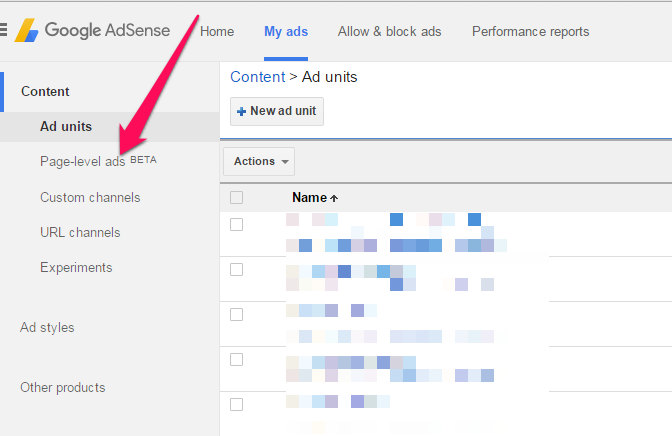
page level ads adsense

==> Enable the ad formats that you’d like to use.==> Click on “Get code”

You can use the code below and replace the publisher ID (bolded) if your template fails to save after adding the code:

<script async=’async’ src=’http://pagead2.googlesyndication.com/pagead/js/adsbygoogle.js’/>
<script>
(adsbygoogle = window.adsbygoogle || []).push({
google_ad_client: “ca-pub- 123456789 “,
enable_page_level_ads: true
});
</script>

==> Sign in to your blogger dashboard
==> Go to “Template” > “Edit HTML”
==> Click inside the html and use CTRL F on your keyboard to find <head>
==> Paste the code directly under the <head>
==> Save the Template.

Because AdSense only shows Page-level ads on your site at optimal times, you’ll need to use the preview tool to check that they’re working correctly. Follow the instructions at the bottom of the “Page-level ads” page to test your ads.

That’s all.

Kindly note that they are only shown by AdSense at optimal times when they’ll perform well and provide a good user experience.

Are these ads types enabled on your AdSense account? If yes, are you making some cool money from the new ad types?

Recommended : How To Check Earnings of Adsense Sticky Ads

Please Share :
adsense

Like What You Read?

Sign Up to get similar articles delivered to your email inbox.

Leave a Reply Cancel reply

Your email address will not be published. Required fields are marked *

35 responses to “How to Add Sticky Adsense Page Level Ads To Blogspot Blogs”

  1. Akpene Jacob Avatar
    Akpene Jacob
    January 13, 2016

    Jide Ogunsanya you're mouthed, I have been seen it on sites like geek.ng n naij but I don't know how to add it, one guy was even saying if someone add it, Google will disable the ad account.

    I will check my AdSense account later to know if the feature is approved on my account.

    Thanks.

    Loading…
    Reply
    1. Jide Oguns Avatar
      Jide Oguns
      January 14, 2016

      The implementation you are seeing on those sites might be different though because there are codes for creating sticky widgets. Anyway, check your Adsense account if this feature has been enabled for you.

      Loading…
      Reply
  2. Victor Kachi Avatar
    Victor Kachi
    January 13, 2016

    Guy, u t00 much…
    I blog @ Entclass.com

    Loading…
    Reply
  3. Ezekiel Odebright Avatar
    Ezekiel Odebright
    January 13, 2016

    Nice one boss

    Loading…
    Reply
  4. Cyracks Zenda Avatar
    Cyracks Zenda
    January 13, 2016

    Nice one bro. I want to add it on my blog too.

    Loading…
    Reply
    1. Jide Oguns Avatar
      Jide Oguns
      January 14, 2016

      Oh K bro. You can , if enabled on your Adsense account.

      Loading…
      Reply
  5. NNAMANI UCHENNA Avatar
    NNAMANI UCHENNA
    January 14, 2016

    Nice1 jide

    Na nairacoded.com dey hail u

    Loading…
    Reply
  6. Yusuff Oluwagbamila Avatar
    Yusuff Oluwagbamila
    January 14, 2016

    The feature is not on my own Adsense account… Or do they also request for such feature #justasking

    Loading…
    Reply
    1. Kanyi Okeke Avatar
      Kanyi Okeke
      January 16, 2016

      It's still in beta mode and not enabled for all accounts.

      Loading…
      Reply
  7. Mr Chuzzy Avatar
    Mr Chuzzy
    January 14, 2016

    Mr Jide, it is not enabled on my adsense yet but is there a way to get hands dirty with xml and css to fix this? i really do covet it.. See http://www.chuzzysblog.com

    Loading…
    Reply
  8. Obinna Onyenali Avatar
    Obinna Onyenali
    January 14, 2016

    Lovely piece…take a look at my inspirational blog, ObinnaOnyenali.com

    Loading…
    Reply
  9. Zubi Avatar
    Zubi
    January 15, 2016

    This a wonderful position. Thanks Jide. I promise to use it on this blog http://androidtvinnigeria.blogspot.com.ng/

    Loading…
    Reply
  10. Valentine kit Avatar
    Valentine kit
    January 16, 2016

    Thanks for sharing.

    From StingerXpress

    Loading…
    Reply
  11. Obinna Onyenali Avatar
    Obinna Onyenali
    January 16, 2016

    Hi Jide, the page-level ads setting is not showing on my blog, ObinnaOnyenali.com. What should I do?

    Loading…
    Reply
  12. Yusuf Elghazeey Avatar
    Yusuf Elghazeey
    January 23, 2016

    I have implemented mine already.

    http://sportsfbl.blogspot.com
    and http://openhealthupdates.blogspot.com

    Loading…
    Reply
  13. Jerry Avatar
    Jerry
    January 25, 2016

    Hi Jide, I have been approved but after implementation, Ads is no more showing on my blog. Please help. http://bluetoothspeakerslink.blogspot.com.ng/

    Loading…
    Reply
  14. WizyTechs Admin Avatar
    WizyTechs Admin
    April 27, 2016

    Weldon Jide. I saw it on my adsense account. Let me implement it asap.
    Commenting from WizyTechs.Com

    Loading…
    Reply
  15. Idowu Babatunde Avatar
    Idowu Babatunde
    April 28, 2016

    Nice update Mr jide
    Got the notification on my adsense account but don't know it's benefit and how to use it. Gonna implement it on my blog ASAP
    Study4free NG

    Loading…
    Reply
  16. Nairaleader Avatar
    Nairaleader
    April 28, 2016

    Thanks for this…

    Loading…
    Reply
  17. One Mic Africa Admin Avatar
    One Mic Africa Admin
    April 28, 2016

    Jide where do I place the code if am on wordpress cos I tried implementing but it did not show up, I don't know if my theme don't support or something, I blog at onemicafrica.com

    Loading…
    Reply
  18. One Mic Africa Admin Avatar
    One Mic Africa Admin
    April 28, 2016

    Jide how do one place this code to be on your mobile theme via wordpress???

    Loading…
    Reply
  19. ozokolo miracle Avatar
    ozokolo miracle
    April 29, 2016

    i have fix it this what google gave script async

    and this the fixed script script async='async'

    thanks bro for your post ….ur boy http://www.mctechng.com

    Loading…
    Reply
  20. Mena Nath Avatar
    Mena Nath
    May 5, 2016

    Hello.. I've done everything I need to do but the ads aren't showing still.. What should I do?

    Loading…
    Reply
  21. Kuch Jano Avatar
    Kuch Jano
    May 16, 2016

    Hi,I activated the Google Page-level ads few days ago but nothing yet, I am sure things are going to turn out soon and i Think not all AdSense account have that feature for now because i have not yet seen the Page-level ad on it.

    Thanks for the info..!

    Loading…
    Reply
  22. Nitin Kumar Avatar
    Nitin Kumar
    June 26, 2016

    Hi,
    I will try this to my website
    thnx

    Loading…
    Reply
  23. peace atake Avatar
    peace atake
    July 3, 2016

    Oga jide just tried it on my blog and tried saving all I got was error message, template could not be saved because blah blah that I need to my code isn't correct and I just lifted it the same way Google AdSense gave it to me…Been trying for weeks but its the same thing!!

    Any help please???

    Loading…
    Reply
  24. Samuel Yinka Avatar
    Samuel Yinka
    August 1, 2016

    Best Among the rest, at last I know how to do this via Ogbenge.

    Loading…
    Reply
  25. Olorunkemi Avatar
    Olorunkemi
    August 12, 2016

    Do we need to parse the code as usual or just a direct code input?

    Secondly, can we implement it on other sites we run, or must be the original blog we got approved adsense on?

    Thirdly, I used directly and my template won't save. I then copied the one in this tutorial while changing the pub ID to mine and it works. How come.. Shey no be Uncle Jide go dey earn my money sha 🙂

    Loading…
    Reply
  26. Fadehan Emmanuel Moore Avatar
    Fadehan Emmanuel Moore
    September 8, 2016

    Hello Jide,

    I followed instruction promptly. But when I clicked Save Template, giving me error parsing xml blah blah.

    But then, I used the code you've got here and it successfully saved.

    Does that means the clicks is generating to your AdSense? I don't understand boss.

    Loading…
    Reply
  27. Capitanul Hook Avatar
    Capitanul Hook
    September 18, 2016

    Thanks!

    Loading…
    Reply
  28. HENRY ANIAGOR Avatar
    HENRY ANIAGOR
    December 17, 2016

    Thank you for this tutorial…You helped me fix it on henryaniagorsblog.com . I have been doing everything on my own using your tutorials

    Loading…
    Reply
  29. Joseph Muyiwa Olusanya Avatar
    Joseph Muyiwa Olusanya
    January 13, 2017

    Hi, Ogbongeblog, I thank you for showing me how to add sticky adsense. But the problem i face now is to page-level ads i put code into the editor. I tried it either at my new blog, http://muyibusiness.blogspot.com but it still does not work even it seems to succeed when i put the code in i learned from blogger. I am tired. What should I do ?

    When i read your blog on Page-level ads now, i am not sure if it works. I will try and see if it works later.

    Thanks.

    Loading…
    Reply
  30. George Melin Avatar
    George Melin
    March 6, 2017

    it worked ,10x bro

    Loading…
    Reply
  31. Emmanuel Mordi Avatar
    Emmanuel Mordi
    June 9, 2017

    Really nice piece, i jist started using adsense on my blog and this post will surely help me alot
    Visit me @ Dhraysblog
    L

    Loading…
    Reply
  32. achadu enenche Avatar
    achadu enenche
    September 13, 2017

    baba jide you three much i blog @ itktechblog.com.ng

    Loading…
    Reply

WANT TO ADVERTISE?

Chat on WhatsApp

RELATED POSTS

  • How To Display Adsense On Mobile Templates of Blogger/Blogspot blogs
  • How To Place Adsense Links Ads below WordPress Posts Titles
  • Adsense Now Allows Placement of 320×250 Ad Banner Above The Fold On Mobile Pages

FEATURED


  • CREDICORP launches C.L.I.C.K.D. Scheme with FG’s 3MTT Programme, expanding affordable consumer credit for locally-assembled laptops and devices for digital workers

    CREDICORP launches C.L.I.C.K.D. Scheme with FG’s 3MTT Programme, expanding affordable consumer credit for locally-assembled laptops and devices for digital workers

  • What Happens to Your Online Accounts When You Die?

    What Happens to Your Online Accounts When You Die?

JOIN AI WEB DESIGN GROUP


  • AI Website Design Training Whatsapp Group by Jidetheblogger

    AI Website Design Training Whatsapp Group by Jidetheblogger

← Bloggers in Nigeria, Drop Your Blog URL If You Need Traffic Back to Back
Blog of The Week : Arsenal Newspaper →

Join 25,000+ subscribers

Receive our latest blog posts in your inbox.

Search

Social

Facebook

Instagram

Twitter

new ogbongeblog logo

Copyright © 2026 | About | Advertise | Featured | Sitemap | Privacy Policy | Powered by WordPress

Your cart (items: 0)

Products in cart

Product
Details
Total
Subtotal ₦0.00
Shipping and discounts calculated at checkout.
View my cart
Go to checkout

Your cart is currently empty!

Start shopping

Notifications

%d

    LIKE My Fan Page

    Privacy Policy | Copyright © 2012,OgbongeBlog.All Rights Reserved. Powered by Blogger .
    Create a Mobile Site
    View Site in Mobile | Classic
    Share by:


