
Skip to content
new ogbongeblog logo
  • Advertise
  • Blog
  • Contact

Unable To Change The Name Servers On Your Whogohost Dashboard? This Should Work

September 20, 2015

·

Uncategorized
jidetheblogger Avatar
jidetheblogger
This is a guest post compiled by Kizito Akhilome for OgbongeBlog

One of the most tiresome duties one faces as a blogger/webmaster is having to deal with a hosting/domain issue.

You know the worst part?                                                                                                          

It could drive you nuts if you are new to the interface or dashboard in question.

I faced an issue some days back and mehn!, I almost went mad.

Lucky for me, I was able to fix this problem before having to visit a psychiatric hospital.

What brought about this problem?

I wanted to change the nameservers of a domain on the dashboard of my Whogohost account, but I was getting a “ no response ” server reply.

Initially I thought it was an error from Whogohost’s end, but little did I know that it was my own error (sort of).

Here’s what went wrong.

Registrar Lock!

I did not know that one cannot tamper with the nameservers of a domain on Whogohost which is under registrar lock, and for the domain in question, registrar lock was enabled.

How I Got It Fixed.

Follow through to know where registrar lock is on your Whogohost dashboard and how to enable (or in this case; disable) it.

First off, Login to Whogohost account and go to your “ My Domains ” tab as seen in the screenshot below.
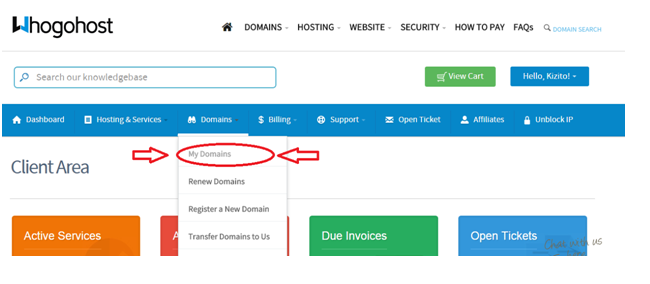
manage domains whogohost

On your domain dashboard, Click on “ manage domain ”.

whogohost nameservers

Once done, your screen should look somewhat like this:

whogohost registrar lock

Locate and click the “ Registrar Lock ” tab as seen above.

So far so good aii?

Ok, let’s disable the registrar lock feature.

As illustrated below, hit the “Disable Registrar Lock” Button.

whogohost registrar lock

Now, go back and change the nameservers to your preferred address.

whogohost nameservers edit

After hitting the “change nameservers” button, you should get the “green light”.

whogohost 2

That was easy enough right?

Ok.

Now do not forget to go back and enable the registrar lock feature – for security purposes.

If this did not solve your problem, you should consider going through Whogohost’s knowledgebase archive. – If I had done that initially, I could have saved myself minutes of worry.

Did this work for you?

This post was written by  Kizito Akhilome.  You can follow him On Twitter @KizitoAkhilome
Please Share :
Guest Posts

Like What You Read?

Sign Up to get similar articles delivered to your email inbox.

Leave a Reply Cancel reply

Your email address will not be published. Required fields are marked *

5 responses to “Unable To Change The Name Servers On Your Whogohost Dashboard? This Should Work”

  1. Abubakar Umar Avatar
    Abubakar Umar
    September 19, 2015

    Please how can I transfer my domain name from godaddy to domainking, and is the transfer free or not

    Loading…
    Reply
    1. Jide Oguns Avatar
      Jide Oguns
      September 19, 2015

      You will have to pay domainking. Not free.

      Loading…
      Reply
  2. Emmanuel Ekanem Avatar
    Emmanuel Ekanem
    September 19, 2015

    Domainking, whogohost and godaddy wish is best and adviceable?

    Loading…
    Reply
  3. Moses Ukanna Avatar
    Moses Ukanna
    October 29, 2016

    It's Godaddy. It has higher domain authority and page authority, this Will automatically boost your search rankings. Whogohost has a domain authority of 1 (over 100) and Domain king has 38 (over 100), Godaddy has a domain authority of 95 (over 100). Well, if you operate a .blogspot blog which will have a domain authority of 98 (all .blogspot blogs have 98 DA because they're initially hosted by blogger), I recommend you either switch to Godaddy or bluehost.

    Loading…
    Reply
    1. Anonymous Avatar
      Anonymous
      June 23, 2017

      Bravo, bozo!

      Loading…
      Reply

WANT TO ADVERTISE?

Chat on WhatsApp

RELATED POSTS

  • wp-login.php Redirects to 404 Page? Try This Trick
  • How To Change Back To Old Blogger Dashboard
  • How To Change Blogger’s Mobile Template

FEATURED


  • CREDICORP launches C.L.I.C.K.D. Scheme with FG’s 3MTT Programme, expanding affordable consumer credit for locally-assembled laptops and devices for digital workers

    CREDICORP launches C.L.I.C.K.D. Scheme with FG’s 3MTT Programme, expanding affordable consumer credit for locally-assembled laptops and devices for digital workers

  • What Happens to Your Online Accounts When You Die?

    What Happens to Your Online Accounts When You Die?

JOIN AI WEB DESIGN GROUP


  • AI Website Design Training Whatsapp Group by Jidetheblogger

    AI Website Design Training Whatsapp Group by Jidetheblogger

← Buy Discounted Sallah Rams Online in Nigeria
Twitter Conversion Tracking/ Remarketing Code Throwing Error on Blogger? Try This →

Join 25,000+ subscribers

Receive our latest blog posts in your inbox.

Search

Social

Facebook

Instagram

Twitter

new ogbongeblog logo

Copyright © 2026 | About | Advertise | Featured | Sitemap | Privacy Policy | Powered by WordPress

Your cart (items: 0)

Products in cart

Product
Details
Total
Subtotal ₦0.00
Shipping and discounts calculated at checkout.
View my cart
Go to checkout

Your cart is currently empty!

Start shopping

Notifications

%d

    LIKE My Fan Page

    Privacy Policy | Copyright © 2012,OgbongeBlog.All Rights Reserved. Powered by Blogger .
    Create a Mobile Site
    View Site in Mobile | Classic
    Share by:


