
Skip to content
new ogbongeblog logo
  • Advertise
  • Blog
  • Contact

How To Add Scrolling Effect to Blogger Link Lists

November 4, 2012

·

Uncategorized
jidetheblogger Avatar
jidetheblogger

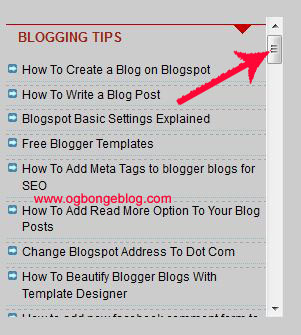
With some few lines of css, you can make a LinkList on your Blogger blog to become scroll-able. This will be helpful in adjusting the height of a LinkList that looks so long on your blog. Below is an example of a scrolling Link List gadget on my blog which am using to display links to some blogging tips on my blog.
ScrollingLinkList

How To Get Started

I expect you to have already added the LinkList to your blog. If not, log in to your Blogger dashboard, go to “ Layout “, click the “ Add gadget ” link and choose “ Link List ” from the list of Blogger gadgets. Add links to the gadget and SAVE .

To add the scrolling effect to the LinkList, we need to get the ID of the LinkList . To get this, go to “ Layout ” and click on the “ edit ” link under the LinkList as seen in the picture below:

Add gadget

You should see a new window similar to the one in the screenshot below:

LinkListBlogger

Click in the address bar of the new window and carefully scroll to the end of the address till you see an ID similar to the one in the screenshot above.

In the screenshot above, the id of my LinkList is LinkList6 . This will be needed in the css code.

==> From your Blogger dashboard, go to “ Template “, ==> “ edit HTML ” ==> “ Proceed “

==> Use CTRL F to find  ]]></b:skin>

==> Immediately above it, paste this css code:

#LinkList6 .widget-content {
height: 150px;
overflow: auto; }

NOTE: If your LinkList is LinkList2, make sure you edit the code above with the id of your LinkList. You can also adjust the “height” as you desire.

==> Click on SAVE TEMPLATE .

View your blog and you should see the scrolling effect, right on your Link List.

I hope this works..

Please, let me know if it works for you. If you face challenges or have contributions to make, kindly relay them via the comments.

Cheers!

Please Share :
blogger tips

Like What You Read?

Sign Up to get similar articles delivered to your email inbox.

Leave a Reply Cancel reply

Your email address will not be published. Required fields are marked *

7 responses to “How To Add Scrolling Effect to Blogger Link Lists”

  1. Simon Avatar
    Simon
    November 4, 2012

    Thanks for this. will try it when I go to the cafe 2mao.

    Loading…
    Reply
  2. Adetony Avatar
    Adetony
    November 4, 2012

    Yess! I can now scrolling linklist on my blog. I have tried it and it works.Thanks for sharing the Ogbonge man called Jide.

    Loading…
    Reply
    1. Jide Oguns Avatar
      Jide Oguns
      November 6, 2012

      Glad it worked for you. Thanks for the feedback. Happy Blogging!

      Loading…
      Reply
  3. charles Avatar
    charles
    November 9, 2012

    Please, i will like you to take a close look at http://www.naijainformation.com and tell me what you like and dislike about the blog.

    God bless you as you take your time to help me with this.

    Cheers.

    Loading…
    Reply
    1. Jide Oguns Avatar
      Jide Oguns
      November 11, 2012

      This is off topic bro. You can contact me via email and I will get back to you

      Loading…
      Reply
  4. Olaegbe Joe Avatar
    Olaegbe Joe
    November 12, 2012

    i go try am shap shap

    Loading…
    Reply
  5. ARUN Avatar
    ARUN
    August 21, 2018

    HI HOW MAKE STYLISH SKIN FOR SIDE BAR MENUS IN BLOGGER

    Loading…
    Reply

WANT TO ADVERTISE?

Chat on WhatsApp

RELATED POSTS

  • New Google Translate gadget allows blog visitors translate your blog into different languages
  • How To Add Follow by Email Gadget to Blogger/Blogspot Blogs
  • How I inserted Google Adsense Link List ads at the end of my blog posts

FEATURED


  • CREDICORP launches C.L.I.C.K.D. Scheme with FG’s 3MTT Programme, expanding affordable consumer credit for locally-assembled laptops and devices for digital workers

    CREDICORP launches C.L.I.C.K.D. Scheme with FG’s 3MTT Programme, expanding affordable consumer credit for locally-assembled laptops and devices for digital workers

  • What Happens to Your Online Accounts When You Die?

    What Happens to Your Online Accounts When You Die?

JOIN AI WEB DESIGN GROUP


  • AI Website Design Training Whatsapp Group by Jidetheblogger

    AI Website Design Training Whatsapp Group by Jidetheblogger

← How To Use NameCheap FREE DNS To Set Up Blogger Custom Domain With Registrars That Do Not Offer DNS Management
How To Write Blog Posts Using Nokia Phones OviMail App →

Join 25,000+ subscribers

Receive our latest blog posts in your inbox.

Search

Social

Facebook

Instagram

Twitter

new ogbongeblog logo

Copyright © 2026 | About | Advertise | Featured | Sitemap | Privacy Policy | Powered by WordPress

Your cart (items: 0)

Products in cart

Product
Details
Total
Subtotal ₦0.00
Shipping and discounts calculated at checkout.
View my cart
Go to checkout

Your cart is currently empty!

Start shopping

Notifications

%d

    LIKE My Fan Page

    Privacy Policy | Copyright © 2012,OgbongeBlog.All Rights Reserved. Powered by Blogger .
    Create a Mobile Site
    View Site in Mobile | Classic
    Share by:


