
Skip to content
new ogbongeblog logo
  • Advertise
  • Blog
  • Contact

How To Centralize Title and Description of Blogger Blog ( +Video tutorial)

April 9, 2012

·

Uncategorized
jidetheblogger Avatar
jidetheblogger

If you are not yet using an header banner for your Blogger blog, you can still make the title and description of your blog to appear in the middle of your header by adding some piece of code to your blog html. In this tutorial, a Video tutorial is also included to show you how to get it done.

How To Get Started

==> If you are still using the old Blogger dashboard, you can log in to your blogger dashboard and switch to the new blogger dashboard so you can easily follow this tutorial.

Log in to your Blogger dashboard

Click on “ Template ” (on the right hand side menu). You will see something similar to the picture below:

Template1

Click on the “ Customize ” button. This will open up the “ Template Designer “

On the left menu, you will see “ Advanced “, Click on it.

A new menu will appear by the right. Scroll down till you see” Add CSS “. Click on it.

A box will appear by the right hand side. Copy and paste the code below in it

.Header h1, .Header .description{
text-align:center;
}

Click “ Apply to Blog ” by the top right hand corner.

If you view your blog, the title and description should now be at the center of your blog header as seen in the picture below:
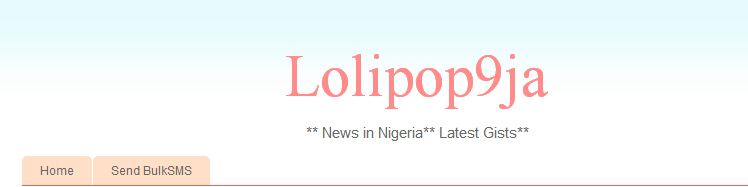
Blog title center

That’s all.

NOTE:  If you downloaded a third party template that is not  compatible with template designer ,
==> go to Template > Edit HTML > Proceed
==> use CTRL F to find  ]]></b:skin>
==> right above it, paste the alignment code in the post above.
==> Save the template and view your blog.

Below is a video tutorial that explains how to centralize your Blogger Title and Description:

I hope this helps…..

Cheers

Please Share :
blogger tips

Like What You Read?

Sign Up to get similar articles delivered to your email inbox.

Leave a Reply Cancel reply

Your email address will not be published. Required fields are marked *

23 responses to “How To Centralize Title and Description of Blogger Blog ( +Video tutorial)”

  1. Benedict Avatar
    Benedict
    April 9, 2012

    Thanks so much for this. The Short video tutorial is really helpful. I hope you share more of this videos bro.

    Loading…
    Reply
    1. Jide Oguns Avatar
      Jide Oguns
      April 15, 2012

      Glad it helped. Yes, I hope to do more of video tutorials. Thanks for the comment.

      Loading…
      Reply
  2. Anonymous Avatar
    Anonymous
    April 12, 2012

    @jide,does google adsense disables account if using stumble upon.do they frawn on using stumble.pls reply

    Loading…
    Reply
    1. Jide Oguns Avatar
      Jide Oguns
      April 15, 2012

      I have not read such in the Adsense TOS.

      Loading…
      Reply
  3. Kingsley Avatar
    Kingsley
    September 26, 2012

    It did not work for me.. am using the awesome inc template

    Loading…
    Reply
  4. PejuLord Avatar
    PejuLord
    June 25, 2014

    God bless you Jide for this, it took me months before I could get this, until I search google and click on your website that explains better. How can I make adverts center alignment too, please? You're such a genius and a God sent!

    Loading…
    Reply
  5. Certified Lazy Man Avatar
    Certified Lazy Man
    September 20, 2014

    Just tried this and it worked beautifully. Thanks, man!

    Loading…
    Reply
  6. FALI CALEB Avatar
    FALI CALEB
    October 9, 2014

    Tanx..it worked

    Loading…
    Reply
  7. Adepeju Oluwatosin Avatar
    Adepeju Oluwatosin
    October 19, 2014

    So greatful, it works for me.
    visit my blog http://www.pejuliciouz.blogspot.com

    Loading…
    Reply
  8. Climb Online Avatar
    Climb Online
    January 12, 2015

    Easy blogger tweak, thanks

    Loading…
    Reply
  9. Aline Avatar
    Aline
    April 26, 2015

    Thank you for this, it worked perfectly!

    Loading…
    Reply
  10. Tuham Sanusi Avatar
    Tuham Sanusi
    May 18, 2015

    Thanks bro. It works, this the first time of touching the CSS part on my template, Kudos #ogbonge master 😉

    Loading…
    Reply
  11. victor eke Avatar
    victor eke
    July 4, 2015

    Thanks bro. It really worked.

    Loading…
    Reply
  12. Major, Gen. victor eke Avatar
    Major, Gen. victor eke
    September 25, 2015

    Thanks it worked. But can i add more than one css code. And how???

    Victoreke.blogspot.com

    Loading…
    Reply
  13. ikoh Stanley Avatar
    ikoh Stanley
    March 21, 2016

    Nice work, ,it works well

    Loading…
    Reply
  14. ADUBI MOBOLAJI Avatar
    ADUBI MOBOLAJI
    April 22, 2016

    wow it really works for me visit my blog http://www.adubyte.blogspot.com

    Loading…
    Reply
  15. Agbontan Precious Avatar
    Agbontan Precious
    May 3, 2016

    Tahnks it woeksworks

    Loading…
    Reply
  16. I_amState Avatar
    I_amState
    June 16, 2016

    tanks man

    Loading…
    Reply
  17. NaijaLatest.com Avatar
    NaijaLatest.com
    September 16, 2016

    Thank man. It helps.

    Loading…
    Reply
  18. emmanuel halem Avatar
    emmanuel halem
    September 30, 2016

    thanks it worked for me, my blog is toptechhub.blogspot.com

    Loading…
    Reply
  19. Beauty And Fashion Blogger Avatar
    Beauty And Fashion Blogger
    October 26, 2016

    It helped, Thank you so much 🙂

    Loading…
    Reply
  20. Joel williams Blog Avatar
    Joel williams Blog
    December 15, 2016

    yaaaaaaay it worked for me,youpy!!!

    Loading…
    Reply
  21. Amoslisky Avatar
    Amoslisky
    July 13, 2017

    Wow! This is awesome. It works. Thanks.

    Loading…
    Reply

WANT TO ADVERTISE?

Chat on WhatsApp

RELATED POSTS

  • How To Add Logo to Blogger Blog
  • How To Add Tabs to Blogger Blogs Header Section
  • How To Hide Blog Description on Blogger Blogs

FEATURED


  • CREDICORP launches C.L.I.C.K.D. Scheme with FG’s 3MTT Programme, expanding affordable consumer credit for locally-assembled laptops and devices for digital workers

    CREDICORP launches C.L.I.C.K.D. Scheme with FG’s 3MTT Programme, expanding affordable consumer credit for locally-assembled laptops and devices for digital workers

  • What Happens to Your Online Accounts When You Die?

    What Happens to Your Online Accounts When You Die?

JOIN AI WEB DESIGN GROUP


  • AI Website Design Training Whatsapp Group by Jidetheblogger

    AI Website Design Training Whatsapp Group by Jidetheblogger

← Google+Badge and +1 Button Now Available As Blogger Gadgets
6 Untold Google Adsense Secrets You Must Know →

Join 25,000+ subscribers

Receive our latest blog posts in your inbox.

Search

Social

Facebook

Instagram

Twitter

new ogbongeblog logo

Copyright © 2026 | About | Advertise | Featured | Sitemap | Privacy Policy | Powered by WordPress

Your cart (items: 0)

Products in cart

Product
Details
Total
Subtotal ₦0.00
Shipping and discounts calculated at checkout.
View my cart
Go to checkout

Your cart is currently empty!

Start shopping

Notifications

%d

    LIKE My Fan Page

    Privacy Policy | Copyright © 2012,OgbongeBlog.All Rights Reserved. Powered by Blogger .
    Create a Mobile Site
    View Site in Mobile | Classic
    Share by:


