
Skip to content
new ogbongeblog logo
  • Advertise
  • Blog
  • Contact

How to know if a Blogger template is compatible with Template Designer

October 23, 2011

·

Uncategorized
jidetheblogger Avatar
jidetheblogger

Blogger’s Template Designer , accessible via the “Design/Layout” tab when you log in to your Blogger’s dashboard,  provide a far wider range of basic designs and far more options for choosing the number of columns, column width, background images, footer structure, colour scheme, etc.

I used the “ Template Designer ” to modify one of the Blogger’s Default Template to the current design of my blog, “OgbongeBlog.com”.

If you download a Blogger template and it is compatible with Blogger’s Template Designer, you will be able to modify the template easily. You will be able to change the colour scheme, the general structure of the template etc In short, it makes it so easy for you to make your blog design look so unique.

If  you download a Blogger template that is not compatible with Blogger’s Template Designer, you will not be able to modify the template with Blogger’s Template Designer. You will have to know some basic html/css skills for you to be able to modify such template via “ edit html “.

To know if your template is compatible with Template Designer, Login to your Blogger dashboard, go to Design/Layout  and choose “ Template Designer “.

Click the Background and Layout tabs (down the left hand side)

If you see a message  like “ Not applicale for this template “, this means your current template is not compatible with Template Designer but if you see options to change the image, colour scheme and column structure, then your template is a Designer template i.e it is compatible with Template Designer.
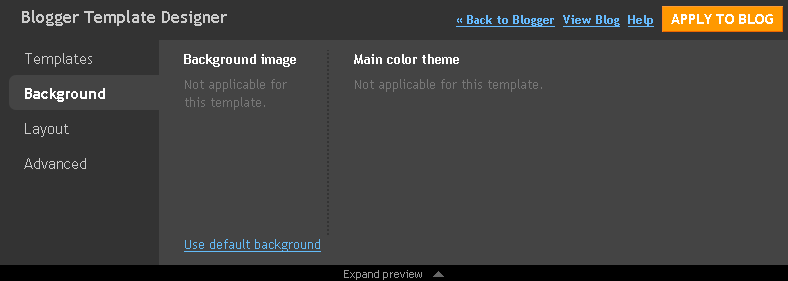

Designer template screen Layout template
Read: How to make your blog look beautiful with Template Designer for more info on the Blogger’s Template designer.
Sometimes soon, I hope to share with you some “Designer Templates”. Just subscribe to my blog for you not to miss them.
Cheers!
Please Share :
blogger tips

Like What You Read?

Sign Up to get similar articles delivered to your email inbox.

Leave a Reply Cancel reply

Your email address will not be published. Required fields are marked *

WANT TO ADVERTISE?

Chat on WhatsApp

RELATED POSTS

  • How To Change Blogger’s Mobile Template
  • How I created Navigation Bar with tabs linking to Labels, External Links, Pages and Post Pages
  • How to remove Navigation Bar of Blogspot Blogs : Latest trick

FEATURED


  • CREDICORP launches C.L.I.C.K.D. Scheme with FG’s 3MTT Programme, expanding affordable consumer credit for locally-assembled laptops and devices for digital workers

    CREDICORP launches C.L.I.C.K.D. Scheme with FG’s 3MTT Programme, expanding affordable consumer credit for locally-assembled laptops and devices for digital workers

  • What Happens to Your Online Accounts When You Die?

    What Happens to Your Online Accounts When You Die?

JOIN AI WEB DESIGN GROUP


  • AI Website Design Training Whatsapp Group by Jidetheblogger

    AI Website Design Training Whatsapp Group by Jidetheblogger

← Facebook Profile ID : How to get it
How to add Google Plus Widget to Blogger/Blogspot Blogs →

Join 25,000+ subscribers

Receive our latest blog posts in your inbox.

Search

Social

Facebook

Instagram

Twitter

new ogbongeblog logo

Copyright © 2026 | About | Advertise | Featured | Sitemap | Privacy Policy | Powered by WordPress

Your cart (items: 0)

Products in cart

Product
Details
Total
Subtotal ₦0.00
Shipping and discounts calculated at checkout.
View my cart
Go to checkout

Your cart is currently empty!

Start shopping

Notifications

LIKE My Fan Page

Privacy Policy | Copyright © 2012,OgbongeBlog.All Rights Reserved. Powered by Blogger .
Create a Mobile Site
View Site in Mobile | Classic
Share by:

