
Skip to content
new ogbongeblog logo
  • Advertise
  • Blog
  • Contact

How to Send Updates to Fans of your Facebook Fan Page

May 28, 2011

·

Uncategorized
jidetheblogger Avatar
jidetheblogger

UPDATE : The New Facebook Timeline for Pages no longer support sending updates to Fans.

If you an admin of a Facebook Fan Page, you can easily send updates to your fans. These updates are delivered to the inbox of your fans. In this short tutorial, I am sharing with you how I send updates to fans of my facebook fan pages.

STEPS

1 . Login to Facebook.com  and go to your Facebook Fan Page.  Read: https://www.ogbongeblog.com/2011/05/how-to-view-list-of-facebook-pages-you_8772.html for info on how to view list of Facebook Pages you have liked. You will get a clue on how to view Facebook Pages that you admin from the info.

2 . Once you are on your Facebook Page, you will see “ EDIT PAGE ” by the top, right-hand corner of your facebook page. Click on it.

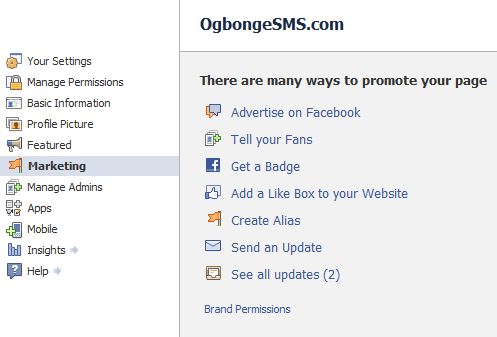
3 . Thereafter, you should see a page showing different settings you can edit. Click on “ Marketing “. Then, you should see a page that looks like the picture below:
FbPageUpdates

4 . Click on “ Send an Update ” . Then, you will see a page where you can compose your message. Enter a subject for your message, enter your message in the “ message ” field and click Send .

That’s all.

I hope this helps…. Kindly use the Share/ Like buttons to share this tip with your friends.

If you do not know how to create a Facebook Fan Page, read; https://www.ogbongeblog.com/2011/04/how-to-create-facebook-fan-page.html

In my future posts, I will share with you how to customize the landing page of your facebook fan page just like have done to my page: www.facebook.com/jideogunsanya

Hence, if you do not want to miss this, SUBSCRIBE to this blog, so that you can receive the infos DIRECTLY into your email inbox, even when you are not online.

CLICK HERE TO SUBSCRIBE NOW!
Connect with me on Facebook now via : www.facebook.com/jideogunsanya

Cheers!

Please Share :
facebook facebook page tips

Like What You Read?

Sign Up to get similar articles delivered to your email inbox.

Leave a Reply Cancel reply

Your email address will not be published. Required fields are marked *

2 responses to “How to Send Updates to Fans of your Facebook Fan Page”

  1. Esther Avatar
    Esther
    May 28, 2011

    I have been wondering how i can do this for a long time now. I just don't know why facebook have to hide the SEND UPDATE link like this. Anyway, thanks for this priceless info. God Bless You

    Loading…
    Reply
  2. Anonymous Avatar
    Anonymous
    June 6, 2011

    my peeps i do hope ur day was kul. Hav a luvly evenin. Lol.

    Loading…
    Reply

WANT TO ADVERTISE?

Chat on WhatsApp

RELATED POSTS

  • How to create a facebook fan page
  • Let Me Add You Fan Page as FAVORITES to my Two Facebook Fan Pages PERMANENTLY
  • How To Add Facebook Like Box to Blogger/blogspot Blog Using html5

FEATURED


  • CREDICORP launches C.L.I.C.K.D. Scheme with FG’s 3MTT Programme, expanding affordable consumer credit for locally-assembled laptops and devices for digital workers

    CREDICORP launches C.L.I.C.K.D. Scheme with FG’s 3MTT Programme, expanding affordable consumer credit for locally-assembled laptops and devices for digital workers

  • What Happens to Your Online Accounts When You Die?

    What Happens to Your Online Accounts When You Die?

JOIN AI WEB DESIGN GROUP


  • AI Website Design Training Whatsapp Group by Jidetheblogger

    AI Website Design Training Whatsapp Group by Jidetheblogger

← How to add Floating Share Bar to right side of blogger blogs
How to test if your ISP is IPv6 compatible →

Join 25,000+ subscribers

Receive our latest blog posts in your inbox.

Search

Social

Facebook

Instagram

Twitter

new ogbongeblog logo

Copyright © 2026 | About | Advertise | Featured | Sitemap | Privacy Policy | Powered by WordPress

Your cart (items: 0)

Products in cart

Product
Details
Total
Subtotal ₦0.00
Shipping and discounts calculated at checkout.
View my cart
Go to checkout

Your cart is currently empty!

Start shopping

Notifications

%d

    LIKE My Fan Page

    Privacy Policy | Copyright © 2012,OgbongeBlog.All Rights Reserved. Powered by Blogger .
    Create a Mobile Site
    View Site in Mobile | Classic
    Share by:


