
Skip to content
new ogbongeblog logo
  • Advertise
  • Blog
  • Contact

How to add Floating Share Bar to right side of blogger blogs

  1. Home
  2. Blog
  3. Uncategorized
  4. How to add Floating Share Bar to right side of blogger blogs
May 28, 2011

Written by

jidetheblogger Avatar
jidetheblogger

Last Modified :

October 8, 2017

In this post, I am sharing with you how I moved the floating share bar on my blog from the left-hand side to the right-hand side of my blog.

If you followed the tutorial at: https://www.ogbongeblog.com/2011/04/how-to-add-facebook-share-like-buttons.html , where I explained how to add the floating share bar to blogger blogs, you will realize that the share bar appears to the left side of your blog after following the steps in the tutorial.

Neeraj of ExpertsGalaxy alerted me that the Share Bar always block/cover up part of my blog posts when he views my blog on his computer ( not on all computers) and I confirmed this when I checked my blog at some cyber cafes. As a result of this, I decided to shift it to the right as you can see in the picture below:
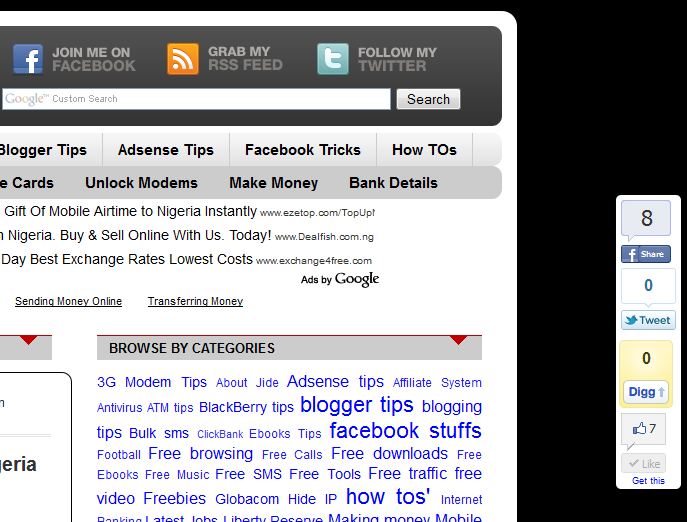
BarRight

So, if you followed my tutorial above and now want to move it to the right, just look for the code below and change the “left” highlighted in red to”right”.

#pageshare {position:fixed; bottom:15%; left: 10px ; float:left; border-radius:5px;

That’s all.

I hope this helps….

Feel Free to Connect with fellow bloggers at BloggersLab via: http://www.facebook.com/home.php?sk=group_182826698400933

P4P9PVP5UCKW

Please Share :
blogger tips

Like What You Read?

Sign Up to get similar articles delivered to your email inbox.

Leave a Reply Cancel reply

Your email address will not be published. Required fields are marked *

3 responses to “How to add Floating Share Bar to right side of blogger blogs”

  1. Anonymous Avatar
    Anonymous
    May 28, 2011

    Thanks for this… I also prefer having the floating share bar by the right side. Will effect the change on my blog too. thanks

    Loading…
    Reply
  2. Tips For A Good Christian Living Avatar
    Tips For A Good Christian Living
    May 28, 2011

    Thanks man, it is better at that rigt side of my blog. My articles are seen clearly and I think visitor can find it easier to use there… I have changed it, want to check it out http://www.christian-tips.blogspot.com . Share it if you cares

    Loading…
    Reply
  3. Akuneme Christopher Avatar
    Akuneme Christopher
    September 26, 2012

    Infact,i just don't know what to say. This blog is truly loaded

    Loading…
    Reply

WANT TO ADVERTISE?

Chat on WhatsApp

RELATED POSTS

  • Floating Sharing Bar for Blogger Blogsshare_bar
  • How to add Facebook Share & Like buttons, Digg and Tweet Button to the side of blogger/blogspot blogs
  • Floating Facebook Like Button For Blogger Blogs

FEATURED


  • How to Pay Chinese Suppliers in RMB (Alipay & WeChat Pay) or Swap Naira, Kenyan Shillings, Ghana Cedis & USDT in Minutes

    How to Pay Chinese Suppliers in RMB (Alipay & WeChat Pay) or Swap Naira, Kenyan Shillings, Ghana Cedis & USDT in Minutes

JOIN AI WEB DESIGN GROUP


  • AI Website Design Training Whatsapp Group by Jidetheblogger

    AI Website Design Training Whatsapp Group by Jidetheblogger

RANDOM POSTS


    I Got One Free Month of Meta Verified After I Tried to Cancel My Subscription


    How To Make Money On Bamboo App: 5 Proven Ways


    How To Use Vibe Coding To Make Money


    How I Earn $100 Per Referral from Affiliate Marketing


    Bluetooth Printer That Connects To Phone


    Can I Use OPay Card for Facebook Ads?


    Why I Moved My Websites From Namecheap To Interserver.net


    How I Earn $50 Per Sale


MORE RANDOM POSTS
← Change Blogspot Address To Dot Com
How to Send Updates to Fans of your Facebook Fan Page →

Join 25,000+ subscribers

Receive our latest blog posts in your inbox.

Search

Social

Facebook

Instagram

Twitter

new ogbongeblog logo

Copyright © 2026 | About | Advertise | Featured | Sitemap | Privacy Policy | Powered by WordPress

Your cart (items: 0)

Products in cart

Product
Details
Total
Subtotal ₦0.00
Shipping and discounts calculated at checkout.
View cart
Go to checkout

Your shopping cart is empty

Return to shop

Notifications

%d

    LIKE My Fan Page

    Privacy Policy | Copyright © 2012,OgbongeBlog.All Rights Reserved. Powered by Blogger .
    Create a Mobile Site
    View Site in Mobile | Classic
    Share by: