
Skip to content
new ogbongeblog logo
  • Advertise
  • Blog
  • Contact

How I Use Feedburner To Auto Post From My Blog To Twitter

January 29, 2017

·

Uncategorized
jidetheblogger Avatar
jidetheblogger

I auto post from this Blogger blog to Twitter account of the blog by making use of Feedburner Socialize feature. The service makes it easy to distribute your content to interested subscribers or followers on social networks using any FeedBurner feed you already have. At this time, the Socialize service only supports Twitter.

So, whenever I publish a new post on the blog, the title and a link back to the post automatically gets tweeted on Twitter. This feature utilizes Google URL shortening service to create short versions of my feed links, e.g. http://goo.gl/xyzxyz. And this makes it easy for me to track the clicks via goo.gl

I set it to generate hashtags from labels added to my posts and those hashtags are automatically added to the tweets. There is also an option to add additional text (which can also be an hashtag) at the beginning or end of the post. Inline hash tags are supported too.

hashtagsonogbongeblogtwitter

If you want to use the service, sign in to feedburner.com and burn a feed for your blog.

If you have an existing feed there for your blog, click on it and click on the “ Publicize ” tab

auto post to twitter from blogger blog

Click “ Socialize ” and add your Twitter account. Once added, set the formatting options as desired and click “ Activate “.
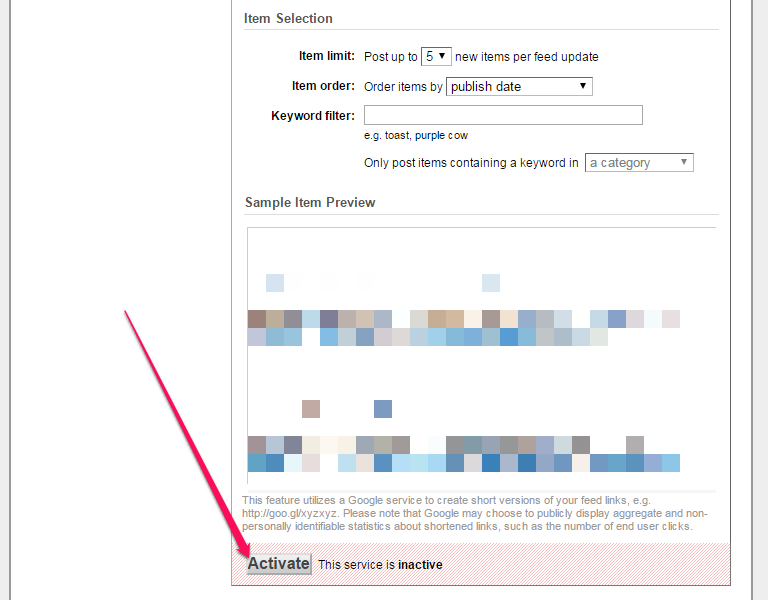
activate feedburner socialize service for content marketing

Thereafter, if you publish a post on your blog, it should appear on the connected Twitter account.

That’s all.

I hope this helps.

Recommended:

==>   How To Download Feedburner Email List
==>   How To Set FeedBurner To Display POST Titles To Email Subscribers Instead of Blog Title

Please Share :
blogger tips feedburner wordpress

Like What You Read?

Sign Up to get similar articles delivered to your email inbox.

Leave a Reply Cancel reply

Your email address will not be published. Required fields are marked *

19 responses to “How I Use Feedburner To Auto Post From My Blog To Twitter”

  1. Joseph Omale Avatar
    Joseph Omale
    January 29, 2017

    Yes, it helps. Bro I sent you a mail last night but you haven't responded.

    Loading…
    Reply
    1. Jide Oguns Avatar
      Jide Oguns
      January 30, 2017

      I responded to the mail same day you sent it. This kind of comment of off topic though. take note…

      Loading…
      Reply
  2. Prince John Okosun Avatar
    Prince John Okosun
    January 29, 2017

    Very nice post Oga Jide. I actually compiled a post on this and intended to post it to you as a guest post.

    I blog @ http://www.obhiabablog.com.ng

    Loading…
    Reply
    1. Jide Oguns Avatar
      Jide Oguns
      January 30, 2017

      You will have to come up with a new post, preferable list post. Thanks.

      Loading…
      Reply
    2. Prince John Okosun Avatar
      Prince John Okosun
      January 30, 2017

      i will do just that. I am working on a new guest post and will send it to you immediately am done.

      Thanks for your great work sir..

      Loading…
      Reply
  3. BelieveAll Avatar
    BelieveAll
    January 29, 2017

    Thanks Jide for this great post, its very helpful

    Loading…
    Reply
  4. Victor Kachi Avatar
    Victor Kachi
    January 29, 2017

    Thanks Jide. Though i have done this 2 years ago when i newly discovered it. I've been using it years ago on my blog Entclass.com

    Loading…
    Reply
  5. Obileye Avatar
    Obileye
    January 31, 2017

    Thanks i have tried that.

    Loading…
    Reply
  6. Chivalry Benson Avatar
    Chivalry Benson
    January 31, 2017

    Thanks Jide for this great post, but i'm currently making use of dlvr in my blog Howtosguide.com

    Loading…
    Reply
  7. Skycodedng Avatar
    Skycodedng
    February 1, 2017

    nice one

    Loading…
    Reply
  8. Writology Avatar
    Writology
    February 1, 2017

    I also use FeedBurner on WordPress and I have reasons for it. First, it helps follow some analytical data. Second, it allows email subscription. Third, change of domain is without the change of a feed. Fourth, there are no plugins for social posting. Finally, there is the possibility of HTML output for the latest messages.

    Loading…
    Reply
  9. ikecy Avatar
    ikecy
    February 2, 2017

    jide thanks for the post, it really helps.

    Loading…
    Reply
  10. Anonymous Avatar
    Anonymous
    February 2, 2017

    nice job Bro…learnt something as usual.

    http://www.ngojobsinafrica.com

    Loading…
    Reply
  11. Ekesplanet Avatar
    Ekesplanet
    April 18, 2017

    9ice article broda but please what about how to post to Facebook and G+

    Loading…
    Reply
  12. Ice king Kefas Avatar
    Ice king Kefas
    July 1, 2017

    I must say, nice and remarkable…

    http://www.yoloaded.com

    Loading…
    Reply
  13. Helen Muna Avatar
    Helen Muna
    July 28, 2017

    Nice is it still working

    Loading…
    Reply
  14. Richard B. Haynes Avatar
    Richard B. Haynes
    August 3, 2017

    Awesome post

    Loading…
    Reply
  15. Inyene Awak Avatar
    Inyene Awak
    August 27, 2017

    waooh that so much for this great post

    Loading…
    Reply
  16. Skycoded Avatar
    Skycoded
    September 18, 2017

    Nice one

    Loading…
    Reply

WANT TO ADVERTISE?

Chat on WhatsApp

RELATED POSTS

  • How To Add Read More To Feedburner Blog Posts Feed
  • How To Add Feedburner Email Subscription Form BELOW Blog Posts of Blogger/Blogspot Blogs
  • How To Set FeedBurner To Display POST Titles To Email Subscribers Instead of Blog Title

FEATURED


  • CREDICORP launches C.L.I.C.K.D. Scheme with FG’s 3MTT Programme, expanding affordable consumer credit for locally-assembled laptops and devices for digital workers

    CREDICORP launches C.L.I.C.K.D. Scheme with FG’s 3MTT Programme, expanding affordable consumer credit for locally-assembled laptops and devices for digital workers

  • What Happens to Your Online Accounts When You Die?

    What Happens to Your Online Accounts When You Die?

JOIN AI WEB DESIGN GROUP


  • AI Website Design Training Whatsapp Group by Jidetheblogger

    AI Website Design Training Whatsapp Group by Jidetheblogger

← Add “Save As PDF” Option To Microsoft Office 2007 With This Add-In
Konga.com Empowers Franchisees and Merchants in Nigeria →

Join 25,000+ subscribers

Receive our latest blog posts in your inbox.

Search

Social

Facebook

Instagram

Twitter

new ogbongeblog logo

Copyright © 2026 | About | Advertise | Featured | Sitemap | Privacy Policy | Powered by WordPress

Your cart (items: 0)

Products in cart

Product
Details
Total
Subtotal ₦0.00
Shipping and discounts calculated at checkout.
View my cart
Go to checkout

Your cart is currently empty!

Start shopping

Notifications

%d

    LIKE My Fan Page

    Privacy Policy | Copyright © 2012,OgbongeBlog.All Rights Reserved. Powered by Blogger .
    Create a Mobile Site
    View Site in Mobile | Classic
    Share by:


