
Skip to content
new ogbongeblog logo
  • Advertise
  • Blog
  • Contact

How To Write a Blog Post (Complete Guide including Pictures)

  1. Home
  2. Blog
  3. how to
  4. How To Write a Blog Post (Complete Guide including Pictures)
January 6, 2012

Written by

jidetheblogger Avatar
jidetheblogger

Last Modified :

January 20, 2025

If you want to start a blog and make money, you will have to create a blog and monetize the blog . After creating your blog, you will have to be writing articles on the blog in other to always keep it updated. The more you write in blog, the more it grows bigger.  In this article, I am sharing with you, how you can be writing blog posts on Blogspot blogs.

Let’s get started.

Log in to your blog at www.blogger.com or www.blogspot.com

Click on the “ New Post ” tab or the pen tab seen in the picture below

NewPost Blogspot

Clicking the “ New Post ” tab will open the “ Post Editor “.

Enter the title of your post ( this is what your post will be about) and enter the content of your post as seen in the picture below

PostEditor2

To enter links in your post , hi-light the text you want to use as a link, click “ LINK ”  as shown in the picture below and enter the url you wish to link the text to.  If you click the “ open this in a new window ” box, the link will open in another window when anyone clicks on it when reading your article.

PostEditorLinking

You can change the font size , font style , font colour and also underline your text , make your text bold or in italics by using the icons available on the top middle of your post editor.   Move your mouse on each icon to see what each icon can do for you .
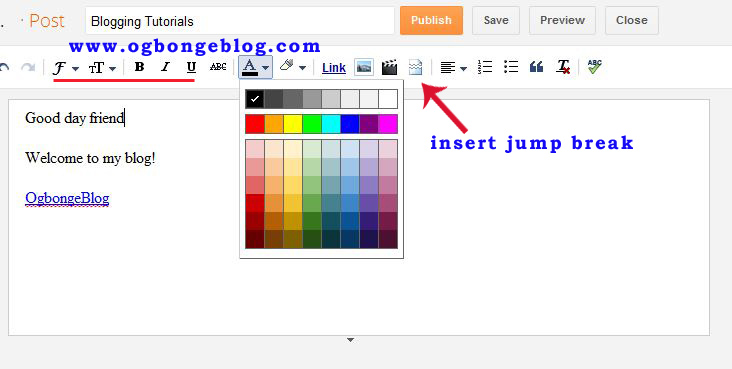
The “ insert jump break ” icon allows you to add jump breaks to any part of your post. I have explained this in the “ How to Add READ MORE option to blogspot post s” tutorial.

To add image , click on the image icon as seen in the picture below:
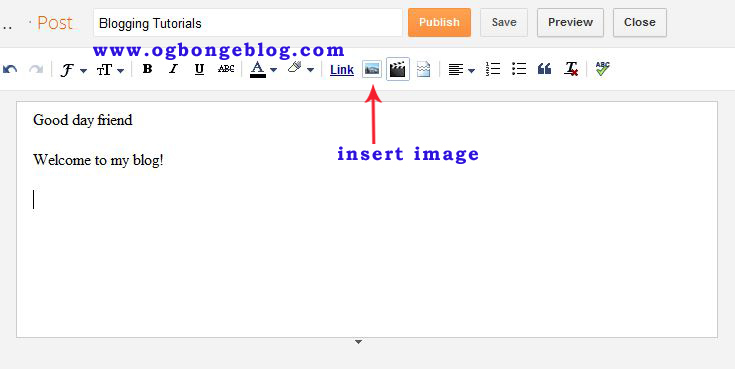
PostEditorImage

There are different options of adding image to your post. Click the “ Choose Files ” button to select pictures from your computer. Then, click “ Add Selected “

postEditoraddpicture

Once you are happy with your post, click on “ Publish ” tab at the top of the post editor.
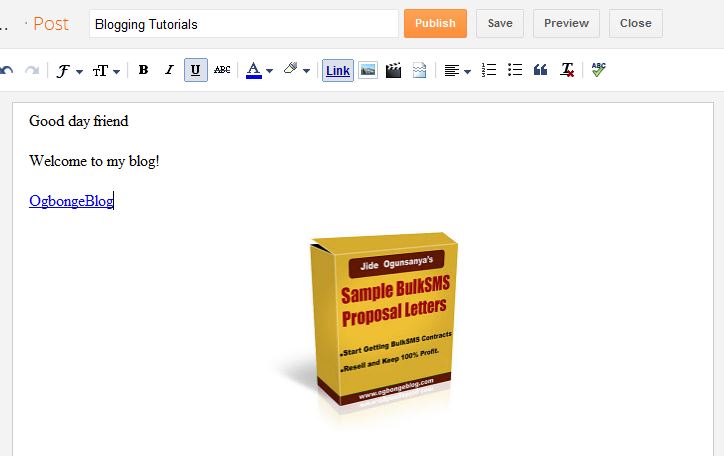
PosteditorPublishPost

That’s all.

You can view your post and start sharing with friends.

If you want to add or remove anything from the post, you can always edit it anytime you want. I will talk about this in one of my future posts.  Also in my future posts, I will be explaining the “ Post Settings ” as seen on the right hand side of your post editor.

So,  subscribe  to my blog if you want to be receiving the tutorials in your email inbox even if you are not online when I post the tutorials.  Make sure you verify your subscription  by clicking on the link that will be in the mail that will be sent to you once you subscribe.

If you are on Facebook, you can join the  Bloggerslab Group  so you can connect with other bloggers and learn more from them.

Feel free to contribute and ask questions using the comment form below.

Kindly share this with friends…

Click here to read “How To Insert YouTube Videos in Blog Posts “

Click here to read “How To add Read More to Blogspot Articles “

Also feel free to check out  “How To Create a blog on Blogspot “

Cheers!

Please Share :
blogger tips

Like What You Read?

Sign Up to get similar articles delivered to your email inbox.

Leave a Reply Cancel reply

Your email address will not be published. Required fields are marked *

2 responses to “How To Write a Blog Post (Complete Guide including Pictures)”

  1. Abdul Avatar
    Abdul
    January 7, 2012

    Thanks, may God bless

    Loading…
    Reply
  2. Akuneme Christopher Avatar
    Akuneme Christopher
    September 24, 2012

    I've been seeking help about this even been to bloggers lab. Thanks a lot

    Loading…
    Reply

WANT TO ADVERTISE?

Chat on WhatsApp

RELATED POSTS

  • How To Add ‘Blog’ tab to Facebook Pages Showing Latest Posts
  • How To Add HulkShare Music Player Inside Blogger Posts
  • How To Add Tabs to Blogger Blogs Header Section

FEATURED


  • How to Pay Chinese Suppliers in RMB (Alipay & WeChat Pay) or Swap Naira, Kenyan Shillings, Ghana Cedis & USDT in Minutes

    How to Pay Chinese Suppliers in RMB (Alipay & WeChat Pay) or Swap Naira, Kenyan Shillings, Ghana Cedis & USDT in Minutes

JOIN AI WEB DESIGN GROUP


  • AI Website Design Training Whatsapp Group by Jidetheblogger

    AI Website Design Training Whatsapp Group by Jidetheblogger

RANDOM POSTS


    I Got One Free Month of Meta Verified After I Tried to Cancel My Subscription


    How To Make Money On Bamboo App: 5 Proven Ways


    How To Use Vibe Coding To Make Money


    How I Earn $100 Per Referral from Affiliate Marketing


    Bluetooth Printer That Connects To Phone


    Can I Use OPay Card for Facebook Ads?


    Why I Moved My Websites From Namecheap To Interserver.net


    How I Earn $50 Per Sale


MORE RANDOM POSTS
← You have been awarded N500,000 Naira in the GTBank New Year promo is SCAM
How To Create New Paragraph or Line Break within a Facebook Comment →

Join 25,000+ subscribers

Receive our latest blog posts in your inbox.

Search

Social

Facebook

Instagram

Twitter

new ogbongeblog logo

Copyright © 2026 | About | Advertise | Featured | Sitemap | Privacy Policy | Powered by WordPress

Your cart (items: 0)

Products in cart

Product
Details
Total
Subtotal ₦0.00
Shipping and discounts calculated at checkout.
View cart
Go to checkout

Your shopping cart is empty

Return to shop

Notifications

%d

    LIKE My Fan Page

    Privacy Policy | Copyright © 2012,OgbongeBlog.All Rights Reserved. Powered by Blogger .
    Create a Mobile Site
    View Site in Mobile | Classic
    Share by: