
Skip to content
new ogbongeblog logo
  • Advertise
  • Blog
  • Contact

Opera Desktop Browser Now Has Sidebar With Whatsapp, Messenger Built-In

May 14, 2017

·

news
jidetheblogger Avatar
jidetheblogger

In an attempt to make things more social, Opera has launched a complete redesign of its desktop browser codenamed “reborn” adopting some messaging features from Neon, an experimental version of Opera. The new features include built-in support for Facebook Messenger, Telegram, and WhatsApp which allows users to chat from their opera browser using the new sidebar.

Instead of using the web or desktop versions of your favorite messaging apps, Opera 45 aka reborn neatly arranges them on the side of your browser window, allowing you to chat while you browse. There’s nothing particularly special about Opera’s versions of the messaging programs though. WhatsApp is just WhatsApp Web that everyone already uses, while clicking the Facebook Messenger takes you to Messenger.com. What’s different about Opera’s approach is that the messaging web apps don’t open in a new tab. Instead, the messengers appear in a panel that pops out from the browser’s left rail.

The shortcuts to Whatsapp, Messsnger etc are always visible on the Speed Dial homepage. And if you choose to pin the new sidebar, the shortcuts will stay available while you browse the web. You can as well pin the chat window so that it sits alongside your current tab. If you want to share a photo you’ve found online, simply drag it to the messenger’s icon and the browser will take care of the rest.
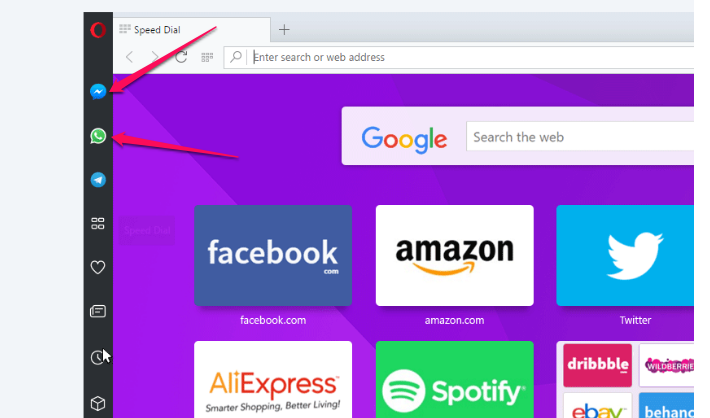
opera desktop browser with chatting apps

By default, Opera shows the Messenger and WhatsApp icons when you enable the new messaging feature (if you are an existing user). If you want to add Telegram shortcut to Opera browser sidebar, click on the Opera menu icon and going to Settings > Sidebar > Manage sidebar. The shortcuts are visible by default for new users of the Opera browser.

In addition to the new messaging features, Opera 45 comes with a few additional features. It now rocks lighter tabs and improved icons. You can also switch between light and dark themes and control how the browser blocks ads. Opera says that while only three services are available at launch, it hopes to add more in the near future.

You can download the latest opera at www.opera.com.

Please Share :
opera

Like What You Read?

Sign Up to get similar articles delivered to your email inbox.

Leave a Reply Cancel reply

Your email address will not be published. Required fields are marked *

3 responses to “Opera Desktop Browser Now Has Sidebar With Whatsapp, Messenger Built-In”

  1. Ejini Emmanuel Avatar
    Ejini Emmanuel
    May 14, 2017

    Good day, please sir I have Issues on my Facebook page. Some posts suddenly disappeared and are currently missing on the page. Please how do I rectify the problem?Thanks.

    Loading…
    Reply
  2. Prosper Ken Avatar
    Prosper Ken
    May 16, 2017

    I got to know of this opera mini right from our ogbonge station itself. Sir keep giving us the right info. Thanks

    Loading…
    Reply
  3. Joy Ladasha Avatar
    Joy Ladasha
    June 7, 2017

    Nice read

    Loading…
    Reply

WANT TO ADVERTISE?

Chat on WhatsApp

RELATED POSTS

  • Opera Telegram Sidebar Shortcut : How To Enable Itopera telegram sidebar widget
  • Opera Instagram Sidebar Shortcut Lets You Access Instagram On Computeropera browser app with instagram for pc
  • Hype Chat In Opera Mini : Features, Free Data and How To Registerhype chat in opera mini browser

FEATURED


  • CREDICORP launches C.L.I.C.K.D. Scheme with FG’s 3MTT Programme, expanding affordable consumer credit for locally-assembled laptops and devices for digital workers

    CREDICORP launches C.L.I.C.K.D. Scheme with FG’s 3MTT Programme, expanding affordable consumer credit for locally-assembled laptops and devices for digital workers

  • What Happens to Your Online Accounts When You Die?

    What Happens to Your Online Accounts When You Die?

JOIN AI WEB DESIGN GROUP


  • AI Website Design Training Whatsapp Group by Jidetheblogger

    AI Website Design Training Whatsapp Group by Jidetheblogger

← Delete Blog On Blogger In Easy Steps
How To Update Opera Browser To Latest Version Manually →

Join 25,000+ subscribers

Receive our latest blog posts in your inbox.

Search

Social

Facebook

Instagram

Twitter

new ogbongeblog logo

Copyright © 2026 | About | Advertise | Featured | Sitemap | Privacy Policy | Powered by WordPress

Your cart (items: 0)

Products in cart

Product
Details
Total
Subtotal ₦0.00
Shipping and discounts calculated at checkout.
View my cart
Go to checkout

Your cart is currently empty!

Start shopping

Notifications

%d

    LIKE My Fan Page

    Privacy Policy | Copyright © 2012,OgbongeBlog.All Rights Reserved. Powered by Blogger .
    Create a Mobile Site
    View Site in Mobile | Classic
    Share by:


