Skip to content
new ogbongeblog logo
  • Advertise
  • Blog
  • Contact

Delete Blog On Blogger In Easy Steps

May 13, 2017

·

Uncategorized
jidetheblogger Avatar
jidetheblogger

In this Blogger tutorial, I want to quickly show you how to delete a blog on Blogger. You might want to do so when you are no longer interested in a blog you have created especially test blogs that were created to test some blogger themes and widgets.

There are two ways to delete a blog:

  • When you delete a blog : you have a short period of time to restore it if you change your mind.
  • When you permanently delete a blog : all of your blog information, posts, and pages will be deleted, and you won’t be able to restore them.

Note: You must be the administrator of a blog to delete it.

How To Delete A Blogger Blog

  • Sign in to Blogger.com.
  • Choose the blog you want to delete from the drop down.
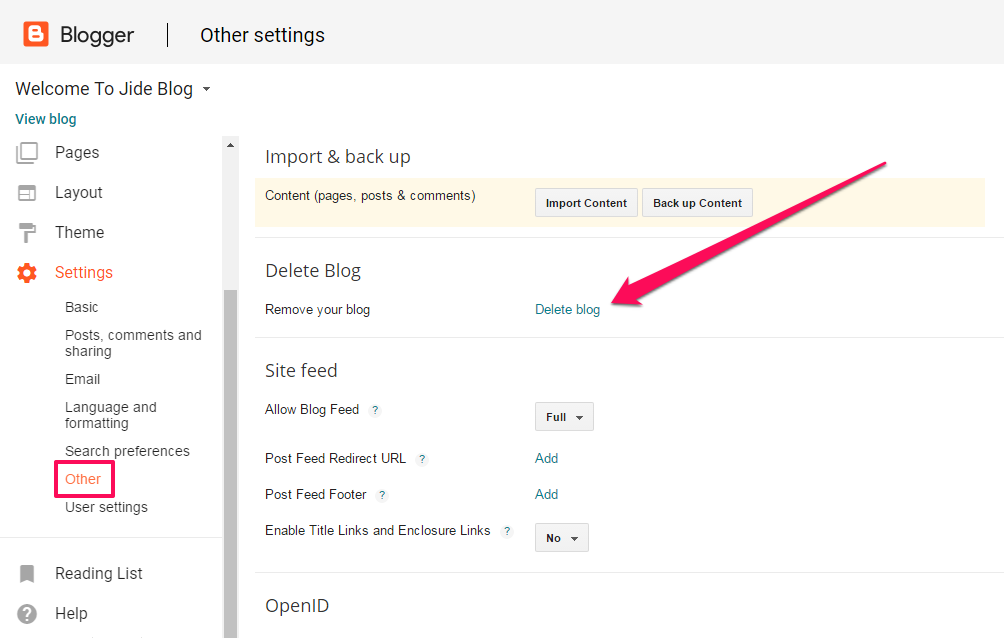
  • In the left menu, select Settings and then “Other”.
  • Under “Delete Blog” next to “Remove your blog,” click “Delete blog”.
  • Click “Delete This Blog”.
delete blogspot blog

How To Delete a Blogger Blog Permanently

To delete it permanently, follow the steps above, then:

  • On the left side of your Blogger dashboard, click the down arrow and scroll to “deleted blogs”. Click the name of the blog you deleted, click “Permanently delete”.
  • In the window that opens, click “Permanently delete”.
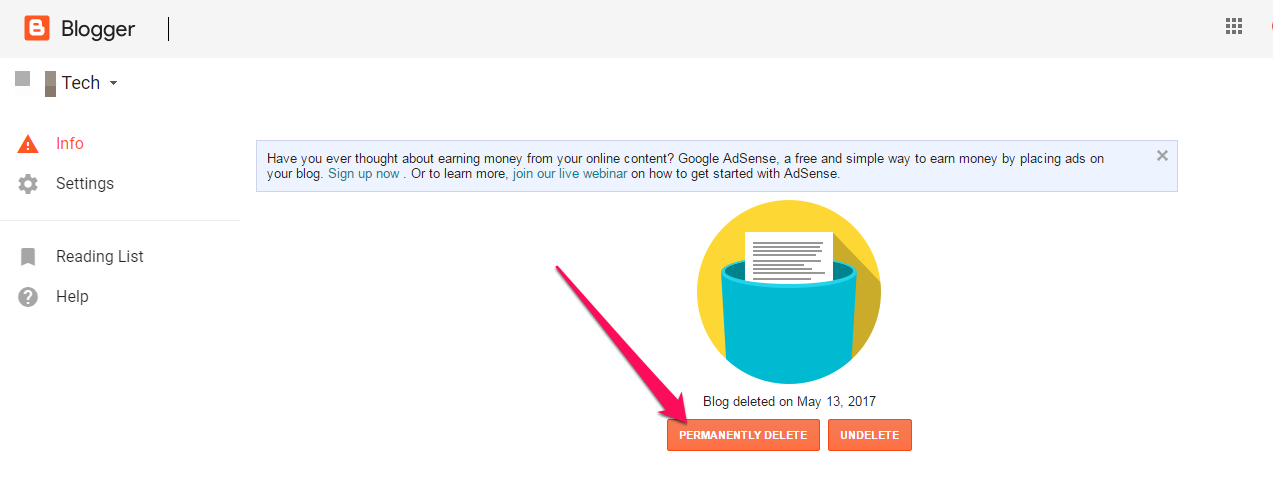
permanentlydeletebloggerblog

Note: After a blog is permanently deleted, the blog’s URL cannot be used again.

How To Restore A Deleted Blogger Blog

You can restore your blog for a short period after deleting it if you haven’t deleted it permanently:

  • Sign in to Blogger.
  • On the left side of your Blogger dashboard, next to the name of your blog, click the down arrow.
  • Under “Deleted blogs,” click the blog you want to restore.
  • Click “Undelete”.

I hope this helps.

Please Share :
blogger tips

Like What You Read?

Sign Up to get similar articles delivered to your email inbox.

Leave a Reply Cancel reply

Your email address will not be published. Required fields are marked *

3 responses to “Delete Blog On Blogger In Easy Steps”

  1. Gift Amadi Avatar
    Gift Amadi
    May 14, 2017

    Nice one thanks..

    Loading…
    Reply
  2. Confy Scenty Avatar
    Confy Scenty
    May 24, 2017

    This may be very important for starters but i do hope they don't try it with their main blogs and end up deleting it, The news would be so touching.

    Anyways, we talk Techs @ Contechsblog.com

    Loading…
    Reply
  3. Ify Arowojolu Avatar
    Ify Arowojolu
    May 24, 2017

    thanks Jide your steps on how to delete a blog was very useful . I just did.

    Loading…
    Reply

WANT TO ADVERTISE?

Chat on WhatsApp

RELATED POSTS

  • How To Change Template of Blogger/Blogspot Blog via the New Blogger Dashboard
  • How To Remove Mobstac Code from Blogger/Blogspot Blogs
  • How To Remove Google Adsense Auto Ads From Your Bloggoogle adsense money

FEATURED


  • CREDICORP launches C.L.I.C.K.D. Scheme with FG’s 3MTT Programme, expanding affordable consumer credit for locally-assembled laptops and devices for digital workers

    CREDICORP launches C.L.I.C.K.D. Scheme with FG’s 3MTT Programme, expanding affordable consumer credit for locally-assembled laptops and devices for digital workers

  • What Happens to Your Online Accounts When You Die?

    What Happens to Your Online Accounts When You Die?

JOIN AI WEB DESIGN GROUP


  • AI Website Design Training Whatsapp Group by Jidetheblogger

    AI Website Design Training Whatsapp Group by Jidetheblogger

← Truecaller Integrates Google Duo, Rolls Out New SMS and Flash Messaging Services to Users
Opera Desktop Browser Now Has Sidebar With Whatsapp, Messenger Built-In →

Join 25,000+ subscribers

Receive our latest blog posts in your inbox.

Search

Social

Facebook

Instagram

Twitter

new ogbongeblog logo

Copyright © 2026 | About | Advertise | Featured | Sitemap | Privacy Policy | Powered by WordPress

Your cart (items: 0)

Products in cart

Product
Details
Total
Subtotal ₦0.00
Shipping and discounts calculated at checkout.
View my cart
Go to checkout

Your cart is currently empty!

Start shopping

Notifications

%d

    LIKE My Fan Page

    Privacy Policy | Copyright © 2012,OgbongeBlog.All Rights Reserved. Powered by Blogger .
    Create a Mobile Site
    View Site in Mobile | Classic
    Share by: