


PR
令和維新
2004年4月から企業を離れ、コンサルタントや情報起業を試行しなが ら、失われた20年を取り戻し、日本再生をめざす私の歩みをみて一人でも多くの後継者が出てくれることを祈りつつ友達から紹 介されたこのホームページの更新を続け、これまでの活動の記録と今やビッグデータ、AI,、IOT,ブロックチェーン、仮想通貨の時代になってしまいましたが、私の現状認識と関連技術を紹介していきたい。
(1)2026年序盤に爆上げし得る15のアルトコイン(15 Altcoins That Could Explode in Early 2026)
先端技術情報20260804
備蓄米を買戻し、積み増せ!
暗号資産が現実味を帯びるとき:価格が停滞する一方で採用が進む理由(When Crypto Gets Real: Why Adoption Is Rising While Prices Stall)
迫り来る経済の嵐:世界を再形成し得る7つの力──そしてあなたを浮かび続けさせる資産(The Coming Economic Storm: 7 Forces That May Reshape the World—and the Assets That Could Keep You Afloat)
(1)2026年序盤に爆上げし得る15のアルトコイン(15 Altcoins That Could Explode in Early 2026)
先端技術情報20260803
続 主権通貨国相手に市場は勝てない
ついに起きている:暗号資産の次の大きな動きが到来(It’s Finally Happening: Crypto’s Next Big Move Is Here)
Comments
 New!
藻緯羅さん
New!
藻緯羅さん源氏物語〔35帖 柏木…
New!
USM1さん上松付近の景色、D51…
New!
GKenさん🌸 新作「二人の宇宙… New! 神風スズキさん
ハープコンサート in… 47弦の詩人さん
Category
カテゴリ未分類
(112)連絡
(24)交流会
(27)セミナー
(29)参考情報
(138)オフ会
(36)on-line報告会
(13)翻訳ビジネス
(8)情報開発
(270)ビッグデータ
(88)ブロックチェーン
(250)人工知能
(539)IOT
(307)仮想通貨
(868)コンテンツ
(127)政治経済
(1953)先端技術
(966)DITA
(52)テレワーク
(28)UX
(0)文書管理
(8)テクニカルライテイング
(23)学習
(9)訓練
(1)XMLソリューション
(3)メタバース
(101)Web3
(69)投資
(193)IoT
(34)投資信託
(1)ビットコイン
(789)イーサリアム
(163)NFT
(41)オンライン
(0)受動収入
(14)ソーシャルメデイア
(0)DAO
(2)DeFi
(79)暗号通貨
(168)トークノミクス
(22)アルトコイン
(232)空中投下
(16)スマート契約
(4)ステーブルコイン
(42)金
(5)生成AI
(5)SCM
(4)ウオレット
(9)不労所得
(58)セキュリテイ
(4)ミームコイン
(51)CBDC
(5)PoS
(3)PoW
(1)ETF
(15)仮想通貨ETF
(1)予言
(7)裁定取引
(1)GameFi
(5)マイニング
(9)RWA
(25)DePIN
(22)SWFT
(1)WLFI
(1)アービトラージ
(7)XRP
(67)大統領選
(4)BCH
(1)取引ボット
(17)トレーデイング
(52)不動産
(1)詐欺
(4)貿易戦争
(1)医療
(1)金融
(2)TEZOS
(1)CARDANO
(2)カルダーノ
(3)ステーキング
(5)チェーンリンク
(1)開発
(0)HEDERA
(3)スマートマネー
(0)流動性
(0)AIエージェント
(19)401k
(1)国際送金
(1)solano
(1)AI
(1)暗号資産
(77)機関投資家
(5)量子コンピューター
(5)AIエージェント
(1)ドキュメンテーション
(2)AIトレーデイング
(1)Keyword Search
Freepage List


Shopping List


BAT withdrawal process
BAT
払戻しプロセス
To withdraw BAT
, you need to connect your Brave Browser
to one of the supported wallets
(either. Uphold
, Gemini or bitFlyer
) based on your location.
BAT
を引き出すには、現在地に基づいてサポートされているウォレットの
1
つにブレーブ
ブラウザーを接続する必要があります。(
Uphold
、
Gemini
、または
bitFlyer
のいずれか
)
。

To withdraw Basic Attention Tokens you need to have a KYC exchange connected like Uphold
or Gemini.
基本注目トークンを引き出すには、
Uphold
や
Gemini
などの
KYC
(本人確認)取引所を接続する必要があります。
After connecting you can transfer tokens
from the browser wallet and sell/convert them to your preferred currency.
接続後、ブラウザウォレットからトークンを転送し、好みの通貨に販売
/
変換できます。
Unfortunately, there is an issue
with connecting Brave wallet
to Uphold
/Gemini
right now. So, you
might not be able to withdraw your tokens if you are not in one of the supported regions.
残念ながら、現在、
Brave
ウォレットを
Uphold / Gemini
に接続する際に課題があります。そのため、サポートされている地域のいずれかにいない場合、トークンを引き出すことができない場合があります。
To see all supported
regions visit:
https://support.brave.com/hc/en-us/articles/6539887971469
すべてのさぽーつぁれている地域を見るためには次を参照
:https://support.brave.com/hc/en-us/articles/6539887971469
My Experience
私の経験
Now that you know
what Brave Browser
does and how it works, let's talk about my experience of using it as a browser of choice for a year.
ブレーブ
ブラウザーの機能と仕組みがわかったところで、ブレーブ
ブラウザーを
1
年間ブラウザとして使用した経験について話しましょう。
Setting things up
諸事の設定
Setup is simple and is done in a few easy steps:
設定は単純で2-3の容易なステップで完了します。:
1.
Download
the app.
アプリのダウンロード。
2.
Migrate
your data
from your previous browser of choice in a few clicks.
2-3のクリックであなたの前のブラウザから貴方のデータを移動。
3.
Check
if your add-ons
were migrated as well.
貴方のアッドーオン
が同様に移動したかどうかチェック。
4.
Set up
how many Brave private ads
you wish to see (0–10)
表示するブレーブの私的な広告の見たい数を設定 (0
10)
5.
You’re all set and ready to browse the internet ad-free
(unless you opted for Brave
private ads
)
準備万端、(ブレーブの私的広告を選択しない限り)広告なしのインターネットをブラウズする準備完了
Using it on a daily basis
日単位でそれを使う
After setting things up, you can browse whatever you like as usual . Brave
will serve you occasional ads
on your home page
or you’ll get a notification pop-up.
諸事を準備後、あなたがいつものように好き物は何でも、見回すことができます。
ブレーブは、ホームページに不定期に広告を出すか、通知ポップアップが表示されます。
As for my experience:
私の経験については:
l
I don’t have pop-ups enabled
on my PC and after some time, you won’t even notice the ad on your home page while opening a new window in Brave browser
.
PC
でポップアップを有効にしていませんが、しばらくすると、ブレーブ
ブラウザで新しいウィンドウを開いてもホームページの広告に気付くことさえなくなります。
l
On my phone I have pop-up notifications turned on, but I rarely click on them
.
私の電話ではポップアップ通知がオンになっていますが、クリックオンすることはめったにありません。
So, in terms of avoiding unwanted ads, Brave served its purpose.
そのため、望まぬ広告を回避するという点では、ブレーブはその目的を果たしました。
Brave Rewards
ブレーブの報酬
After a year of using it, I can safely say that this is not a viable source of income
and you should not treat it as such. However, it is a nice form of a small passive income
that can get you a “free cup of coffee
” at the end of the year.
1
年間使用した後、これは生存可能な収入源ではなく、そのように扱うべきではないというのが間違いないです。しかし、それは年末に「無料のコーヒー」を手に入れることができる小さな不労所得の素敵な形です。
As your reward is in BAT
a cryptocurrency, its price is naturally volatile. At the time of writing this article, the price of the Basic Attention token
is 0,28USD
which is 82%
lower than its all-time high at 1,92USD
.
報酬は暗号通貨である
BAT
であるため、その価格は当然変動します。この記事を書いている時点では、基本注目トークンの価格は
0,28
米ドルで、史上最高値の
1,92
米ドルより
82%
低くなっています。
My PC Reward after 1 year:
1年後の私のPC報酬:
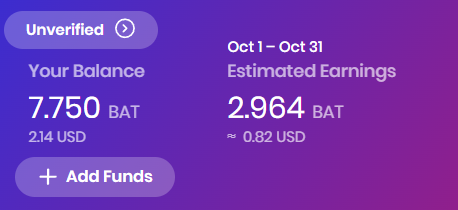
After 1 year, I made around 7,75BAT
so far, and another 2,964BAT
is on its way. So my PC
total balance
is 10,714BAT
or 2,96USD
at the current exchange rate.
1
年後、私はこれまでに約
7,75BAT
を稼ぎ、さらに
2,964BAT
が進行中です。したがって、私の
PC
の合計残高は
10,714BAT
または現在の為替レートで
2,96
米ドルです。
At its peak, it would be worth around 20,57USD
.
ピーク時には、約
20,57
米ドルの価値があります。
My Phone Reward after 1 year:
1年後の私の電話報酬:
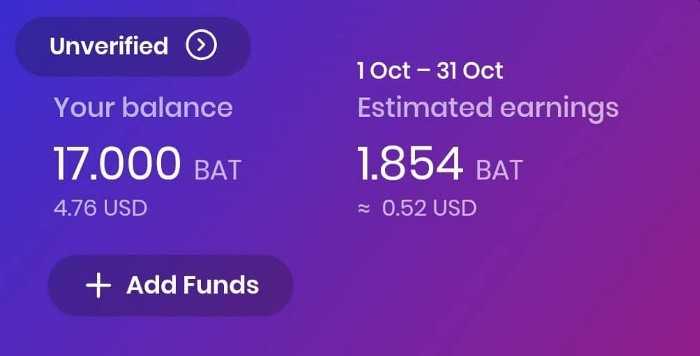
The rewards on my phone are a bit better. The current balance is 17BAT
which translates to 4,76USD
, while 1,854BAT
or 0,52USD
is on its way so far. If exchanged today the total balance on my phone, which is 18,854BAT
would be worth around 5,28USD
.
私の携帯電話の報酬はもう少し良いです。現在の残高は
17BAT
で、
4,76
米ドルに換算されますが、
1,854BAT
または
0,52
米ドルが今のところ進行中です。 今日、交換した場合、私の電話の合計残高である
18,854BAT
は約
5,28
米ドルの価値があります。
At the peak price
of the Basic Attention Token
, my phone balance would be worth 36,2USD
.
基本注目トークンのピーク価格では、私の電話の残高は
36,2
米ドルの価値があります。
インターネット・コンピュータランキング
============================== ネットサービスランキング
==============================
![[商品価格に関しましては、リンクが作成された時点と現時点で情報が変更されている場合がございます。]](https://hbb.afl.rakuten.co.jp/hgb/20f8c8aa.17b1aac8.20f8c8ab.773f6c44/?me_id=1278318&item_id=10000217&pc=https%3A%2F%2Fthumbnail.image.rakuten.co.jp%2F%400_mall%2Firobotstore%2Fcabinet%2Fitem_thum%2Fbr_thum%2Fi3p_tm_y.jpg%3F_ex%3D240x240&s=240x240&t=picttext "[商品価格に関しましては、リンクが作成された時点と現時点で情報が変更されている場合がございます。]")

![[商品価格に関しましては、リンクが作成された時点と現時点で情報が変更されている場合がございます。]](https://hbb.afl.rakuten.co.jp/hgb/36a4669d.509878a1.36a4669e.a1a50ee0/?me_id=1347504&item_id=10002370&pc=https%3A%2F%2Fthumbnail.image.rakuten.co.jp%2F%400_mall%2Ff302023-kainan%2Fcabinet%2Ffrp_goods%2Ffrp013%2F8888698.jpg%3F_ex%3D240x240&s=240x240&t=picttext "[商品価格に関しましては、リンクが作成された時点と現時点で情報が変更されている場合がございます。]")
【ふるさと納税】コカ・コーラ 爽健美茶 2L×6本【2ケース】 計12本 | コカコーラ 茶 お茶 おちゃ ペットボトル PET 飲料 飲み物 ドリンク 人気 おすすめ 送料無料 2リットル お取り寄せ そうけんびちゃ 和歌山県 海南市
価格:8,000円(税込、送料無料) (2023/11/1時点)
![[商品価格に関しましては、リンクが作成された時点と現時点で情報が変更されている場合がございます。]](https://hbb.afl.rakuten.co.jp/hgb/21492812.d14aaf9f.21492813.d663ddf0/?me_id=1380407&item_id=10000018&pc=https%3A%2F%2Fthumbnail.image.rakuten.co.jp%2F%400_mall%2Fshuuemura%2Fcabinet%2F07947415%2Fimgrc0124771893.jpg%3F_ex%3D240x240&s=240x240&t=picttext "[商品価格に関しましては、リンクが作成された時点と現時点で情報が変更されている場合がございます。]")
【総合ランキング1位】アルティム8∞ クレンジング オイル ベストセラーキット / メイク落とし 化粧落とし リムーバー しっとり ダブル洗顔不要 / shu uemura シュウウエムラ 正規品 送料無料 / シュウ 公式 公式ショップ
価格:14,850円(税込、送料別) (2023/11/1時点)
![[商品価格に関しましては、リンクが作成された時点と現時点で情報が変更されている場合がございます。]](https://hbb.afl.rakuten.co.jp/hgb/36a46796.7b686697.36a46797.84629daf/?me_id=1348110&item_id=10001007&pc=https%3A%2F%2Fthumbnail.image.rakuten.co.jp%2F%400_mall%2Festeelauder%2Fcabinet%2Fitem%2Fvel230929_bg8.jpg%3F_ex%3D240x240&s=240x240&t=picttext "[商品価格に関しましては、リンクが作成された時点と現時点で情報が変更されている場合がございます。]")
【送料無料】【10/13(金)全国発売】【2023 ホリデーコレクション】エスティ ローダー メークアップ コレクション 2023【 クリスマスコフレ 2023 ホリディコレクション コフレ 】 / ギフト
価格:18,700円(税込、送料無料) (2023/11/1時点)
![[商品価格に関しましては、リンクが作成された時点と現時点で情報が変更されている場合がございます。]](https://hbb.afl.rakuten.co.jp/hgb/36a467f8.553672e2.36a467f9.9666b256/?me_id=1279181&item_id=10001780&pc=https%3A%2F%2Fthumbnail.image.rakuten.co.jp%2F%400_mall%2Fkanidokoro%2Fcabinet%2F428%2F428_r_23thum_00b.jpg%3F_ex%3D240x240&s=240x240&t=picttext "[商品価格に関しましては、リンクが作成された時点と現時点で情報が変更されている場合がございます。]")
【11/1限定!!最大100%ポイントバック】福袋おせち 【12,345円】高級おせちを含む48種のおせちのいずれかをお届け【送料無料】2024年 お正月 お節料理 予約 冷蔵おせち 冷蔵
価格:12,345円(税込、送料無料) (2023/11/1時点)
![[商品価格に関しましては、リンクが作成された時点と現時点で情報が変更されている場合がございます。]](https://hbb.afl.rakuten.co.jp/hgb/36a46896.3ae91cf5.36a46897.ecefee06/?me_id=1213222&item_id=10000519&pc=https%3A%2F%2Fthumbnail.image.rakuten.co.jp%2F%400_mall%2Ftakami-labo%2Fcabinet%2Fprd%2Fr-s009%2Fr-s009.jpg%3F_ex%3D240x240&s=240x240&t=picttext "[商品価格に関しましては、リンクが作成された時点と現時点で情報が変更されている場合がございます。]")
![[商品価格に関しましては、リンクが作成された時点と現時点で情報が変更されている場合がございます。]](https://hbb.afl.rakuten.co.jp/hgb/34468c5d.55403c90.34468c5e.38ae89ed/?me_id=1395258&item_id=10000039&pc=https%3A%2F%2Fthumbnail.image.rakuten.co.jp%2F%400_mall%2Flarocheposay%2Fcabinet%2Fproducts%2Fmain%2Fimgrc0115948742.jpg%3F_ex%3D240x240&s=240x240&t=picttext "[商品価格に関しましては、リンクが作成された時点と現時点で情報が変更されている場合がございます。]")
数量限定★スキンケアサンプル5点付き!トーンアップUV 3種お試し&スキンケアケアキット / 30mL / ローズ / ホワイト / クリア / 無香料 / 日焼け止め / UVケア / SPF 50+ / 洗顔 / 化粧水 / クリーム / 保湿 / 正規品
価格:3,960円(税込、送料無料) (2023/11/1時点)

-
FRBのバランスシート拡大:なぜ2026年が次… 2026.07.31
-
暗号資産への巨大な警鐘:ウォール街の9億… 2026.07.30
-
あなたのトークンが下がり続ける理由:壊… 2026.07.18


