



PR
キーワードサーチ

pelo7777
pelo7777のブログへようこそ
カレンダー
コメント新着
フリーページ

変数を使ってみます。
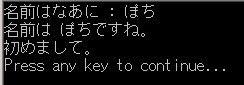
--- Sample Program 1 ---
TextWindow.Write("名前はなあに : ")
name = TextWindow.Read()TextWindow.WriteLine("名前は " + name + "ですね。")
TextWindow.WriteLine("初めまして。")
--- Sample Program 2 ---
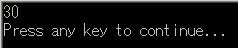
number1 = 10
number2 = 20number3 = number1 + number2
TextWindow.WriteLine(number3)
--- Sample Program 3 ---
TextWindow.Write("華氏を入力して: ")
fahr = TextWindow.ReadNumber()
celsius = 5 * (fahr - 32) / 9
TextWindow.WriteLine("摂氏 " + celsius + "です。")
https://ja.wikipedia.org/wiki/セルシウス度
https://ja.wikipedia.org/wiki/華氏

--- Sample Program 4 ---
IF文を使ってみます。
「If ... Then ... EndIf」の例。
If (Clock.Hour < 12) Then
TextWindow.WriteLine("おはよう!")
EndIf
If (Clock.Hour >= 12) Then
TextWindow.WriteLine("こんにちは!")
EndIf
「Clock.Hour」は時刻を戻します。

--- Sample Program 5 ---
「If ... Then ... Else ... EndIf」の例。
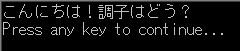
If (Clock.Hour < 12) Then
TextWindow.Write("おはよう!")
TextWindow.WriteLine("朝食はどうする?")
Else
TextWindow.Write("こんにちは!")
TextWindow.WriteLine("調子はどう?")
EndIf
--- Sample Program 6 ---
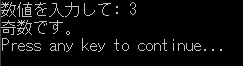
TextWindow.Write("数値を入力して: ")
num = TextWindow.ReadNumber()
remainder = Math.Remainder(num, 2)
If (remainder = 0) Then
TextWindow.WriteLine("偶数です。")
Else
TextWindow.WriteLine("奇数です。")
EndIf
「Math.Remainder」は、最初の値を 2 番目の値で割った余りを返します。
--- Sample Program 7 ---
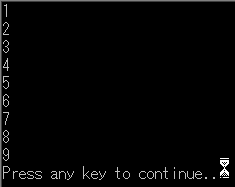
ラベルとGoto文を使ってみます。
i = 1
start:
TextWindow.WriteLine(i)
i = i + 1
If (i < 10) Then
Goto start
EndIf
「start:」はラベル。「Goto start」でここにジャンプする。

【楽天ブックスならいつでも送料無料】フリーランスのジタバタな舞台裏 [ きたみりゅうじ ]
楽天ブックス


-
「Microsoft Small Basic」で遊んでみる。… 2016.01.02
-
「Microsoft Small Basic」で遊んでみる。… 2016.01.01
-
「Microsoft Small Basic」で遊んでみる。… 2016.01.01


