



PR
キーワードサーチ

pelo7777
pelo7777のブログへようこそ
カレンダー
コメント新着
フリーページ

亀さんを動かしてみた
「Logo
In the 1970s, there was a very simple but powerful programming language, called Logo that was used by
a few researchers. This was until someone added what is called “Turtle Graphics” to the language and
made available a “Turtle” that was visible on the screen and responded to commands like Move
Forward, Turn Right, Turn Left, etc. Using the Turtle, people were able to draw interesting shapes on the
screen. This made the language immediately accessible and appealing to people of all ages, and was
largely responsible for its wild popularity in the 1980s.
Small Basic comes with a Turtle object with many commands that can be called from within Small Basic
programs. In this chapter, we’ll use the Turtle to draw graphics on the screen.」
説明にもあるように「Logo」の機能を再現したものです。
亀さん用の画面を表示します。
--- Sample Program Turtle --- ここから
Turtle.Show()
--- Sample Program Turtle --- ここまで

上に移動します。
--- Sample Program Turtle(Move) --- ここから
Turtle.Show() Turtle.Move(100)
--- Sample Program Turtle(Move) --- ここまで
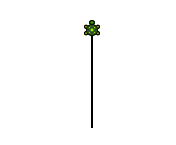
四角形を描きます。
--- Sample Program Turtle(Square1) --- ここから
Turtle.Show()
Turtle.Move(100)
Turtle.TurnRight()
Turtle.Move(100)
Turtle.TurnRight()
Turtle.Move(100)
Turtle.TurnRight()
Turtle.Move(100)
Turtle.TurnRight()
--- Sample Program Turtle(Square1) --- ここまで
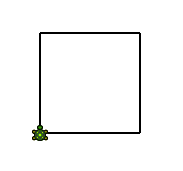


別の方法で四角形を描きます。
--- Sample Program Turtle(Square2) --- ここから
Turtle.Show()
For i = 1 To 4
Turtle.Move(100)
Turtle.TurnRight()
EndFor
--- Sample Program Turtle(Square2) --- ここまで
線に色を付けてみます。
--- Sample Program Turtle(Square3) --- ここから
Turtle.Show()
For i = 1 To 4
GraphicsWindow.PenColor = GraphicsWindow.GetRandomColor()
Turtle.Move(100)
Turtle.TurnRight()
EndFor
--- Sample Program Turtle(Square3) --- ここまで
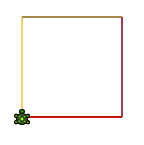
六角形を描きます。
--- Sample Program Turtle(hexagon) --- ここから
Turtle.Show()
For i = 1 To 6
Turtle.Move(100)
Turtle.Turn(60)
EndFor
--- Sample Program Turtle(hexagon) --- ここまで
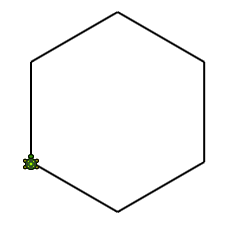
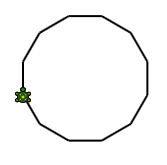
多角形を描きます。
--- Sample Program Turtle(polygon) --- ここから
Turtle.Show()
sides = 12
length = 400 / sides
angle = 360 / sides
For i = 1 To sides
Turtle.Move(length)
Turtle.Turn(angle)
EndFor
--- Sample Program Turtle(polygon) --- ここまで
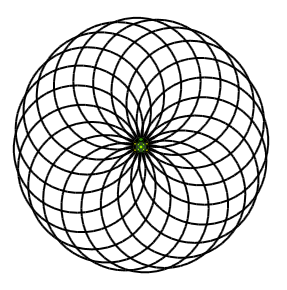
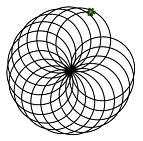
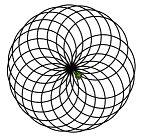
複数の円を描きます。
--- Sample Program Turtle(multiple circles) --- ここから
Turtle.Show()
sides = 50
length = 400 / sides
angle = 360 / sides
Turtle.Speed = 9
For j = 1 To 20
For i = 1 To sides
Turtle.Move(length)
Turtle.Turn(angle)
EndFor
Turtle.Turn(18)
EndFor
--- Sample Program Turtle(multiple circles) --- ここまで

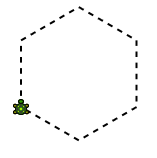
破線を描きます。
--- Sample Program Turtle(PenUpDown) --- ここから
Turtle.Show()
sides = 6
length = 400 / sides
angle = 360 / sides
For i = 1 To sides
For j = 1 To 6
Turtle.Move(length / 12)
Turtle.PenUp()
Turtle.Move(length / 12)
Turtle.PenDown()
EndFor
Turtle.Turn(angle)
EndFor
--- Sample Program Turtle(PenUpDown) --- ここまで

【楽天ブックスならいつでも送料無料】こち亀ビッグバン!!(2015年12月) [ 秋本治 ]


-
「Microsoft Small Basic」で遊んでみる。… 2016.01.02
-
「Microsoft Small Basic」で遊んでみる。… 2016.01.01
-
「Microsoft Small Basic」で遊んでみる。… 2015.12.31


