TheTensorFlow Lite Model Maker librarysimplifies the process of adapting and converting a TensorFlow model to particular input data when deploying this model for on-device ML applications.
This notebook shows an end-to-end example that utilizes the Model Maker library to illustrate the adaptation and conversion of a commonly-used question answer model for question answer task.
Introduction to BERT Question Answer Task
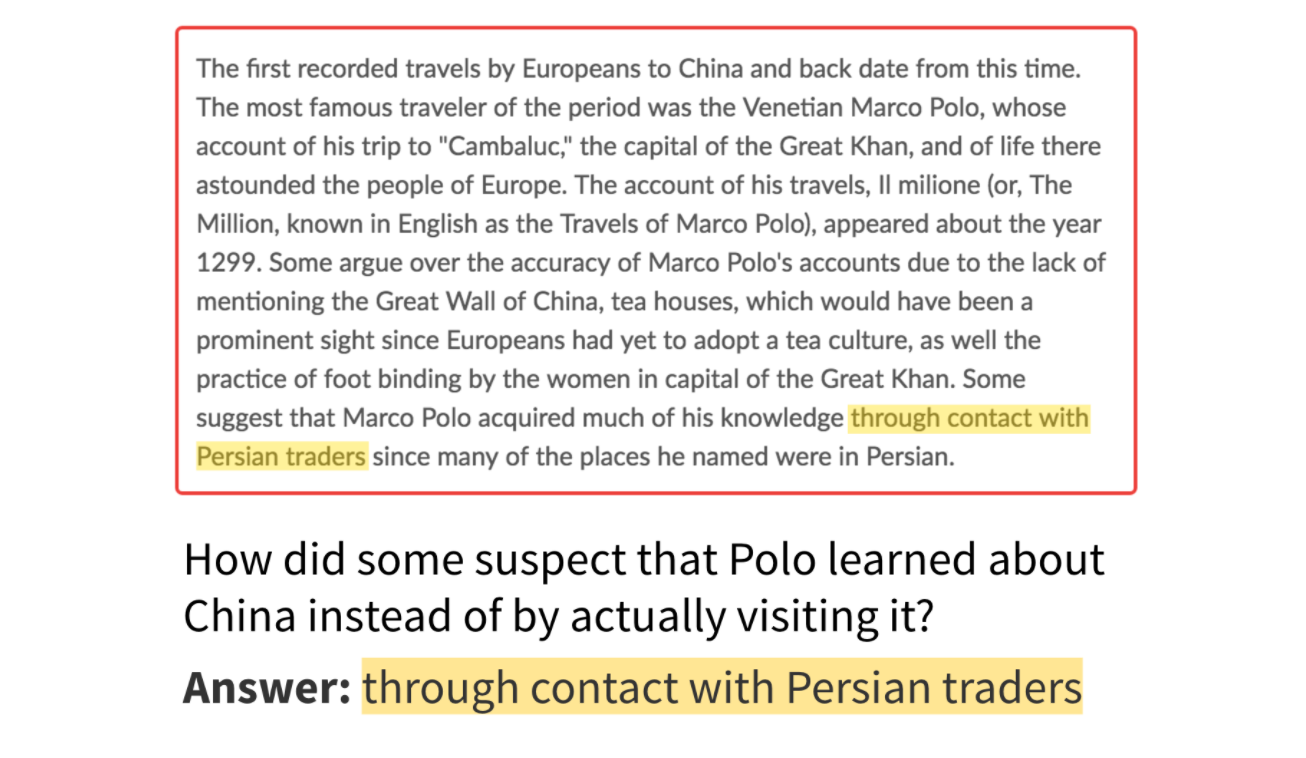
The supported task in this library is extractive question answer task, which means given a passage and a question, the answer is the span in the passage. The image below shows an example for question answer.
Answers are spans in the passage (image credit:SQuAD blog)
As for the model of question answer task, the inputs should be the passage and question pair that are already preprocessed, the outputs should be the start logits and end logits for each token in the passage.
The size of input could be set and adjusted according to the length of passage and question.
End-to-End Overview
The following code snippet demonstrates how to get the model within a few lines of code. The overall process includes 5 steps: (1) choose a model, (2) load data, (3) retrain the model, (4) evaluate, and (5) export it to TensorFlow Lite format.
# Chooses a model specification that represents the model.spec=model_spec.get('mobilebert_qa')# Gets the training data and validation data.train_data=DataLoader.from_squad(train_data_path,spec,is_training=True)validation_data=DataLoader.from_squad(validation_data_path,spec,is_training=False)# Fine-tunes the model.model=question_answer.create(train_data,model_spec=spec)# Gets the evaluation result.metric=model.evaluate(validation_data)# Exports the model to the TensorFlow Lite format with metadata in the export directory.model.export(export_dir)
The following sections explain the code in more detail.
Prerequisites
To run this example, install the required packages, including the Model Maker package from theGitHub repo.
Standard BERT model that widely used in NLP tasks.
In this tutorial,MobileBERT-SQuADis used as an example. Since the model is already retrained onSQuAD1.1, it could coverage faster for question answer task.
spec = model_spec.get('mobilebert_qa_squad')
Load Input Data Specific to an On-device ML App and Preprocess the Data
TheTriviaQAis a reading comprehension dataset containing over 650K question-answer-evidence triples. In this tutorial, you will use a subset of this dataset to learn how to use the Model Maker library.
To load the data, convert the TriviaQA dataset to theSQuAD1.1format by running theconverter Python scriptwith--sample_size=8000and a set ofwebdata. Modify the conversion code a little bit by:
Skipping the samples that couldn't find any answer in the context document;
Getting the original answer in the context without uppercase or lowercase.
Download the archived version of the already converted dataset.
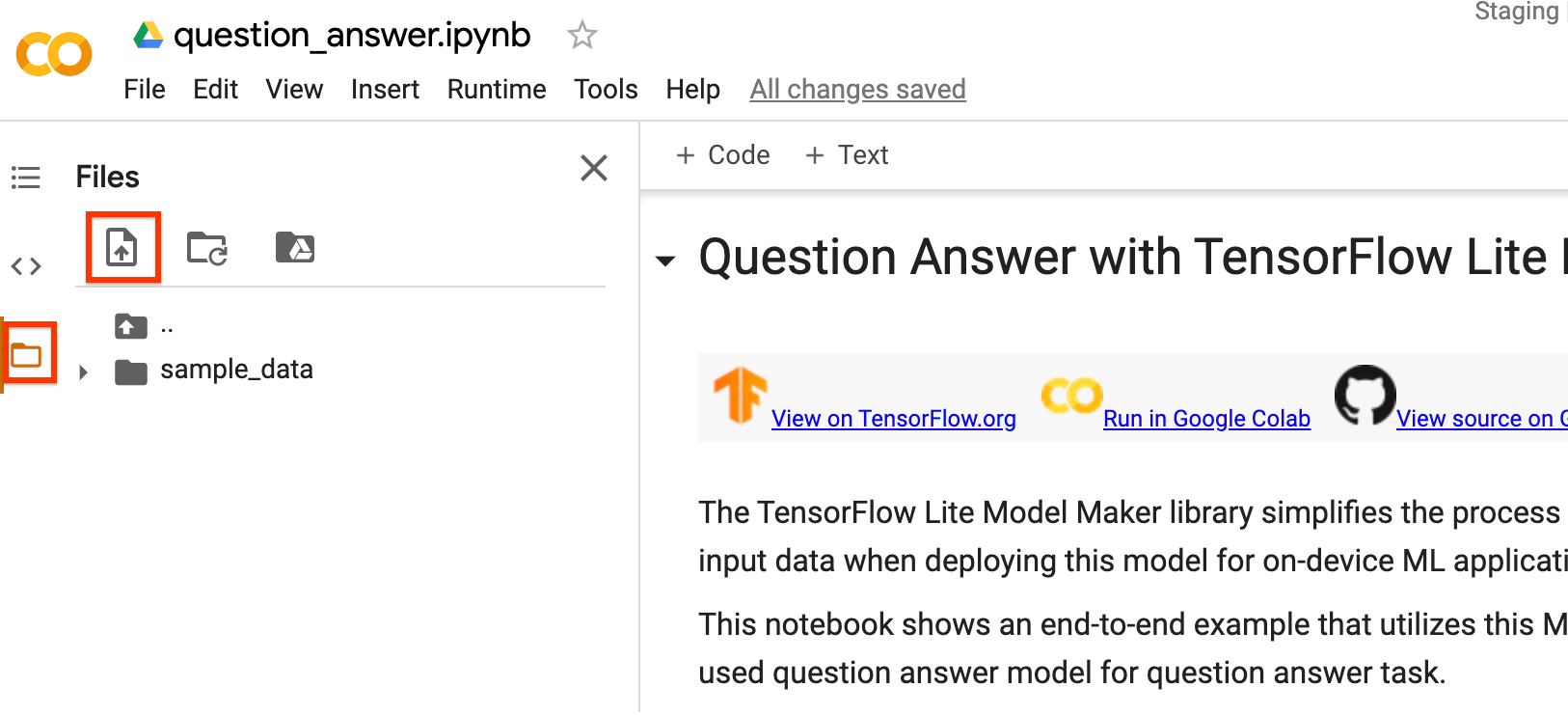
You can also train the MobileBERT model with your own dataset. If you are running this notebook on Colab, upload your data by using the left sidebar.
If you prefer not to upload your data to the cloud, you can also run the library offline by following theguide.
Use theDataLoader.from_squadmethod to load and preprocess theSQuAD formatdata according to a specificmodel_spec. You can use either SQuAD2.0 or SQuAD1.1 formats. Setting parameterversion_2_with_negativeasTruemeans the formats is SQuAD2.0. Otherwise, the format is SQuAD1.1. By default,version_2_with_negativeisFalse.
Create a custom question answer model based on the loaded data. Thecreatefunction comprises the following steps:
Creates the model for question answer according tomodel_spec.
Train the question answer model. The default epochs and the default batch size are set according to two variablesdefault_training_epochsanddefault_batch_sizein themodel_specobject.
model = question_answer.create(train_data, model_spec=spec)
Have a look at the detailed model structure.
model.summary()
Evaluate the Customized Model
Evaluate the model on the validation data and get a dict of metrics includingf1score andexact matchetc. Note that metrics are different for SQuAD1.1 and SQuAD2.0.
model.evaluate(validation_data)
Export to TensorFlow Lite Model
Convert the trained model to TensorFlow Lite model format withmetadataso that you can later use in an on-device ML application. The vocab file are embedded in metadata. The default TFLite filename ismodel.tflite.
In many on-device ML application, the model size is an important factor. Therefore, it is recommended that you apply quantize the model to make it smaller and potentially run faster.
The default post-training quantization technique is dynamic range quantization for the BERT and MobileBERT models.
The allowed export formats can be one or a list of the following:
ExportFormat.TFLITE
ExportFormat.VOCAB
ExportFormat.SAVED_MODEL
By default, it just exports TensorFlow Lite model with metadata. You can also selectively export different files. For instance, exporting only the vocab file as follows:
Thecreatefunction is the critical part of this library in which themodel_specparameter defines the model specification. TheBertQASpecclass is currently supported. There are 2 models: MobileBERT model, BERT-Base model. Thecreatefunction comprises the following steps:
Creates the model for question answer according tomodel_spec.
Train the question answer model.
This section describes several advanced topics, including adjusting the model, tuning the training hyperparameters etc.
Adjust the model
You can adjust the model infrastructure like parametersseq_lenandquery_lenin theBertQASpecclass.
Adjustable parameters for model:
seq_len: Length of the passage to feed into the model.
query_len: Length of the question to feed into the model.
doc_stride: The stride when doing a sliding window approach to take chunks of the documents.
initializer_range: The stdev of the truncated_normal_initializer for initializing all weight matrices.
trainable: Boolean, whether pre-trained layer is trainable.
Adjustable parameters for training pipeline:
model_dir: The location of the model checkpoint files. If not set, temporary directory will be used.
dropout_rate: The rate for dropout.
learning_rate: The initial learning rate for Adam.
predict_batch_size: Batch size for prediction.
tpu: TPU address to connect to. Only used if using tpu.
For example, you can train the model with a longer sequence length. If you change the model, you must first construct a newmodel_spec.
The remaining steps are the same. Note that you must rerun both thedataloaderandcreateparts as different model specs may have different preprocessing steps.
Tune training hyperparameters
You can also tune the training hyperparameters likeepochsandbatch_sizeto impact the model performance. For instance,
epochs: more epochs could achieve better performance, but may lead to overfitting.
batch_size: number of samples to use in one training step.
For example, you can train with more epochs and with a bigger batch size like:
You can change the base model your data trains on by changing themodel_spec. For example, to change to the BERT-Base model, run:
spec=model_spec.get('bert_qa')
The remaining steps are the same.
Customize Post-training quantization on the TensorFlow Lite model
Post-training quantizationis a conversion technique that can reduce model size and inference latency, while also improving CPU and hardware accelerator inference speed, with a little degradation in model accuracy. Thus, it's widely used to optimize the model.
Model Maker library applies a default post-training quantization techique when exporting the model. If you want to customize post-training quantization, Model Maker supports multiple post-training quantization options usingQuantizationConfigas well. Let's take float16 quantization as an instance. First, define the quantization config.
config=QuantizationConfig.for_float16()
Then we export the TensorFlow Lite model with such configuration.
[[["Easy to understand","easyToUnderstand","thumb-up"],["Solved my problem","solvedMyProblem","thumb-up"],["Other","otherUp","thumb-up"]],[["Missing the information I need","missingTheInformationINeed","thumb-down"],["Too complicated / too many steps","tooComplicatedTooManySteps","thumb-down"],["Out of date","outOfDate","thumb-down"],["Samples / code issue","samplesCodeIssue","thumb-down"],["Other","otherDown","thumb-down"]],["Last updated 2026-05-28 UTC."],[],[]]