

TensorFlow Lite Task Library provides prebuilt C++, Android, and iOS APIs on top of the same infrastructure that abstracts TensorFlow. You can extend the Task API infrastructure to build customized APIs if your model is not supported by existing Task libraries.
Overview
Task API infrastructure has a two-layer structure: the bottom C++ layer encapsulating the TFLite runtime and the top Java/ObjC layer that communicates with the C++ layer through JNI or wrapper.
Implementing all the TensorFlow logic in only C++ minimizes cost, maximizes inference performance and simplifies the overall workflow across platforms.
To create a Task class, extend the BaseTaskApi to provide conversion logic between TFLite model interface and Task API interface, then use the Java/ObjC utilities to create corresponding APIs. With all TensorFlow details hidden, you can deploy the TFLite model in your apps without any machine learning knowledge.
TensorFlow Lite provides some prebuilt APIs for most popular Vision and NLP tasks . You can build your own APIs for other tasks using the Task API infrastructure.
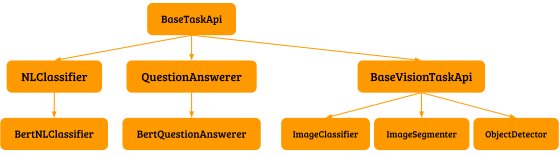
Build your own API with Task API infra
C++ API
All TFLite details are implemented in the C++ API. Create an API object by using one of the factory functions and get model results by calling functions defined in the interface.
Sample usage
Here is an example using the C++ BertQuestionAnswerer
for MobileBert
.
 char

 kBertModelPath
 []

 =

 "path/to/model.tflite"
 ;

 // Create the API from a model file

 std
 ::
 unique_ptr<BertQuestionAnswerer>

 question_answerer

 =

 BertQuestionAnswerer
 ::
 CreateFromFile
 (
 kBertModelPath
 );

 char

 kContext
 []

 =

 ...;

 // context of a question to be answered

 char

 kQuestion
 []

 =

 ...;

 // question to be answered

 // ask a question

 std
 ::
 vector<QaAnswer>

 answers

 =

 question_answerer
 .
 Answer
 (
 kContext
 ,

 kQuestion
 );

 // answers[0].text is the best answer
Building the API
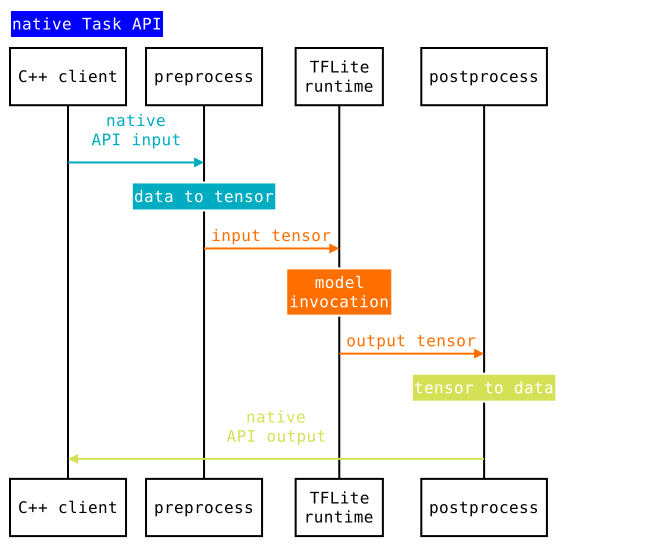
To build an API object,you must provide the following information by extending BaseTaskApi
-
Determine the API I/O- Your API should expose similar input/output across different platforms. e.g.
BertQuestionAnswerertakes two strings(std::string& context, std::string& question)as input and outputs a vector of possible answer and probabilities asstd::vector<QaAnswer>. This is done by specifying the corresponding types inBaseTaskApi's template parameter . With the template parameters specified, theBaseTaskApi::Inferfunction will have the correct input/output types. This function can be directly called by API clients, but it is a good practice to wrap it inside a model-specific function, in this case,BertQuestionAnswerer::Answer.class BertQuestionAnswerer : public BaseTaskApi < std :: vector<QaAnswer> , // OutputType const std :: string & , const std :: string & // InputTypes > { // Model specific function delegating calls to BaseTaskApi::Infer std :: vector<QaAnswer> Answer ( const std :: string & context , const std :: string & question ) { return Infer ( context , question ). value (); } } -
Provide conversion logic between API I/O and input/output tensor of the model- With input and output types specified, the subclasses also need to implement the typed functions
BaseTaskApi::PreprocessandBaseTaskApi::Postprocess. The two functions provide inputs and outputs from the TFLiteFlatBuffer. The subclass is responsible for assigning values from the API I/O to I/O tensors. See the complete implementation example inBertQuestionAnswerer.class BertQuestionAnswerer : public BaseTaskApi < std :: vector<QaAnswer> , // OutputType const std :: string & , const std :: string & // InputTypes > { // Convert API input into tensors absl :: Status BertQuestionAnswerer::Preprocess ( const std :: vector<TfLiteTensor * >& input_tensors , // input tensors of the model const std :: string & context , const std :: string & query // InputType of the API ) { // Perform tokenization on input strings ... // Populate IDs, Masks and SegmentIDs to corresponding input tensors PopulateTensor ( input_ids , input_tensors [ 0 ]); PopulateTensor ( input_mask , input_tensors [ 1 ]); PopulateTensor ( segment_ids , input_tensors [ 2 ]); return absl :: OkStatus (); } // Convert output tensors into API output StatusOr<std :: vector<QaAnswer> > // OutputType BertQuestionAnswerer::Postprocess ( const std :: vector<const TfLiteTensor * >& output_tensors , // output tensors of the model ) { // Get start/end logits of prediction result from output tensors std :: vector<float> end_logits ; std :: vector<float> start_logits ; // output_tensors[0]: end_logits FLOAT[1, 384] PopulateVector ( output_tensors [ 0 ], & end_logits ); // output_tensors[1]: start_logits FLOAT[1, 384] PopulateVector ( output_tensors [ 1 ], & start_logits ); ... std :: vector<QaAnswer :: Pos > orig_results ; // Look up the indices from vocabulary file and build results ... return orig_results ; } } -
Create factory functions of the API- A model file and a
OpResolverare needed to initialize thetflite::Interpreter.TaskAPIFactoryprovides utility functions to create BaseTaskApi instances.You must also provide any files associated with the model. e.g.,
BertQuestionAnswerercan also have an additional file for its tokenizer's vocabulary.class BertQuestionAnswerer : public BaseTaskApi < std :: vector<QaAnswer> , // OutputType const std :: string & , const std :: string & // InputTypes > { // Factory function to create the API instance StatusOr<std :: unique_ptr<QuestionAnswerer> > BertQuestionAnswerer::CreateBertQuestionAnswerer ( const std :: string & path_to_model , // model to passed to TaskApiFactory const std :: string & path_to_vocab // additional model specific files ) { // Creates an API object by calling one of the utils from TaskAPIFactory std :: unique_ptr<BertQuestionAnswerer> api_to_init ; ASSIGN_OR_RETURN ( api_to_init , core :: TaskAPIFactory :: CreateFromFile<BertQuestionAnswerer> ( path_to_model , absl :: make_unique<tflite :: ops :: builtin :: BuiltinOpResolver > (), kNumLiteThreads )); // Perform additional model specific initializations // In this case building a vocabulary vector from the vocab file. api_to_init - > InitializeVocab ( path_to_vocab ); return api_to_init ; } }
Android API
Create Android APIs by defining Java/Kotlin interface and delegating the logic to the C++ layer through JNI. Android API requires native API to be built first.
Sample usage
Here is an example using Java BertQuestionAnswerer
for MobileBert
.
 String

 BERT_MODEL_FILE

 =

 "path/to/model.tflite"
 ;

 String

 VOCAB_FILE

 =

 "path/to/vocab.txt"
 ;

 // Create the API from a model file and vocabulary file

 BertQuestionAnswerer

 bertQuestionAnswerer

 =

 BertQuestionAnswerer
 .
 createBertQuestionAnswerer
 (

 ApplicationProvider
 .
 getApplicationContext
 (),

 BERT_MODEL_FILE
 ,

 VOCAB_FILE
 );

 String

 CONTEXT

 =

 ...;

 // context of a question to be answered

 String

 QUESTION

 =

 ...;

 // question to be answered

 // ask a question

 List<QaAnswer>

 answers

 =

 bertQuestionAnswerer
 .
 answer
 (
 CONTEXT
 ,

 QUESTION
 );

 // answers.get(0).text is the best answer
Building the API
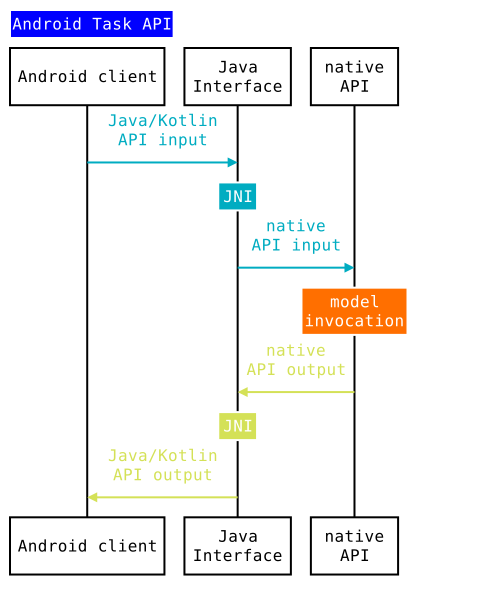
Similar to Native APIs, to build an API object, the client needs to provide the
following information by extending BaseTaskApi
,
which provides JNI handlings for all Java Task APIs.
-
Determine the API I/O- This usually mirrors the native interfaces. e.g.
BertQuestionAnswerertakes(String context, String question)as input and outputsList<QaAnswer>. The implementation calls a private native function with similar signature, except it has an additional parameterlong nativeHandle, which is the pointer returned from C++.class BertQuestionAnswerer extends BaseTaskApi { public List<QaAnswer> answer ( String context , String question ) { return answerNative ( getNativeHandle (), context , question ); } private static native List<QaAnswer> answerNative ( long nativeHandle , // C++ pointer String context , String question // API I/O ); } -
Create factory functions of the API- This also mirrors native factory functions, except Android factory functions also need to take
Contextfor file access. The implementation calls one of the utilities inTaskJniUtilsto build the corresponding C++ API object and pass its pointer to theBaseTaskApiconstructor.class BertQuestionAnswerer extends BaseTaskApi { private static final String BERT_QUESTION_ANSWERER_NATIVE_LIBNAME = "bert_question_answerer_jni" ; // Extending super constructor by providing the // native handle(pointer of corresponding C++ API object) private BertQuestionAnswerer ( long nativeHandle ) { super ( nativeHandle ); } public static BertQuestionAnswerer createBertQuestionAnswerer ( Context context , // Accessing Android files String pathToModel , String pathToVocab ) { return new BertQuestionAnswerer ( // The util first try loads the JNI module with name // BERT_QUESTION_ANSWERER_NATIVE_LIBNAME, then opens two files, // converts them into ByteBuffer, finally ::initJniWithBertByteBuffers // is called with the buffer for a C++ API object pointer TaskJniUtils . createHandleWithMultipleAssetFilesFromLibrary ( context , BertQuestionAnswerer :: initJniWithBertByteBuffers , BERT_QUESTION_ANSWERER_NATIVE_LIBNAME , pathToModel , pathToVocab )); } // modelBuffers[0] is tflite model file buffer, and modelBuffers[1] is vocab file buffer. // returns C++ API object pointer casted to long private static native long initJniWithBertByteBuffers ( ByteBuffer ... modelBuffers ); } -
Implement the JNI module for native functions- All Java native methods are implemented by calling a corresponding native function from the JNI module. The factory functions would create a native API object and return its pointer as a long type to Java. In later calls to Java API, the long type pointer is passed back to JNI and cast back to the native API object. The native API results are then converted back to Java results.
For example, this is how bert_question_answerer_jni is implemented.
 // Implements BertQuestionAnswerer::initJniWithBertByteBuffers

 extern

 "C"

 JNIEXPORT

 jlong

 JNICALL

 Java_org_tensorflow_lite_task_text_qa_BertQuestionAnswerer_initJniWithBertByteBuffers
 (

 JNIEnv
 *

 env
 ,

 jclass

 thiz
 ,

 jobjectArray

 model_buffers
 )

 {

 // Convert Java ByteBuffer object into a buffer that can be read by native factory functions

 absl
 ::
 string_view

 model

 =

 GetMappedFileBuffer
 (
 env
 ,

 env
 -
> GetObjectArrayElement
 (
 model_buffers
 ,

 0
 ));

 // Creates the native API object

 absl
 ::
 StatusOr<std
 ::
 unique_ptr<QuestionAnswerer>
>
 status

 =

 BertQuestionAnswerer
 ::
 CreateFromBuffer
 (

 model
 .
 data
 (),

 model
 .
 size
 ());

 if

 (
 status
 .
 ok
 ())

 {

 // converts the object pointer to jlong and return to Java.

 return

 reinterpret_cast<jlong>
 (
 status
 -
> release
 ());

 }

 else

 {

 return

 kInvalidPointer
 ;

 }

 }

 // Implements BertQuestionAnswerer::answerNative

 extern

 "C"

 JNIEXPORT

 jobject

 JNICALL

 Java_org_tensorflow_lite_task_text_qa_BertQuestionAnswerer_answerNative
 (

 JNIEnv
 *

 env
 ,

 jclass

 thiz
 ,

 jlong

 native_handle
 ,

 jstring

 context
 ,

 jstring

 question
 )

 {

 // Convert long to native API object pointer

 QuestionAnswerer
 *

 question_answerer

 =

 reinterpret_cast<QuestionAnswerer
 *
> (
 native_handle
 );

 // Calls the native API

 std
 ::
 vector<QaAnswer>

 results

 =

 question_answerer
 -
> Answer
 (
 JStringToString
 (
 env
 ,

 context
 ),

 JStringToString
 (
 env
 ,

 question
 ));

 // Converts native result(std::vector<QaAnswer>) to Java result(List<QaAnswerer>)

 jclass

 qa_answer_class

 =

 env
 -
> FindClass
 (
 "org/tensorflow/lite/task/text/qa/QaAnswer"
 );

 jmethodID

 qa_answer_ctor

 =

 env
 -
> GetMethodID
 (
 qa_answer_class
 ,

 "<init>"
 ,

 "(Ljava/lang/String;IIF)V"
 );

 return

 ConvertVectorToArrayList<QaAnswer>
 (

 env
 ,

 results
 ,

 [
 env
 ,

 qa_answer_class
 ,

 qa_answer_ctor
 ](
 const

 QaAnswer
&
 ans
 )

 {

 jstring

 text

 =

 env
 -
> NewStringUTF
 (
 ans
 .
 text
 .
 data
 ());

 jobject

 qa_answer

 =

 env
 -
> NewObject
 (
 qa_answer_class
 ,

 qa_answer_ctor
 ,

 text
 ,

 ans
 .
 pos
 .
 start
 ,

 ans
 .
 pos
 .
 end
 ,

 ans
 .
 pos
 .
 logit
 );

 env
 -
> DeleteLocalRef
 (
 text
 );

 return

 qa_answer
 ;

 });

 }

 // Implements BaseTaskApi::deinitJni by delete the native object

 extern

 "C"

 JNIEXPORT

 void

 JNICALL

 Java_task_core_BaseTaskApi_deinitJni
 (

 JNIEnv
 *

 env
 ,

 jobject

 thiz
 ,

 jlong

 native_handle
 )

 {

 delete

 reinterpret_cast<QuestionAnswerer
 *
> (
 native_handle
 );

 }
iOS API
Create iOS APIs by wrapping a native API object into a ObjC API object. The created API object can be used in either ObjC or Swift. iOS API requires the native API to be built first.
Sample usage
Here is an example using ObjC TFLBertQuestionAnswerer
for MobileBert
in Swift.
 static

 let

 mobileBertModelPath

 =

 "path/to/model.tflite"
 ;

 // Create the API from a model file and vocabulary file

 let

 mobileBertAnswerer

 =

 TFLBertQuestionAnswerer
 .
 mobilebertQuestionAnswerer
 (

 modelPath
 :

 mobileBertModelPath
 )

 static

 let

 context

 =

 ...;

 // context of a question to be answered

 static

 let

 question

 =

 ...;

 // question to be answered

 // ask a question

 let

 answers

 =

 mobileBertAnswerer
 .
 answer
 (

 context
 :

 TFLBertQuestionAnswererTest
 .
 context
 ,

 question
 :

 TFLBertQuestionAnswererTest
 .
 question
 )

 // answers.[0].text is the best answer
Building the API
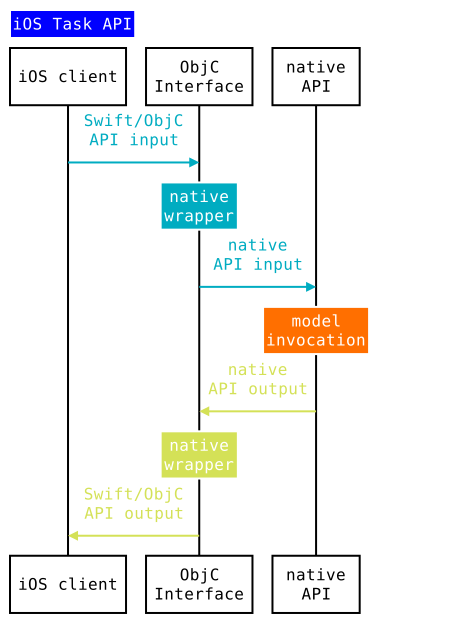
iOS API is a simple ObjC wrapper on top of native API. Build the API by following the steps below:
-
Define the ObjC wrapper- Define an ObjC class and delegate the implementations to the corresponding native API object. Note the native dependencies can only appear in a .mm file due to Swift's inability to interop with C++.
- .h file
@interface TFLBertQuestionAnswerer : NSObject // Delegate calls to the native BertQuestionAnswerer::CreateBertQuestionAnswerer + ( instancetype ) mobilebertQuestionAnswererWithModelPath : ( NSString * ) modelPath vocabPath :( NSString * ) vocabPath NS_SWIFT_NAME ( mobilebertQuestionAnswerer ( modelPath : vocabPath : )); // Delegate calls to the native BertQuestionAnswerer::Answer - ( NSArray<TFLQAAnswer *>* ) answerWithContext : ( NSString * ) context question :( NSString * ) question NS_SWIFT_NAME ( answer ( context : question : )); }- .mm file
 using

 BertQuestionAnswererCPP

 =

 ::
 tflite
 ::
 task
 ::
 text
 ::
 BertQuestionAnswerer
 ;

 @implementation
 TFLBertQuestionAnswerer
 {

 // define an iVar for the native API object

 std
 ::
 unique_ptr<QuestionAnswererCPP>

 _bertQuestionAnswerwer
 ;

 }

 // Initialize the native API object

 +

 (
 instancetype
 )
 mobilebertQuestionAnswererWithModelPath
 :
 (
 NSString

 *
 )
 modelPath

 vocabPath
 :(
 NSString

 *
 )
 vocabPath

 {

 absl
 ::
 StatusOr<std
 ::
 unique_ptr<QuestionAnswererCPP>
>
 cQuestionAnswerer

 =

 BertQuestionAnswererCPP
 ::
 CreateBertQuestionAnswerer
 (
 MakeString
 (
 modelPath
 ),

 MakeString
 (
 vocabPath
 ));

 _GTMDevAssert
 (
 cQuestionAnswerer
 .
 ok
 (),

 @"Failed to create BertQuestionAnswerer"
 );

 return

 [[
 TFLBertQuestionAnswerer

 alloc
 ]

 initWithQuestionAnswerer
 :
 std
 ::
 move
 (
 cQuestionAnswerer
 .
 value
 ())];

 }

 // Calls the native API and converts C++ results into ObjC results

 -

 (
 NSArray<TFLQAAnswer

 *
>
 *
 )
 answerWithContext
 :
 (
 NSString

 *
 )
 context

 question
 :
 (
 NSString

 *
 )
 question

 {

 std
 ::
 vector<QaAnswerCPP>

 results

 =

 _bertQuestionAnswerwer
 -
> Answer
 (
 MakeString
 (
 context
 ),

 MakeString
 (
 question
 ));

 return

 [
 self

 arrayFromVector
 :
 results
 ];

 }
 }
