
Skip to content
new ogbongeblog logo
  • Advertise
  • Blog
  • Contact

Show Author Profile Below Posts In Blogger Blog Without Editing HTML

September 16, 2013

·

Uncategorized
jidetheblogger Avatar
jidetheblogger

Recently, a new functionality was introduced to Blogger which makes it possible to display author profile below posts without adding any code to the blog’s html. The Author profile box looks similar to what you get if you add the Blogger About ME gadget to your blog and it makes most sense for multi-author blogs as it will make it easier for readers to identify each post’s author.

This functionality lets readers identify the author of a post by displaying the name, Google+ profile picture and a small description of the author below the post. Clicking on the Author’s name, takes the reader to the Google+ profile of the author. This without doubt, will help the author in getting more Google+ followers.

Below is a screenshot of my profile below a blog post on of my blogs:
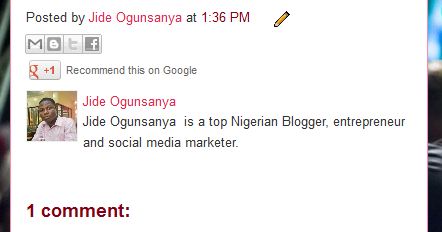
Blogger author profile box

To display your profile under your Blogger posts, you must have replaced your Blogger profile with Google+ profile .

Thereafter, you can log in to your Blogger dashboard, go to “ Layout ” and click the “edit” link of the “ Blog Posts ” gadget. You should see a new window similar to the one below:

Blog1 options

==> Tick the “ Show Author Profile Below Post ” box as shown in the screenshot. Also ensure you ticked the “ Post by …” box.

==> SAVE your settings and view your blog posts.

If you have a customized template and you don’t see the author profile below your blog posts, you may need to reset your Blog1 widget in the template editor for it to be added.

How To Reset Blog1 Widget Template

==> Go to “ Template ” > Edit HTML

==> Click the “ Revert widget templates to default ” tab

==> Select Blog1 from the list of widgets and click the “ revert selected widgets ” button.

==> SAVE your template and view your blog posts.

I hope it works for you.

NOTE : To edit the bio displayed in your Blogger author profile, go to the “About”section of your Google+ profile and edit the “Introduction”.

Recommended: How to display author profile below posts on Blogger mobile view

Please Share :
blogger tips

Like What You Read?

Sign Up to get similar articles delivered to your email inbox.

Leave a Reply Cancel reply

Your email address will not be published. Required fields are marked *

7 responses to “Show Author Profile Below Posts In Blogger Blog Without Editing HTML”

  1. Sinmi Avatar
    Sinmi
    September 15, 2013

    I tried it last week and didn't work on my customized template. I've reset the widget as explained and now showing. thx thx thx

    Loading…
    Reply
    1. Jide Oguns Avatar
      Jide Oguns
      September 17, 2013

      Glad it's now working for you. Happy blogging!

      Loading…
      Reply
  2. Olili Bob Avatar
    Olili Bob
    September 16, 2013

    Boss you are the bomb. I have been looking for a way to do this and you just made it easy for me, Tnx boss

    Loading…
    Reply
    1. Jide Oguns Avatar
      Jide Oguns
      September 17, 2013

      You're welcome bro.

      Loading…
      Reply
  3. Chidera Nzekwe Avatar
    Chidera Nzekwe
    November 6, 2014

    you too much

    Loading…
    Reply
  4. Henry Odili Avatar
    Henry Odili
    January 3, 2016

    Good work on the article. It worked as you said it would but something came up. The related posts at the bottom of my blogger posts vanished how do i get it back.

    Loading…
    Reply
  5. Ashok Kumar Avatar
    Ashok Kumar
    May 30, 2020

    My blogger blog does not show blog author profiles even after being enabled even after posted by option plz help

    Loading…
    Reply

WANT TO ADVERTISE?

Chat on WhatsApp

RELATED POSTS

  • How To Replace Blogger Profile with Google+ Profile
  • New Facebook Comment form for Blogger/Blogspot Blogs( reply & notifications enabled)
  • How To Add Feedburner Email Subscription Form BELOW Blog Posts of Blogger/Blogspot Blogs

FEATURED


  • CREDICORP launches C.L.I.C.K.D. Scheme with FG’s 3MTT Programme, expanding affordable consumer credit for locally-assembled laptops and devices for digital workers

    CREDICORP launches C.L.I.C.K.D. Scheme with FG’s 3MTT Programme, expanding affordable consumer credit for locally-assembled laptops and devices for digital workers

  • What Happens to Your Online Accounts When You Die?

    What Happens to Your Online Accounts When You Die?

JOIN AI WEB DESIGN GROUP


  • AI Website Design Training Whatsapp Group by Jidetheblogger

    AI Website Design Training Whatsapp Group by Jidetheblogger

← Blogger About Me Widget With Follow Button
Price of iPhone 5C and 5S in Nigeria At SLOT and Jumia →

Join 25,000+ subscribers

Receive our latest blog posts in your inbox.

Search

Social

Facebook

Instagram

Twitter

new ogbongeblog logo

Copyright © 2026 | About | Advertise | Featured | Sitemap | Privacy Policy | Powered by WordPress

Your cart (items: 0)

Products in cart

Product
Details
Total
Subtotal ₦0.00
Shipping and discounts calculated at checkout.
View my cart
Go to checkout

Your cart is currently empty!

Start shopping

Notifications

%d

    LIKE My Fan Page

    Privacy Policy | Copyright © 2012,OgbongeBlog.All Rights Reserved. Powered by Blogger .
    Create a Mobile Site
    View Site in Mobile | Classic
    Share by:


