Skip to content
new ogbongeblog logo
  • Advertise
  • Blog
  • Contact

Blogger Pages Tabs Linking To External web Address Not Working? The Solution

  1. Home
  2. Blog
  3. Uncategorized
  4. Blogger Pages Tabs Linking To External web Address Not Working? The Solution
October 15, 2012

Written by

jidetheblogger Avatar
jidetheblogger

Last Modified :

October 8, 2017

While scanning through my Blogger blog to see if something is broken, I noticed that the Pages tabs linking to external web addresses are not working. If I click the tabs, nothing happens and if I right-click to open their links in new windows, they lead to dead links.

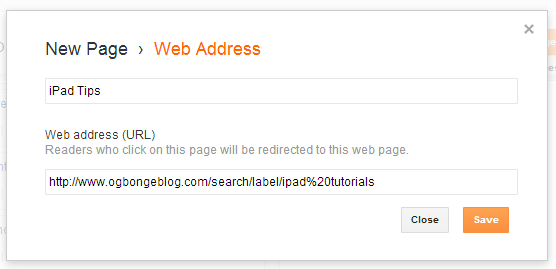
When I checked my Pages Editor, I saw:

Blogger tabs settings

instead of

Blogger tabs settings2

As you can see, the label link has been replaced by javascript: ;

While trying to find a solution, I stumbled on a post on the Known Issues for Blogger blog where Blogger announced that they are aware of the issue and working on fixing it as soon as possible.

So, What Is The Solution?

Instead of waiting for Blogger to automatically fix the problem, I decided to edit the tabs and replace the “ javascript ” with the respective links of the tabs .

I viewed my blog, clicked on the tabs and everything now works fine.

So, if you are experiencing similar problem, edit your tabs .

Are you facing the same problem? Have you been able to resolve the issue after following this tutorial? Please,let me know via comments.

If you do not know how to create and link tabs to external web addresses, read: “ How to add tabs to Blogger header section “.

Cheers!

Please Share :
blogger tips

Like What You Read?

Sign Up to get similar articles delivered to your email inbox.

Leave a Reply Cancel reply

Your email address will not be published. Required fields are marked *

3 responses to “Blogger Pages Tabs Linking To External web Address Not Working? The Solution”

  1. Tidus Avatar
    Tidus
    October 15, 2012

    Worked perfectly. Thumbs up.

    Loading…
    Reply
  2. Emmanuel Avatar
    Emmanuel
    October 15, 2012

    Was helpful. Never knew this thing is up but I'll go check all tabs on my site.

    Loading…
    Reply
  3. Anonymous Avatar
    Anonymous
    December 2, 2012

    Thank you.it worked..

    Loading…
    Reply

WANT TO ADVERTISE?

Chat on WhatsApp

RELATED POSTS

  • How I created Navigation Bar with tabs linking to Labels, External Links, Pages and Post Pages
  • How To Add Tabs to Blogger Blogs Header Section
  • How To Hide a Page from Showing In Blogger Navigation Menu

FEATURED


  • How to Pay Chinese Suppliers in RMB (Alipay & WeChat Pay) or Swap Naira, Kenyan Shillings, Ghana Cedis & USDT in Minutes

    How to Pay Chinese Suppliers in RMB (Alipay & WeChat Pay) or Swap Naira, Kenyan Shillings, Ghana Cedis & USDT in Minutes

JOIN AI WEB DESIGN GROUP


  • AI Website Design Training Whatsapp Group by Jidetheblogger

    AI Website Design Training Whatsapp Group by Jidetheblogger

RANDOM POSTS


    I Got One Free Month of Meta Verified After I Tried to Cancel My Subscription


    How To Make Money On Bamboo App: 5 Proven Ways


    How To Use Vibe Coding To Make Money


    How I Earn $100 Per Referral from Affiliate Marketing


    Bluetooth Printer That Connects To Phone


    Can I Use OPay Card for Facebook Ads?


    Why I Moved My Websites From Namecheap To Interserver.net


    How I Earn $50 Per Sale


MORE RANDOM POSTS
← OgbongeBlog Hits 10,000+ Verified Subscribers
Download PinShare App for BB: Meet Boys/Girls For BBM Chat →

Join 25,000+ subscribers

Receive our latest blog posts in your inbox.

Search

Social

Facebook

Instagram

Twitter

new ogbongeblog logo

Copyright © 2026 | About | Advertise | Featured | Sitemap | Privacy Policy | Powered by WordPress

Your cart (items: 0)

Products in cart

Product
Details
Total
Subtotal ₦0.00
Shipping and discounts calculated at checkout.
View cart
Go to checkout

Your shopping cart is empty

Return to shop

Notifications

%d

    LIKE My Fan Page

    Privacy Policy | Copyright © 2012,OgbongeBlog.All Rights Reserved. Powered by Blogger .
    Create a Mobile Site
    View Site in Mobile | Classic
    Share by: