
Skip to content
new ogbongeblog logo
  • Advertise
  • Blog
  • Contact

How to add Facebook Share & Like buttons, Digg and Tweet Button to the side of blogger/blogspot blogs

April 3, 2011

·

Uncategorized
jidetheblogger Avatar
jidetheblogger
ALERT : Get the updated floating share bar here . 

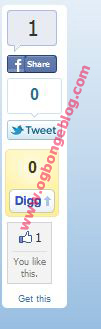
In this tutorial, I am sharing with you, how to add floating bar of social media buttons to a Blogger blog. This simple and very useful widget includes Facebook Share, Tweet, Digg and Facebook Like buttons. Each of them comes with a live counter.

This widget is a modified version of the widget originally created by BloggerSentral . In the modified version of the widget am sharing with you, I have introduced the facebook Like button and replaced the TweetMeme button with standard Tweet button. More so, the bar will float far to the left of your blog.

I. Adding the buttons

    Bar
  1. Login to your Blogger account.
  2. Go to Layout.
  3. Click Add A Gadget.
  4. In Add A Gadget window, select HTML/Javascript .
  5. Copy the code highlighted below and paste it inside the HTML/Javascript box. 
<!– floating page sharers Start Share This With Friends–>
<style>
#pageshare {position:fixed; bottom:15%; left:10px; float:left; border-radius:5px;-moz-border-radius:5px;-webkit-border-radius:5px;background-color:#fff;padding:0 0 2px 
0;z-index:10;}
#pageshare .sbutton {float:left;clear:both;margin:5px 5px 0 5px;}
.fb_share_count_top {width:48px !important;}
.fb_share_count_top, .fb_share_count_inner {-moz-border-radius:3px;-webkit-border-radius:3px;}
.FBConnectButton_Small, .FBConnectButton_RTL_Small {width:49px !important; -moz-border-radius:3px;-webkit-border-radius:3px;}
.FBConnectButton_Small .FBConnectButton_Text {padding:2px 2px 3px !important;-moz-border-radius:3px;-webkit-border-radius:3px;font-size:8px;}
</style>
<div id=’pageshare’ title=”Share This With Your Friends”>
<div class=’sbutton’ id=’fb’>
<a name=”fb_share” type=”box_count” href=”http://www.facebook.com/sharer.php”>Share</a><script src=”http://static.ak.fbcdn.net/connect.php/js/FB.Share” 
type=”text/javascript”></script>
</div>
<div class=’sbutton’ id=’rt’>
<a href=”http://twitter.com/share” class=”twitter-share-button” data-count=”vertical” >Tweet</a>
<script src=’http://platform.twitter.com/widgets.js’ type=”text/javascript”></script>
</div>
<div class=’sbutton’ id=’su’>
<script src=”http://www.stumbleupon.com/hostedbadge.php?s=5″></script>
</div>
<div class=’sbutton’ id=’digg’ style=’margin-left:3px;width:48px’>
<script src=’http://widgets.digg.com/buttons.js’ type=’text/javascript’></script>
<a class=”DiggThisButton DiggMedium”></a>
</div>
<div class=’sbutton’ id=’gb’>
<script src=”http://connect.facebook.net/en_US/all.js#xfbml=1″></script>
<fb:like layout=”box_count” show_faces=”false” font=””></fb:like></div>
<div style=”clear: both;font-size: 9px;text-align:center;”><a href=””>Get</a> <a href=””>this</a></div>
</div>
<!– floating page sharers End –>

Save the gadget and Click Save button on the upper right corner.

View Your blog and I hope it works for you.

UPDATE : If you want it to float to the right hand side of your blog, read:  https://www.ogbongeblog.com/2011/05/how-to-add-floating-share-bar-to-right.html

Join the BloggersLab on facebook today for instant answers to your blogging questions, while also connecting with other Bloggers.

Feel Free to share this blog post with your friends using the share buttons below this post.

If you have anything to contribute or ask, Kindly make use of the comment form below.

Please, do not forget to SUBSCRIBE to this blog, so that you can be receiving future Blogging tricks/tips , articles, freebies DIRECTLY into your email inbox, even when you are not online.

CLICK HERE TO SUBSCRIBE NOW!

CLICK HERE TO DOWNLOAD MY 20 FREE EBOOKS

Cheers!

    Please Share :
    blogger tips widgets

    Like What You Read?

    Sign Up to get similar articles delivered to your email inbox.

    Leave a Reply Cancel reply

    Your email address will not be published. Required fields are marked *

    18 responses to “How to add Facebook Share & Like buttons, Digg and Tweet Button to the side of blogger/blogspot blogs”

    1. Anonymous Avatar
      Anonymous
      April 3, 2011

      Thanks so much for this…i have really been wondering how you added this to your blog. Thanks once again.

      Loading…
      Reply
    2. cat poop Avatar
      cat poop
      April 9, 2011

      Thanks! it works for my blog well!

      Loading…
      Reply
    3. Tips For A Good Christian Living Avatar
      Tips For A Good Christian Living
      May 21, 2011

      Thanks man it worked for me.

      Loading…
      Reply
    4. THEMGPRODUCTIONS Avatar
      THEMGPRODUCTIONS
      June 18, 2011

      Very nice. But i think i have a problem..
      Look at mine http://photoshopph.blogspot.com/
      It doesnt look like whats the original looks.

      Loading…
      Reply
    5. Baxterius Avatar
      Baxterius
      August 6, 2011

      Hi, nice job.
      But i don't want the box to appear on my home page, but instead in each post page of the blogg.
      Can you help me?

      Loading…
      Reply
    6. Brent @ Turnkey Websites Avatar
      Brent @ Turnkey Websites
      August 30, 2011

      FWIW – This code isn't just for Blogger.

      I just took your code and added it to my HTML website. All I had to do was copy and paste, so easy. Out of all the floating social share codes I found, this was by far the easiest to ease.

      Loading…
      Reply
    7. Theodore Avatar
      Theodore
      September 9, 2011

      Works perfectly –

      See it in action here: http://secretlivesofobjects.blogspot.com

      Loading…
      Reply
    8. blogging tips Avatar
      blogging tips
      October 28, 2011

      wow, work perfectly, thanks blacky!

      Loading…
      Reply
    9. Tblogger SM Avatar
      Tblogger SM
      August 7, 2012

      hello like button does not points any page of facebook . So if a person click on that . they will like what . please say me. thank you.

      Loading…
      Reply
    10. gooodluck Avatar
      gooodluck
      September 28, 2012

      Thanks for nice update

      Loading…
      Reply
    11. Oluwafemi ketiku Avatar
      Oluwafemi ketiku
      October 13, 2012

      This is a nice post but i believe you can save some stress when you just use wibiya

      Loading…
      Reply
    12. Aloy Son Avatar
      Aloy Son
      February 3, 2013

      THANKS FOR YOUR NICE UPDATES

      Loading…
      Reply
    13. Oyedepo John Avatar
      Oyedepo John
      February 13, 2013

      Just used this for my mini site and it worked so great. Very simple copy and paste. Thanks for the post.

      Loading…
      Reply
    14. kampe blog Avatar
      kampe blog
      April 10, 2013

      thanks sir for this, great post installed on my blog now. thanks once again for this nice article and also tutorial

      Loading…
      Reply
    15. Asim Nawaz Avatar
      Asim Nawaz
      April 11, 2013

      Its not working on my site. I think that facebook has disabled this feature and replaced it with the like button.

      Loading…
      Reply
    16. Samson Ojedeji Avatar
      Samson Ojedeji
      April 18, 2013

      Wow. Lovely. I av wondered how to get that done several times. It worked. Thanks. But couldnt find the facebook like tab amongst the buttons.

      Loading…
      Reply
    17. santanu achar Avatar
      santanu achar
      July 20, 2015

      nice thank u

      Loading…
      Reply
    18. santanu achar Avatar
      santanu achar
      May 25, 2016

      thanks

      Loading…
      Reply

    WANT TO ADVERTISE?

    Chat on WhatsApp

    RELATED POSTS

    • How To Add Feedjit Live Traffic Widget To Blogger: 2011 Update
    • WordPress Sharing Plugin with Facebook Like Buttonsassy share plugin
    • Codes for Google+, Twitter and Facebook Follow Buttons

    FEATURED


    • CREDICORP launches C.L.I.C.K.D. Scheme with FG’s 3MTT Programme, expanding affordable consumer credit for locally-assembled laptops and devices for digital workers

      CREDICORP launches C.L.I.C.K.D. Scheme with FG’s 3MTT Programme, expanding affordable consumer credit for locally-assembled laptops and devices for digital workers

    • What Happens to Your Online Accounts When You Die?

      What Happens to Your Online Accounts When You Die?

    JOIN AI WEB DESIGN GROUP


    • AI Website Design Training Whatsapp Group by Jidetheblogger

      AI Website Design Training Whatsapp Group by Jidetheblogger

    ← Buy Cheap Recharge PINs/Cards In Nigeria plus free Universal Software
    How To Make N50,000 to N250,000 income per month In Nigeria →

    Join 25,000+ subscribers

    Receive our latest blog posts in your inbox.

    Search

    Social

    Facebook

    Instagram

    Twitter

    new ogbongeblog logo

    Copyright © 2026 | About | Advertise | Featured | Sitemap | Privacy Policy | Powered by WordPress

    Your cart (items: 0)

    Products in cart

    Product
    Details
    Total
    Subtotal ₦0.00
    Shipping and discounts calculated at checkout.
    View my cart
    Go to checkout

    Your cart is currently empty!

    Start shopping

    Notifications

    %d

      LIKE My Fan Page

      Privacy Policy | Copyright © 2012,OgbongeBlog.All Rights Reserved. Powered by Blogger .
      Create a Mobile Site
      View Site in Mobile | Classic
      Share by:


