
Skip to content
new ogbongeblog logo
  • Advertise
  • Blog
  • Contact

How To add Breadcrumb Navigation to Blogger/Blogspot

January 21, 2011

·

Uncategorized
jidetheblogger Avatar
jidetheblogger

With a “ breadcrumb-navigation ”, readers of your blog can easily know the position of an article that’s being read and also can search the articles in the same category.

If you have been reading www.ogbongeblog.com lately , you might have seen a simple row of navigation above the title of an article that you’re reading, like the screenshot below:

Breadcrumb

The navigation like above is known better by the name of “ breadcrumb-navigation ”.

With a few modifications to your blogger template code, you can add the  “ breadcrumb-navigation ” to your blogger blog. Just follow the steps below:

  1. Please log in to blogger with your ID
  2. Click Design
  3. Click Edit HTML tab
  4. Click Download Full Template and please back up your template first
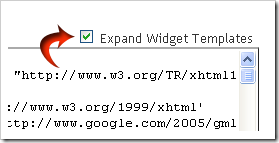
  5. Please check the small box beside Expand Widget Template
    expand
  6. Find the code ]]></b:skin>
  7. Copy and paste the code below exactly above the code ]]></b:skin>

    /* Breadcrumb from www.ogbongeblog.com
    ———————————————– */
    .breadcrumbs {
          padding:5px 5px 5px 0px;
            margin: 0px 0px 15px 0px;
          font-size:100%;
            line-height: 1.4em;
          border-bottom:3px double #e6e4e3;
          }

  8. Find the following code in your template :
    <div class=’post hentry uncustomized-post-template’>  or <div class=’post hentry’>
  9. Copy and paste the code below exactly below the code <div class=’post hentry uncustomized-post-template’> or <div class=’post hentry’>

    <b:if cond=’data:blog.homepageUrl == data:blog.url’>
          <b:else/>        <b:if cond=’data:blog.pageType == &quot;item&quot;’>
                <div class=’breadcrumbs’>

                 Browse &#187;  <a expr:href=’data:blog.homepageUrl’ rel=’tag’>Home</a>
            <b:loop values=’data:posts’ var=’post’>
              <b:if cond=’data:post.labels’>
                <b:loop values=’data:post.labels’ var=’label’>
                      <b:if cond=’data:label.isLast == &quot;true&quot;’> &#187;
                        <a expr:href=’data:label.url’ rel=’tag’><data:label.name/></a>
                      </b:if>
              </b:loop>
          &#187; <span><data:post.title/></span>
               </b:if>
            </b:loop>
                </div>
            </b:if>
          <b:else/>
          <b:if cond=’data:blog.pageType == &quot;archive&quot;’>
          <div class=’breadcrumbs’>
          Browse &#187; <a expr:href=’data:blog.homepageUrl’>Home</a> &#187; Archives for <data:blog.pageName/>
          </div>
          </b:if>
          <b:else/>
            <b:if cond=’data:navMessage’>
          <div class=’breadcrumbs’>
          <data:navMessage/>
          </div>
          </b:if>
          </b:if>

  10. Click Save Template button
  11. Wait for a while until your template saved
  12. Open your blog, click the title of an article, see the result
  13. Finished. 

If your steps are correct, view one of your blog posts, the “ breadcrumb-navigation ” will be like this:

Breadcrumb

Note : you must be categorizing your posts with “Labels” for this to really work.

I hope it works for you.

Feel free to check other Blogger tricks and tips .

If you are in need of more help or have anything to say, just use the comment from below this post, at www.ogbongeblog.com .

Credit

Please Share :
blogger tips

Like What You Read?

Sign Up to get similar articles delivered to your email inbox.

Leave a Reply Cancel reply

Your email address will not be published. Required fields are marked *

16 responses to “How To add Breadcrumb Navigation to Blogger/Blogspot”

  1. mr.jim Avatar
    mr.jim
    April 30, 2011

    VERY HELPFUL

    Loading…
    Reply
  2. Fewlines4Biju Avatar
    Fewlines4Biju
    May 6, 2011

    I have implemented in my web site http://www.fewlines4biju.com

    But my link is not working. Can any one help me out.

    Bijay http://www.fewlines4biju.com

    Loading…
    Reply
  3. Oluwayomi Obadina Avatar
    Oluwayomi Obadina
    August 1, 2011

    I just implemented this today,It was so easy and straight forward. Thanks pal. http://www.dreamersmine.blogspot.com

    Loading…
    Reply
  4. Jide Ogunsanya Avatar
    Jide Ogunsanya
    August 1, 2011

    @Oluwayomi…You are welcome bro.. Glad it worked for you.

    @Bijay..the tutorial is very straight forward.. Try and start all over again

    Loading…
    Reply
  5. topbody.info Avatar
    topbody.info
    September 8, 2011

    thank you very much!!! :X :X

    Loading…
    Reply
  6. trueinternetworld Avatar
    trueinternetworld
    September 16, 2011

    i have tried it but still not working. http://www.trueinternetworld.com

    Loading…
    Reply
  7. Jide Ogunsanya Avatar
    Jide Ogunsanya
    September 21, 2011

    Might be an issue with your template bro. Try it on a new Test blog and you will see it working.

    Loading…
    Reply
  8. Internet Investment Ideas Avatar
    Internet Investment Ideas
    April 18, 2012

    I just made use of this breadcrumb trick again and it worked perfectly well for my blog even though it is a third party template.Thanks once again for this blogging tip.

    Loading…
    Reply
  9. Emmanuel Obarhua Avatar
    Emmanuel Obarhua
    September 30, 2012

    I guess my template is the cos of this. It isn't working with my template. how do i go about this?

    Loading…
    Reply
  10. Ologundudu Opeoluwa Abraham Avatar
    Ologundudu Opeoluwa Abraham
    October 13, 2012

    i installed it and it worked. but it's only the last label tag that appears.is it possible to make all tags shows http://seasonedlife.blogspot.com/

    Loading…
    Reply
  11. Chukwuebuka Okwuosa Avatar
    Chukwuebuka Okwuosa
    June 13, 2014

    i wasnt able to fix mine sir, is there any ways else to this? http://www.currentechinfo.blogspot.com . please help a brother

    Loading…
    Reply
  12. hadharm Avatar
    hadharm
    January 25, 2015

    Although I don't find body hentry code but i placed it correctly thanks for this.

    Loading…
    Reply
  13. Chukwuemeka Elekanachi Avatar
    Chukwuemeka Elekanachi
    July 8, 2015

    Yea, i just forgot it and i have been looking for it. Tnx my Oga
    Let me implement it immediately @ http://www.emmyworldwide.com

    Loading…
    Reply
  14. Anonymous Avatar
    Anonymous
    April 9, 2016

    Thanks

    Loading…
    Reply
  15. Rasyid Habibie Avatar
    Rasyid Habibie
    May 28, 2016

    Is it possible to place the <b:include … of breadcrumb outside the main section? please.

    Loading…
    Reply
  16. Mahesar Avatar
    Mahesar
    April 13, 2018

    I just implemented this today,It was so easy and straightforward. Thanks pal. https://techstribe.com

    Loading…
    Reply

WANT TO ADVERTISE?

Chat on WhatsApp

RELATED POSTS

  • How to remove Navigation Bar of Blogspot Blogs : Latest trick
  • How I created Navigation Bar with tabs linking to Labels, External Links, Pages and Post Pages
  • How To Add Tabs to Blogger Blogs Header Section

FEATURED


  • CREDICORP launches C.L.I.C.K.D. Scheme with FG’s 3MTT Programme, expanding affordable consumer credit for locally-assembled laptops and devices for digital workers

    CREDICORP launches C.L.I.C.K.D. Scheme with FG’s 3MTT Programme, expanding affordable consumer credit for locally-assembled laptops and devices for digital workers

  • What Happens to Your Online Accounts When You Die?

    What Happens to Your Online Accounts When You Die?

JOIN AI WEB DESIGN GROUP


  • AI Website Design Training Whatsapp Group by Jidetheblogger

    AI Website Design Training Whatsapp Group by Jidetheblogger

← List of Globacom Outlets In Nigeria, Buy Glo Modem for N5000
How To Insert “LOVE SYMBOL” In Facebook Status Updates →

Join 25,000+ subscribers

Receive our latest blog posts in your inbox.

Search

Social

Facebook

Instagram

Twitter

new ogbongeblog logo

Copyright © 2026 | About | Advertise | Featured | Sitemap | Privacy Policy | Powered by WordPress

Your cart (items: 0)

Products in cart

Product
Details
Total
Subtotal ₦0.00
Shipping and discounts calculated at checkout.
View my cart
Go to checkout

Your cart is currently empty!

Start shopping

Notifications

%d

    LIKE My Fan Page

    Privacy Policy | Copyright © 2012,OgbongeBlog.All Rights Reserved. Powered by Blogger .
    Create a Mobile Site
    View Site in Mobile | Classic
    Share by:


