
Skip to content
new ogbongeblog logo
  • Advertise
  • Blog
  • Contact

Steps To Adding Breadcrumb Navigation Below Posts

December 23, 2012

·

Uncategorized
jidetheblogger Avatar
jidetheblogger

Readers of your blog can easily know which post and which section of your blog they are, if you have added the breadcrumb navigation to your blog. Most bloggers using wordpress and Blogger platforms use the navigation system alot to make their blog readers stay longer on their blogs.

Breadcrumb

I have explained how to add the breadcrumb navigation above post titles in Blogger blogs in one of the published posts on this blog but today, I am sharing with you, how you can add the navigation system right below your Blogger posts.

How To Get Started

Please, back up your Blogger template before implementing this trick.

  1. Log in to your dashboard via   www.blogger.com
  2. Click Template
  3. Click Edit HTML tab
  4. Please check the small box beside Expand Widget Template
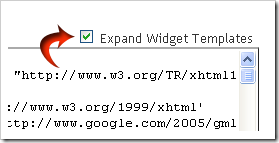
    expand
  5. Find the code ]]></b:skin>
  6. Copy the highlighted code below


    /* Breadcrumb from www.ogbongeblog.com
    ———————————————– */
    .breadcrumbs {
          padding:5px 5px 5px 0px;
            margin: 0px 0px 15px 0px;
          font-size:100%;
            line-height: 1.4em;
          border-bottom:3px double #e6e4e3;
          }

    and paste it  exactly above  the code  ]]></b:skin>

  7. Find the following code in your template :   <data:post.body/>
  8. Copy the code below:


    <b:if cond=’data:blog.homepageUrl == data:blog.url’>
          <b:else/>
            <b:if cond=’data:blog.pageType == &quot;item&quot;’>
                <div class=’breadcrumbs’>

                 Browse &#187;  <a expr:href=’data:blog.homepageUrl’ rel=’tag’>Home</a>
            <b:loop values=’data:posts’ var=’post’>
              <b:if cond=’data:post.labels’>
                <b:loop values=’data:post.labels’ var=’label’>
                      <b:if cond=’data:label.isLast == &quot;true&quot;’> &#187;
                        <a expr:href=’data:label.url’ rel=’tag’><data:label.name/></a>
                      </b:if>
              </b:loop>
          &#187; <span><data:post.title/></span>
               </b:if>
            </b:loop>
                </div>
            </b:if>
          <b:else/>
          <b:if cond=’data:blog.pageType == &quot;archive&quot;’>
          <div class=’breadcrumbs’>
          Browse &#187; <a expr:href=’data:blog.homepageUrl’>Home</a> &#187; Archives for <data:blog.pageName/>
          </div>
          </b:if>
          <b:else/>
            <b:if cond=’data:navMessage’>
          <div class=’breadcrumbs’>
          <data:navMessage/>
          </div>
          </b:if>
          </b:if>

  9. Paste it exactly below the :   <data:post.body/>
  10. Click Save Template button
  11. View one of your blog posts and scroll down the page and you should see something similar to: 
breadcrumb footer2

Note : You must be categorizing your posts with “ Labels ” for this to really work. if you don’t know how, read: “ How To Group Blog Posts into Categories “.

I hope it works for you.

Feel free to check other Blogger tricks and tips .

Please Share :
blogger tips

Like What You Read?

Sign Up to get similar articles delivered to your email inbox.

Leave a Reply Cancel reply

Your email address will not be published. Required fields are marked *

4 responses to “Steps To Adding Breadcrumb Navigation Below Posts”

  1. Franklin Avatar
    Franklin
    December 23, 2012

    Nice share. Will implement it once am on my computer later today but I think I will prefer it been at the top

    Loading…
    Reply
    1. Jide Oguns Avatar
      Jide Oguns
      December 26, 2012

      No problem. If you want it at the top, follow the tutorial quoted in the post.

      Loading…
      Reply
  2. david odes Avatar
    david odes
    December 26, 2012

    pls jide i wnat to install flash on my blog but i have no idea.i also wana know to advertise for people when they pay me on my blog plss i need your help my blog is nigeriatechonline.tk my mail is davrex9@gmail.com

    Loading…
    Reply
  3. NOKOT Avatar
    NOKOT
    March 8, 2013

    oga Jide i can't find these

    Loading…
    Reply

WANT TO ADVERTISE?

Chat on WhatsApp

RELATED POSTS

  • How To add Breadcrumb Navigation to Blogger/Blogspot
  • How to remove Navigation Bar of Blogspot Blogs : Latest trick
  • How To Add Tabs to Blogger Blogs Header Section

FEATURED


  • CREDICORP launches C.L.I.C.K.D. Scheme with FG’s 3MTT Programme, expanding affordable consumer credit for locally-assembled laptops and devices for digital workers

    CREDICORP launches C.L.I.C.K.D. Scheme with FG’s 3MTT Programme, expanding affordable consumer credit for locally-assembled laptops and devices for digital workers

  • What Happens to Your Online Accounts When You Die?

    What Happens to Your Online Accounts When You Die?

JOIN AI WEB DESIGN GROUP


  • AI Website Design Training Whatsapp Group by Jidetheblogger

    AI Website Design Training Whatsapp Group by Jidetheblogger

← Music.Eskimi.com: Download Nigerian Music Free
iTunes 12 Days of Gifts Starts Today →

Join 25,000+ subscribers

Receive our latest blog posts in your inbox.

Search

Social

Facebook

Instagram

Twitter

new ogbongeblog logo

Copyright © 2026 | About | Advertise | Featured | Sitemap | Privacy Policy | Powered by WordPress

Your cart (items: 0)

Products in cart

Product
Details
Total
Subtotal ₦0.00
Shipping and discounts calculated at checkout.
View my cart
Go to checkout

Your cart is currently empty!

Start shopping

Notifications

%d

    LIKE My Fan Page

    Privacy Policy | Copyright © 2012,OgbongeBlog.All Rights Reserved. Powered by Blogger .
    Create a Mobile Site
    View Site in Mobile | Classic
    Share by:


