

Places Insights lets you enhance your own data with statistical insights about points of interest data to make more informed business decisions.
Before you can query Places Insights data, you must first sign up to get access to the Places Insights product. Once your account has been onboarded, you will be able to subscribeto the Places Insights dataset for your target country.
Prerequisites
To access the Places Insights data, you must:
-
Sign up to request access to Places Insights.
-
Have a Google Cloud account.
If you don't have an account, click the Get Startedbutton that links to an interactive setup experience in the Cloud console for new users:
-
Enable the BigQuery API. For instructions on enabling BigQuery and for a tutorial on using BigQuery, see Query a public dataset with the Google Cloud console .
-
Enable the Analytics Hub API .
-
Ensure that your account has the Analytics Hub Subscription Owner (
roles/analyticshub.subscriptionOwner) role to perform subscriber tasks. -
Ensure that your account has the BigQuery User (
roles/bigquery.user) role to create datasets.For more information, see View and subscribe to listings .
Subscribe to the Places Insights dataset
Places Insights data is available for the cities and countries listed in the table below . Each city and country has its own data listing that you must subscribe to individually.
To subscribe to a listing:
-
Select the subscribe link for the city of interest from the table below .
-
A dialog opens for that country in the Google Cloud console. For example for the New York City, United States (US) listing:

-
Select the Subscribebutton in the dialog.
-
Confirm or edit the Project, Linked dataset name, Primary region, and Replica regionsin the dialog. You can choose to use the default listing name or you can optionally set the name to use your own naming convention.
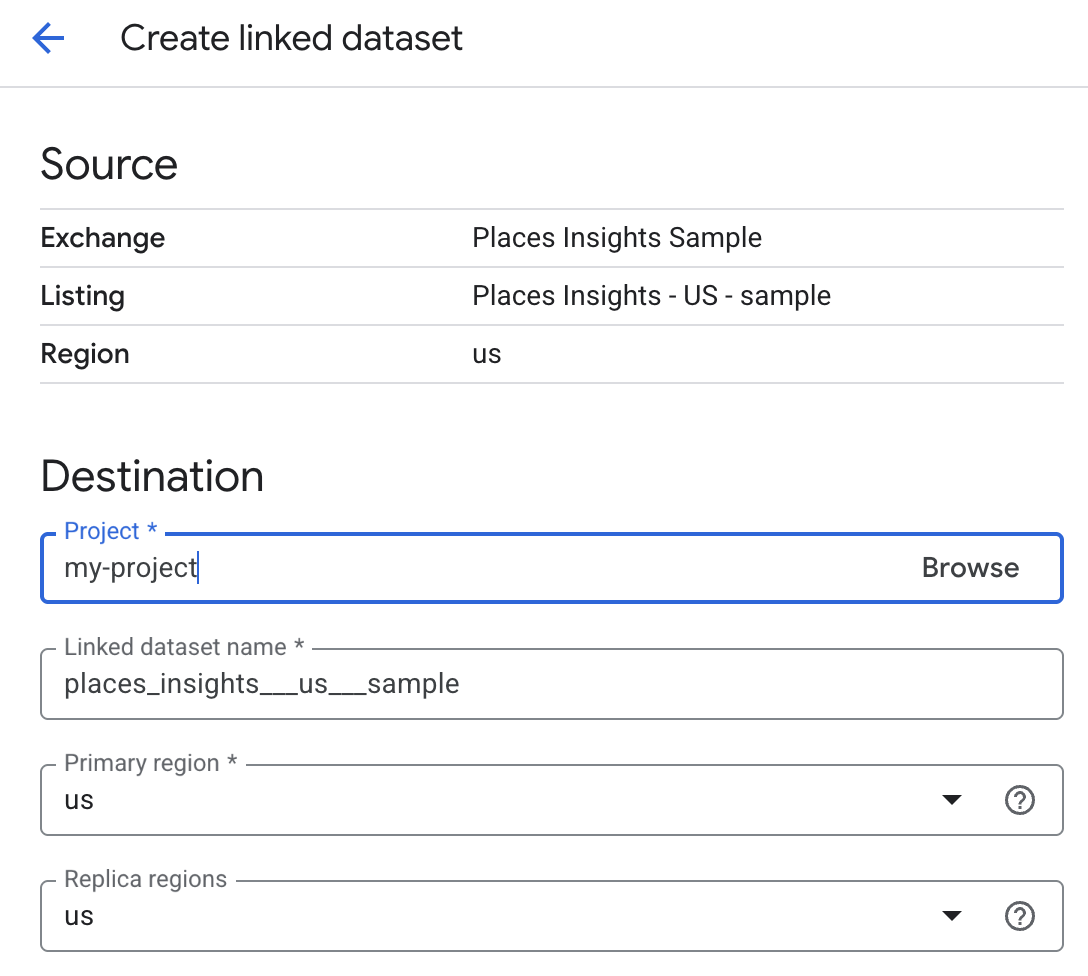
-
Select Save.
-
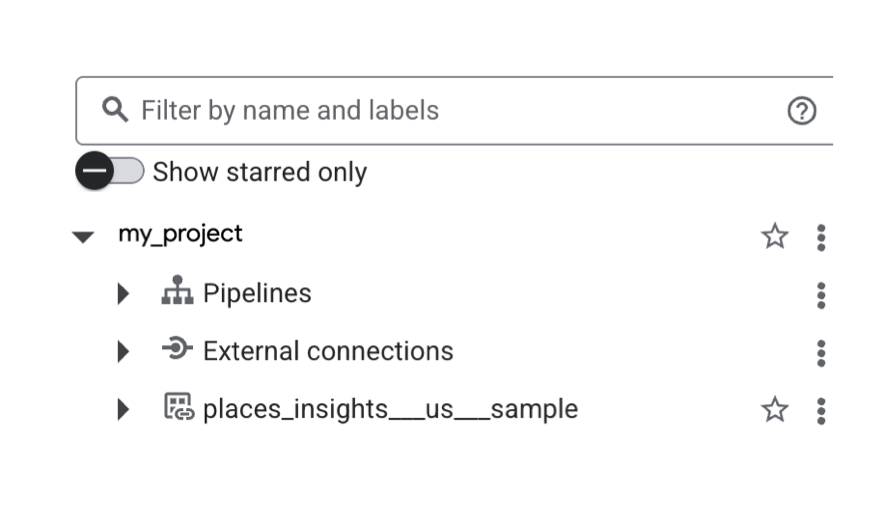
When complete, the table subscription appears in the BigQuery Explorerpanel in the Google Cloud console. In your SQL queries, use the table name shown below to access the data.
Available listings
The following tables list the supported cities and countries and provide links to subscribe. You can subscribe to sample data and full data for each city and country.
Once you have subscribed to one or more listings, run the following notebook to see the data in action within an interactive environment.


Sample data
| City, Country | Subscribe link | Table names |
|---|---|---|
|
Buenos Aires, Argentina
|
AR | |
|
Sydney, Australia
|
AU | |
|
Bad Gastein, Austria
|
AT | |
|
Riffa, Bahrain
|
BH | |
|
Brussels, Belgium
|
BE | |
|
Sao Paulo, Brazil
|
BR | |
|
Plovdiv, Bulgaria
|
BG | |
|
Toronto, Canada
|
CA | |
|
Santiago, Chile
|
CL | |
|
Medellín, Colombia
|
CO | |
|
Brno, Czechia
|
CZ | |
|
Copenhagen, Denmark
|
DK | |
|
Cairo, Egypt
|
EG | |
|
Helsinki, Finland
|
FI | |
|
Paris, France
|
FR | |
|
Berlin, Germany
|
DE | |
|
Athens, Greece
|
GR | |
|
Hong Kong, Hong Kong
|
HK | |
|
Debrecen, Hungary
|
HU | |
|
Mumbai, India
|
IN | |
|
Jakarta, Indonesia
|
ID | |
|
Cork, Ireland
|
IE | |
|
Tel Aviv-Yafo, Israel
|
IL | |
|
Rome, Italy
|
IT | |
|
Tokyo, Japan
|
JP | |
|
Busan, South Korea
|
KR | |
|
Kuala Lumpur, Malaysia
|
MY | |
|
Mexico City, Mexico
|
MX | |
|
Amsterdam, Netherlands
|
NL | |
|
Wellington, New Zealand
|
NZ | |
|
Oslo, Norway
|
NO | |
|
Arequipa, Peru
|
PE | |
|
Manila, Philippines
|
PH | |
|
Warsaw, Poland
|
PL | |
|
Lisbon, Portugal
|
PT | |
|
Lusail, Qatar
|
QA | |
|
Bucharest, Romania
|
RO | |
|
Jeddah, Saudi Arabia
|
SA | |
|
Singapore, Singapore
|
SG | |
|
Johannesburg, South Africa
|
ZA | |
|
Madrid, Spain
|
ES | |
|
Stockholm, Sweden
|
SE | |
|
Zurich, Switzerland
|
CH | |
|
Taipei, Taiwan
|
TW | |
|
Chiang Mai, Thailand
|
TH | |
|
Ankara, Turkey
|
TR | |
|
Sharjah, United Arab Emirates
|
AE | |
|
London, United Kingdom
|
GB | |
|
New York City, United States
|
US | |
|
Hanoi, Vietnam
|
VN | |
Full data
| Country | Subscribe link | Table names |
|---|---|---|
|
Argentina
|
AR | |
|
Australia
|
AU | |
|
Austria
|
AT | |
|
Bahrain
|
BH | |
|
Belgium
|
BE | |
|
Brazil
|
BR | |
|
Bulgaria
|
BG | |
|
Canada
|
CA | |
|
Chile
|
CL | |
|
Colombia
|
CO | |
|
Czechia
|
CZ | |
|
Denmark
|
DK | |
|
Egypt
|
EG | |
|
Finland
|
FI | |
|
France
|
FR | |
|
Germany
|
DE | |
|
Greece
|
GR | |
|
Hong Kong
|
HK | |
|
Hungary
|
HU | |
|
India
|
IN | |
|
Indonesia
|
ID | |
|
Ireland
|
IE | |
|
Israel
|
IL | |
|
Italy
|
IT | |
|
Japan
|
JP | |
|
Malaysia
|
MY | |
|
Mexico
|
MX | |
|
Netherlands
|
NL | |
|
New Zealand
|
NZ | |
|
Norway
|
NO | |
|
Peru
|
PE | |
|
Philippines
|
PH | |
|
Poland
|
PL | |
|
Portugal
|
PT | |
|
Qatar
|
QA | |
|
Romania
|
RO | |
|
Saudi Arabia
|
SA | |
|
Singapore
|
SG | |
|
South Africa
|
ZA | |
|
South Korea
|
KR | |
|
Spain
|
ES | |
|
Sweden
|
SE | |
|
Switzerland
|
CH | |
|
Taiwan
|
TW | |
|
Thailand
|
TH | |
|
Turkey
|
TR | |
|
United Arab Emirates
|
AE | |
|
United Kingdom
|
GB | |
|
United States
|
US | |
|
Vietnam
|
VN | |
