

The PLACES_COUNT
function returns a single count value of places based on the
specified search area and search filters. You must specify the search area to
the PLACES_COUNT
function and can optionally specify additional filter
parameters, such as place type, operating status, price level, and more.
Because the PLACES_COUNT
function returns a single value, call it using
a SELECT
clause.
-
Input parameters:
-
Required: The
geographyfilter parameter that specifies the search area. Thegeographyparameter takes a value defined by the BigQueryGEOGRAPHYdata type, which supports points, linestrings, and polygons. -
Optional: Additional filter parameters to refine your search.
-
-
Returns:
- A single
countvalue as anINT64.
- A single
Example: Calculate the number of places in a search radius
The simplest PLACES_COUNT
function call returns a single count of all places
in a geographical area. In this example, you return the count of all operational
places within 1000 meters of the Empire State building.
This example uses the BigQuery ST_GEOGPOINT
function to return a GEOGRAPHY
value from a point.
 SELECT

 ` PROJECT_NAME
.places_insights___us.PLACES_COUNT`
 (

 JSON_OBJECT
 (

  'geography'
 ,

 ST_GEOGPOINT
 (
 -
 73.9857
 ,

 40.7484
 ),

 -- Empire State Building

 'geography_radius'
 ,

 1000

 -- Radius in meters

 )
 )

 as

 count
 ;
The response contains a single count:
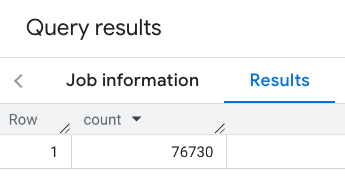
A more typical call applies filters to the search area. The next example uses filters to limit the search to only return a count of:
- Places of type
restaurantwith the minimum rating of 3 - A price level of inexpensive or medium
- Currently operational
- Allows dogs
 SELECT

 ` PROJECT_NAME
.places_insights___us.PLACES_COUNT`
 (

 JSON_OBJECT
 (

 'geography'
 ,

 ST_GEOGPOINT
 (
 -
 73.9857
 ,

 40.7484
 ),

 -- Empire State Building

 'geography_radius'
 ,

 1000
 ,

 -- Radius in meters

  'types'
 ,

 [
 "restaurant"
 ]
 ,

 'min_rating'
 ,

 3
 ,

 'price_level'
 ,

 [
 'PRICE_LEVEL_INEXPENSIVE'
 ,

 'PRICE_LEVEL_MODERATE'
 ]
 ,

 'business_status'
 ,

 [
 'OPERATIONAL'
 ]
 ,

 'allows_dogs'
 ,

 TRUE

 )
 )

 as

 count
 ;
The filtered response:

Remember that place dataset queries enforce a minimum count threshold of 5. One of the advantages of the place count functions is that they can return any counts, including 0. For example, the following call returns a count of 1:
 SELECT

 ` PROJECT_NAME
.places_insights___us.PLACES_COUNT`
 (

 JSON_OBJECT
 (

 'geography'
 ,

 ST_GEOGPOINT
 (
 -
 73.9857
 ,

 40.7484
 ),

 -- Empire State Building

 'geography_radius'
 ,

 500
 ,

 -- Radius in meters

 'types'
 ,

 [
 "restaurant"
 ]
 ,

 'min_rating'
 ,

 4.0
 ,

 'free_parking_lot'
 ,

 TRUE
 ,

 'good_for_watching_sports'
 ,

 TRUE

 )
 )

 as

 count
 ;
Example: Calculate the number of restaurants using a polygon
You can use a polygon to specify the search area. When using a polygon, the points of the polygon must define a closed loop where the first point in the polygon is the same as the last point.
This example uses the BigQuery ST_GEOGFROMTEXT
function to return a GEOGRAPHY
value from a polygon.
 DECLARE

 geo

 GEOGRAPHY
 ;
 SET

 geo

 =

 ST_GEOGFROMTEXT
 (
 '
 ''
 POLYGON((-73.985708 40.75773,-73.993324 40.750298,
 -73.9857 40.7484,-73.9785 40.7575,
 -73.985708 40.75773))
 ''
 '
 );

 -- NYC viewport
 SELECT

 ` PROJECT_NAME
.places_insights___us.PLACES_COUNT`
 (

 JSON_OBJECT
 (

  'geography'
 ,
 geo
 ,

 -- viewport

 'types'
 ,

 [
 "restaurant"
 ]
 ,

 'min_rating'
 ,

 1.0
 ,

 'max_rating'
 ,

 4.5
 ,

 'min_user_rating_count'
 ,

 1
 ,

 'max_user_rating_count'
 ,

 10000
 ,

 'price_level'
 ,

 [
 'PRICE_LEVEL_INEXPENSIVE'
 ,

 'PRICE_LEVEL_MODERATE'
 ]
 ,

 'business_status'
 ,

 [
 'OPERATIONAL'
 ]
 ,

 'allows_dogs'
 ,

 TRUE

 )
 )

 as

 count
 ;
The response for the viewport:
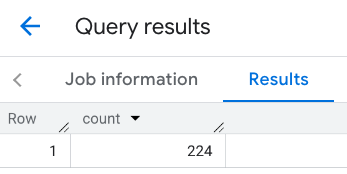
Example: Calculate the number of restaurants using a line
In the next example, you define the search area using a line of connected points with a search radius of 100 meters around the line. The line is similar to a travel route calculated by the Routes API . The route might be for a vehicle, a bicycle, or for a pedestrian:
 DECLARE

 geo

 GEOGRAPHY
 ;
 SET

 geo

 =

 ST_GEOGFROMTEXT
 (
 'LINESTRING(-73.98903537033028 40.73655649223003,-73.93580216278471 40.80955538843361)'
 );

 -- NYC line
 SELECT

 ` PROJECT_NAME
.places_insights___us.PLACES_COUNT`
 (

 JSON_OBJECT
 (

  'geography'
 ,
 geo
 ,

 -- line

 'geography_radius'
 ,

 100
 ,

 -- Radius around line

 'types'
 ,

 [
 "restaurant"
 ]
 ,

 'min_rating'
 ,

 1.0
 ,

 'max_rating'
 ,

 4.5
 ,

 'min_user_rating_count'
 ,

 1
 ,

 'max_user_rating_count'
 ,

 10000
 ,

 'price_level'
 ,

 [
 'PRICE_LEVEL_INEXPENSIVE'
 ,

 'PRICE_LEVEL_MODERATE'
 ]
 ,

 'business_status'
 ,

 [
 'OPERATIONAL'
 ]
 ,

 'allows_dogs'
 ,

 TRUE

 )
 )

 as

 count
 ;
The response for the line:
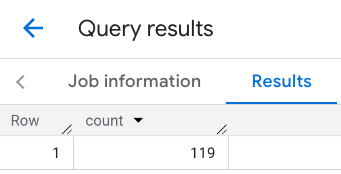
Example: Combine the results of multiple calls
You can combine the results of multiple calls to the PLACES_COUNT
function.
For example, you want a single result showing the number of restaurants for
the following price levels within a specific area:
-
PRICE_LEVEL_INEXPENSIVE -
PRICE_LEVEL_MODERATE -
PRICE_LEVEL_EXPENSIVE -
PRICE_LEVEL_VERY_EXPENSIVE"
In this example, you create a loop to call the PLACES_COUNT
function for each
price level, and insert the results of each call to a temporary table. You then
query the temporary table to display the results:
 -- Create a temp table to hold the results.
  CREATE

 TEMP

 TABLE

 results

 (
 type

 STRING
 ,

 count

 INT64
 );
 -- Create a loop that calls PLACES_COUNT for each price level.
  FOR

 types

 IN

 (
 SELECT

 type

 FROM

 UNNEST
 (
 [
 "PRICE_LEVEL_INEXPENSIVE"
 ,

 "PRICE_LEVEL_MODERATE"
 ,

 "PRICE_LEVEL_EXPENSIVE"
 ,

 "PRICE_LEVEL_VERY_EXPENSIVE"
 ]
 )

 as

 type
 )
 DO

 INSERT

 INTO

 results

 VALUES

 (
 types
 .
 type
 ,

 ` PROJECT_NAME
.places_insights___us.PLACES_COUNT`
 (

 JSON_OBJECT
 (

 'types'
 ,

 [
 "restaurant"
 ]
 ,

 'geography'
 ,

 ST_GEOGPOINT
 (
 -
 73.9857
 ,

 40.7484
 ),

 -- Empire State Building

 'geography_radius'
 ,

 1000
 ,

 -- Radius in meters

 'business_status'
 ,

 [
 'OPERATIONAL'
 ]
 ,

  'price_level'
 ,

 [
 types
 .
 type
 ]

 )));
 END

 FOR
 ;
 -- Query the table of results.
  SELECT

 *

 FROM

 results
 ;
The combined response:
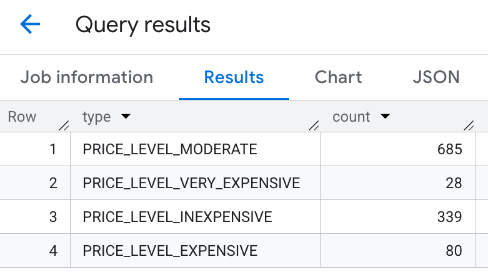
Another option is to use the UNION ALL
command to combine the results of
multiple SELECT
statements. The following example shows the same results as
from the previous example:
 SELECT

 "PRICE_LEVEL_INEXPENSIVE"

 as

 price_level
 ,

 ` PROJECT_NAME
.places_insights___us.PLACES_COUNT`
 (

 JSON_OBJECT
 (

 'types'
 ,

 [
 "restaurant"
 ]
 ,

 'geography'
 ,

 ST_GEOGPOINT
 (
 -
 73.9857
 ,

 40.7484
 ),

 -- Empire State Building

 'geography_radius'
 ,

 1000
 ,

 -- Radius in meters

 'business_status'
 ,

 [
 'OPERATIONAL'
 ]
 ,

  'price_level'
 ,

 [
 'PRICE_LEVEL_INEXPENSIVE'
 ]

 )
 )

 as

 count
  UNION

 ALL
 SELECT

 "PRICE_LEVEL_MODERATE"

 as

 price_level
 ,

 ` PROJECT_NAME
.places_insights___us.PLACES_COUNT`
 (

 JSON_OBJECT
 (

 'types'
 ,

 [
 "restaurant"
 ]
 ,

 'geography'
 ,

 ST_GEOGPOINT
 (
 -
 73.9857
 ,

 40.7484
 ),

 -- Empire State Building

 'geography_radius'
 ,

 1000
 ,

 -- Radius in meters

 'business_status'
 ,

 [
 'OPERATIONAL'
 ]
 ,

  'price_level'
 ,

 [
 'PRICE_LEVEL_MODERATE'
 ]

 )
 )

 as

 count
  UNION

 ALL
 SELECT

 "PRICE_LEVEL_EXPENSIVE"

 as

 price_level
 ,

 ` PROJECT_NAME
.places_insights___us.PLACES_COUNT`
 (

 JSON_OBJECT
 (

 'types'
 ,

 [
 "restaurant"
 ]
 ,

 'geography'
 ,

 ST_GEOGPOINT
 (
 -
 73.9857
 ,

 40.7484
 ),

 -- Empire State Building

 'geography_radius'
 ,

 1000
 ,

 -- Radius in meters

 'business_status'
 ,

 [
 'OPERATIONAL'
 ]
 ,

  'price_level'
 ,

 [
 'PRICE_LEVEL_EXPENSIVE'
 ]

 )
 )

 as

 count
  UNION

 ALL
 SELECT

 "PRICE_LEVEL_VERY_EXPENSIVE"

 as

 price_level
 ,

 ` PROJECT_NAME
.places_insights___us.PLACES_COUNT`
 (

 JSON_OBJECT
 (

 'types'
 ,

 [
 "restaurant"
 ]
 ,

 'geography'
 ,

 ST_GEOGPOINT
 (
 -
 73.9857
 ,

 40.7484
 ),

 -- Empire State Building

 'geography_radius'
 ,

 1000
 ,

 -- Radius in meters

 'business_status'
 ,

 [
 'OPERATIONAL'
 ]
 ,

  'price_level'
 ,

 [
 'PRICE_LEVEL_VERY_EXPENSIVE'
 ]

 )
 )

 as

 count
