To access Places Insights data directly, you write SQL queries in BigQuery that return aggregated insights about places. Results are returned from the dataset for the search criteria specified in the query.
If you need to get counts less than 5, consider using Places Count functions instead. These functions can return any counts, including 0, but enforce a minimum search area of 40.0 meters by 40.0 meters (1600 m 2 ). Learn more about when to query directly and when to use functions .
Query basics
The following image shows the basic format of a query:
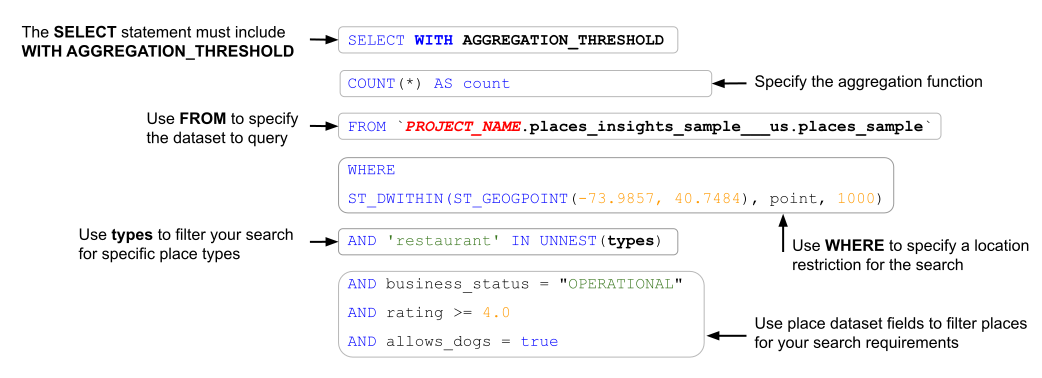
Each part of the query is described in more detail below.
Query requirements
SQL queries made directly on the dataset must specify the dataset and include WITH AGGREGATION_THRESHOLD
in the SELECT
clause. Without this, the query
will fail.
This example specifies places_insights___us.places
to query the dataset for
the United States.
  SELECT

 WITH

 AGGREGATION_THRESHOLD
 COUNT
 (
 *
 )

 AS

 count
 FROM

 ` PROJECT_NAME
.places_insights___us.places`
Specify a project name (optional)
You can optionally include your project name in the query. If you don't specify a project name, your query will default to the active project.
You may want to include your project name if you have linked datasets with the same name in different projects, or if you are querying a table outside of the active project.
For example, [project name].[dataset name].places
.
Specify an aggregation function
The example below shows the supported BigQuery aggregation functions . This query aggregates the ratings of all places situated within a 1000 meter radius of the Empire State Building in New York City to produce rating statistics:
 SELECT

 WITH

 AGGREGATION_THRESHOLD

 COUNT
 (
 id
 )

 AS

 place_count
 ,

 APPROX_COUNT_DISTINCT
 (
 rating
 )

 as

 distinct_ratings
 ,

 COUNTIF
 (
 rating

 >

 4.0
 )

 as

 good_rating_count
 ,

 LOGICAL_AND
 (
 rating

 <=

 5
 )

 as

 all_ratings_equal_or_below_five
 ,

 LOGICAL_OR
 (
 rating

 =

 5
 )

 as

 any_rating_exactly_five
 ,

 AVG
 (
 rating
 )

 as

 avg_rating
 ,

 SUM
 (
 user_rating_count
 )

 as

 rating_count
 ,

 COVAR_POP
 (
 rating
 ,

 user_rating_count
 )

 as

 rating_covar_pop
 ,

 COVAR_SAMP
 (
 rating
 ,

 user_rating_count
 )

 as

 rating_covar_samp
 ,

 STDDEV_POP
 (
 rating
 )

 as

 rating_stddev_pop
 ,

 STDDEV_SAMP
 (
 rating
 )

 as

 rating_stddev_samp
 ,

 VAR_POP
 (
 rating
 )

 as

 rating_var_pop
 ,

 VAR_SAMP
 (
 rating
 )

 as

 rating_var_samp
 ,
 FROM

 ` PROJECT_NAME
.places_insights___us.places`
 WHERE

 ST_DWITHIN
 (
 ST_GEOGPOINT
 (
 -
 73.9857
 ,

 40.7484
 ),

 point
 ,

 1000
 )

 AND

 business_status

 =

 "OPERATIONAL"
Specify a location restriction
If you don't specify a location restriction, the data aggregation is applied to the entiredataset. Typically you specify a location restriction to search a specific area. This example query specifies a target restriction centered on the Empire State Building in New York City, with a radius of 1000 meters.
 SELECT

 WITH

 AGGREGATION_THRESHOLD
 COUNT
 (
 *
 )

 AS

 count
 FROM

 ` PROJECT_NAME
.places_insights___us.places`
 WHERE
  ST_DWITHIN
 (
 ST_GEOGPOINT
 (
 -
 73.9857
 ,

 40.7484
 ),

 point
 ,

 1000
 )
You can use a polygon to specify the search area. When using a polygon, the points of the polygon must define a closed loop where the first point in the polygon is the same as the last point:
 SELECT

 WITH

 AGGREGATION_THRESHOLD
 COUNT
 (
 *
 )

 AS

 count
 FROM

 ` PROJECT_NAME
.places_insights___us.places`
 WHERE
 ST_CONTAINS
 (
 ST_GEOGFROMTEXT
 (
 "
 ""
 POLYGON((-73.985708 40.75773,-73.993324 40.750298,
 -73.9857 40.7484,-73.9785 40.7575,
 -73.985708 40.75773))
 ""
 "
 ),

 point
 )
In the next example, you define the search area using a line of connected points and set the search radius to 100 meters around the line. The line is similar to a travel route calculated by the Routes API . The route might be for a vehicle, a bicycle, or for a pedestrian:
 DECLARE

 route

 GEOGRAPHY
 ;
 SET

 route

 =

 ST_GEOGFROMTEXT
 (
 "
 ""
 LINESTRING(-73.98903537033028 40.73655649223003,
 -73.93580216278471 40.80955538843361)
 ""
 "
 );
 SELECT

 WITH

 AGGREGATION_THRESHOLD

 COUNT
 (
 *
 )

 AS

 count
 FROM

 ` PROJECT_NAME
.places_insights___us.places`
 WHERE

 ST_DWITHIN
 (
 route
 ,

 point
 ,

 100
 )
Filter by place dataset fields
Refine your search based on the fields defined by the dataset
schema
. Filter results based on
dataset fields such as place regular_opening_hours
, price_level
, and
customer rating
.
Reference any fields in the dataset defined by the dataset schema for your country of interest. The dataset schema for each country is comprised of two parts:
- The core schema that is common to the datasets for all countries.
- A country-specific schema that defines schema components specific to that country.
For example, your query can include a WHERE
clause that defines filtering
criteria for the query.
In the following example, you return aggregation data
for places of type tourist_attraction
with a business_status
of OPERATIONAL
, that have a rating
greater than or equal to 4.0, and with allows_dogs
set to true
:
 SELECT

 WITH

 AGGREGATION_THRESHOLD
 COUNT
 (
 *
 )

 AS

 count
 FROM

 ` PROJECT_NAME
.places_insights___us.places`
 WHERE
 ST_DWITHIN
 (
 ST_GEOGPOINT
 (
 -
 73.9857
 ,

 40.7484
 ),

 point
 ,

 1000
 )
  AND

 'tourist_attraction'

 IN

 UNNEST
 (
 types
 )
 AND

 business_status

 =

 "OPERATIONAL"
 AND

 rating

 >=

 4.0
 AND

 allows_dogs

 =

 true
The next query returns results for places that have at least eight EV charging stations:
 SELECT

 WITH

 AGGREGATION_THRESHOLD

 COUNT
 (
 *
 )

 AS

 count
 FROM

 ` PROJECT_NAME
.places_insights___us.places`
 WHERE

 ev_charge_options
 .
 connector_count

 >

 8
 ;
Filter on place primary type and place type
Each place in the dataset can have:
-
A single primary typeassociated with it from the types defined by Place types . For example, the primary type might be
mexican_restaurantorsteak_house. Useprimary_typein a query to filter the results on a place's primary type. -
Multiple type valuesassociated with it from the types defined by Place types . For example a restaurant might have the following types:
seafood_restaurant,restaurant,food,point_of_interest,establishment. Usetypesin a query to filter the results on the list of types associated with the place.
The following query returns results for all places with a primary type of skin_care_clinic
that also function as a spa
:
 SELECT

 WITH

 AGGREGATION_THRESHOLD

 COUNT
 (
 *
 )

 AS

 count
 FROM

 ` PROJECT_NAME
.places_insights___us.places`
 WHERE

 'spa'

 IN

 UNNEST
 (
 types
 )

 AND

 'skin_care_clinic'

 =

 primary_type
Filter by place ID
The example below computes the average rating for 5 places. The places are
identified by their place_id
.
 DECLARE

 place_ids

 ARRAY<STRING>
 ;
 SET

 place_ids

 =

 [
 'ChIJPQOh8YVZwokRE2WsbZI4tOk'
 ,

 'ChIJibtT3ohZwokR7tX0gp0nG8U'
 ,

 'ChIJdfD8moVZwokRO6vxjXAtoWs'
 ,

 'ChIJsdNONuFbwokRLM-yuifjb8k'
 ,

 'ChIJp0gKoClawokR0txqrcaEkFc'
 ]
 ;
 SELECT

 WITH

 AGGREGATION_THRESHOLD

 AVG
 (
 rating
 )

 as

 avg_rating
 ,
 FROM

 `PROJECT_NAME.places_insights___us.places`
 ,

 UNNEST
 (
 place_ids
 )

 place_id
 WHERE

 id

 =

 place_id
 ;
Filter out certain place IDs
You can also exclude an array of Place IDs from a query.
You can find the Place IDs you're looking for by using the Place ID finder , or programmatically using the Places API to perform a Text Search (New) request .
In the example below, the query finds the count of cafes in the 2000 postal code
of Sydney, Australia, that don't
appear in the excluded_cafes
array. Such a
query might be useful for a business owner who would like to exclude their own
businesses from a count.
 WITH

 excluded_cafes

 AS

 (

 -- List the specific place IDs to exclude from the final count

 SELECT

 *

 FROM

 UNNEST
 (
 [

 'ChIJLTcYGz-uEmsRmazk9oMnP5w'
 ,

 'ChIJeWDDDNOvEmsRF8SMPUwPbhw'
 ,

 'ChIJKdaKHbmvEmsRSdxq_1O05bU'

 ]
 )

 AS

 place_id
 )
 SELECT

 WITH

 AGGREGATION_THRESHOLD

 COUNT
 (
 *
 )

 AS

 count
 FROM

 `places_insights___au.places`

 AS

 places
 -- Perform a LEFT JOIN to identify which places are in the exclusion list
 LEFT

 JOIN

 excluded_cafes

 ON

 places
 .
 id

 =

 excluded_cafes
 .
 place_id
 WHERE

 -- Filter for specific place type and postal code

 places
 .
 primary_type

 =

 'cafe'

 AND

 '2000'

 IN

 UNNEST
 (
 places
 .
 postal_code_names
 )

 -- Keep only the rows where the join failed (meaning the ID was NOT in the list)

 AND

 excluded_cafes
 .
 place_id

 IS

 NULL
 ;
Filter on predefined data values
Many dataset fields have predefined values. For example
-
The
price_levelfield supports the following predefined values:-
PRICE_LEVEL_FREE -
PRICE_LEVEL_INEXPENSIVE -
PRICE_LEVEL_MODERATE -
PRICE_LEVEL_EXPENSIVE -
PRICE_LEVEL_VERY_EXPENSIVE
-
-
The
business_statusfield supports the following predefined values:-
OPERATIONAL -
CLOSED_TEMPORARILY -
CLOSED_PERMANENTLY -
FUTURE_OPENING
-
In this example, the query returns the count of all florists with a business_status
of OPERATIONAL
within a 1000 meter radius of the Empire
State Building in New York City:
 SELECT

 WITH

 AGGREGATION_THRESHOLD
 COUNT
 (
 *
 )

 AS

 count
 FROM

 ` PROJECT_NAME
.places_insights___us.places`
 WHERE
 ST_DWITHIN
 (
 ST_GEOGPOINT
 (
 -
 73.9857
 ,

 40.7484
 ),

 point
 ,

 1000
 )
 AND

 business_status

 =

 "OPERATIONAL"
 AND

 'florist'

 IN

 UNNEST
 (
 types
 )
Filter by hours of operation
In this example, return the count of all places in a geographic area with Friday happy hours:
 SELECT

 WITH

 AGGREGATION_THRESHOLD

 COUNT
 (
 *
 )

 AS

 count
 FROM

 ` PROJECT_NAME
.places_insights___us.places`
 ,
 UNNEST
 (
 regular_opening_hours_happy_hour
 .
 friday
 )

 AS

 friday_hours
 WHERE

 '17:00:00'

 BETWEEN

 friday_hours
 .
 start_time

 AND

 friday_hours
 .
 end_time
 AND

 ST_DWITHIN
 (
 ST_GEOGPOINT
 (
 -
 73.9857
 ,

 40.7484
 ),

 point
 ,

 1000
 );
Filter by Region (address components)
Our places dataset also contains a set of address components that are useful for
filtering results based on political boundaries. Each address component is
identified by their text code name ( 10002
for postal code in NYC) or place ID
( ChIJm5NfgIBZwokR6jLqucW0ipg
) for the equivalent postal code ID.
 SELECT

 WITH

 AGGREGATION_THRESHOLD

 COUNT
 (
 *
 )

 AS

 count
 FROM

 ` PROJECT_NAME
.places_insights___us.places`
 WHERE

 '10002'

 IN

 UNNEST
 (
 postal_code_names
 )

 -
 -- 'ChIJm5NfgIBZwokR6jLqucW0ipg'  IN UNNEST(postal_code_ids) -- same filter as above using postal code ID
Filter by EV charging
This example provides a count of the number of places with at least 8 ev chargers:
 SELECT

 WITH

 AGGREGATION_THRESHOLD

 COUNT
 (
 *
 )

 AS

 count
 FROM

 ` PROJECT_NAME
.places_insights___us.places`
 WHERE

 ev_charge_options
 .
 connector_count

 >

 8
 ;
This example counts the number of places that have at least 10 Tesla chargers that support fast charging:
 SELECT

 WITH

 AGGREGATION_THRESHOLD

 COUNT
 (
 *
 )

 AS

 count
 FROM

 ` PROJECT_NAME
.places_insights___us.places`
 ,

 UNNEST
 (
 ev_charge_options
 .
 connector_aggregation
 )

 as

 connectors
 WHERE

 connectors
 .
 type

 =
 'EV_CONNECTOR_TYPE_TESLA'

 AND

 connectors
 .
 max_charge_rate_kw

 >=

 50

 AND

 connectors
 .
 count

 >=

 10
Return result groups
The queries shown so far return a single row in the result that contains the
aggregation count for the query. You can also use the GROUP BY
operator to
return multiple rows in the response based on the grouping criteria.
For example, the following query returns results grouped by the primary type of each place in the search area:
 SELECT

 WITH

 AGGREGATION_THRESHOLD

 primary_type
 ,

 COUNT
 (
 *
 )

 AS

 count
 FROM

 ` PROJECT_NAME
.places_insights___us.places`
 WHERE

 ST_DWITHIN
 (
 ST_GEOGPOINT
 (
 -
 73.99992071622756
 ,

 40.71818785986936
 ),

 point
 ,

 1000
 )
 GROUP

 BY

 primary_type
This image shows an example output to this query:

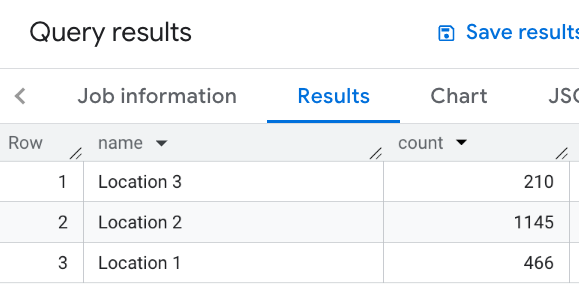
In this example you define a table of locations. For each location you then compute the number of nearby restaurants, meaning those within 1000 meters:
 WITH

 my_locations

 AS

 (

 SELECT

 'Location 1'

 AS

 name
 ,

 ST_GEOGPOINT
 (
 -
 74.00776440888504
 ,

 40.70932825380786
 )

 AS

 location

 UNION

 ALL

 SELECT

 'Location 2'

 AS

 name
 ,

 ST_GEOGPOINT
 (
 -
 73.98257192833559
 ,

 40.750738934863215
 )

 AS

 location

 UNION

 ALL

 SELECT

 'Location 3'

 AS

 name
 ,

 ST_GEOGPOINT
 (
 -
 73.94701794263223
 ,

 40.80792954838445
 )

 AS

 location
 )
 SELECT

 WITH

 AGGREGATION_THRESHOLD

 l
 .
 name
 ,

 COUNT
 (
 *
 )

 as

 count
 FROM

 ` PROJECT_NAME
.places_insights___us.places`
 JOIN

 my_locations

 l
 ON

 ST_DWITHIN
 (
 l
 .
 location
 ,

 p
 .
 point
 ,

 1000
 )
 WHERE

 primary_type

 =

 "restaurant"

 AND

 business_status

 =

 "OPERATIONAL"
 GROUP

 BY

 l
 .
 name
This image shows an example output to this query: