



2025年05月07日

カテゴリ: PCネット時計カメラ
https://plaza.rakuten.co.jp/szwine/diary/202505060000/
スマホ買い替え(その2)〜結局Xperia1VIの中古を購入
というわけで、GW前に新しいスマホXpearia1VIを購入したわけだが。今回特に気を使ったのは、データの移行だった。
というのも、気づけばここ数年でデジタル会員証の類が劇的に増えて、そのすべてのIDとパスをきちんと控えていたわけでないからだ(汗)。
*まず、これはヤバいなぁと思ったのは、「マイナポータル」だ。
機種変更の際、古い端末で「スマホ用電子証明書」に登録している場合、こちらをまず失効させ、新しい端末で新たに登録しなおさなければならない。これらの手続き方法はデジタル庁のマニュアルを参照できるのだが、これがまたいかにもお役所の仕事らしく、「わかりやすいようでわかりずらい」のである。また、電子利用証明書には、「利用者証明用電子証明書」と「署名用電子証明書」の2種類あるということも、今回の作業で初めて知った。移行作業自体は大した手間ではなかったのだが、このようにそもそもの仕組み自体がわかりずらいので、非常にストレスがたまった。
*次に気を使ったのが、「LINE」と「SUICA」。どちらも過去の機種変更で痛い思いをしているからだ。しかし、これらについては、アプリ自体の改善も進んでいるのか、それほどストレスを感じずに移行させることができた。
なお、私の場合、SUICA以外にEDYにもいくらか残額が残っていた(実質的に全く使っていないのだが)ので、こちらの移行手続きもしなければならなかった。これら「おさいふケータイ」アプリは、ひとつずつ丁寧に消しておかないと、旧端末を売りに出すときにショップに買い取ってもらえないので、注意が必要だ。
*銀行アプリや証券アプリの中には、ワンタイムパスワードを再設定しなければならなかったり、「信頼できる端末」の設定を変えなければならないアプリもあった。
*ドトールとかスタバとか、タリーズなど、それぞれのiDのカフェのアプリにチャージしてあったので、これらの移行も必要だった(とはいえ、難しいものではなかった。)
*さらに私の場合、ローカルのストレージにも音楽ファイル(100GB超)を入れているので、こちらに移行にひどく時間がかかった。
データの移行は、Googleのツールを使ってもできるが、私の場合、前述のようにとにかくデータ量が大きかったので、有線で新旧スマホを繋いで、「Xperia Transfer」という専用アプリで移行させた。それでも移行には1時間以上かかった。
また、アプリによっては、設定が引き継がれないものがあるので、それらの設定にも時間を要した。結局ほぼ丸一日かかってどうにか仕上がった。
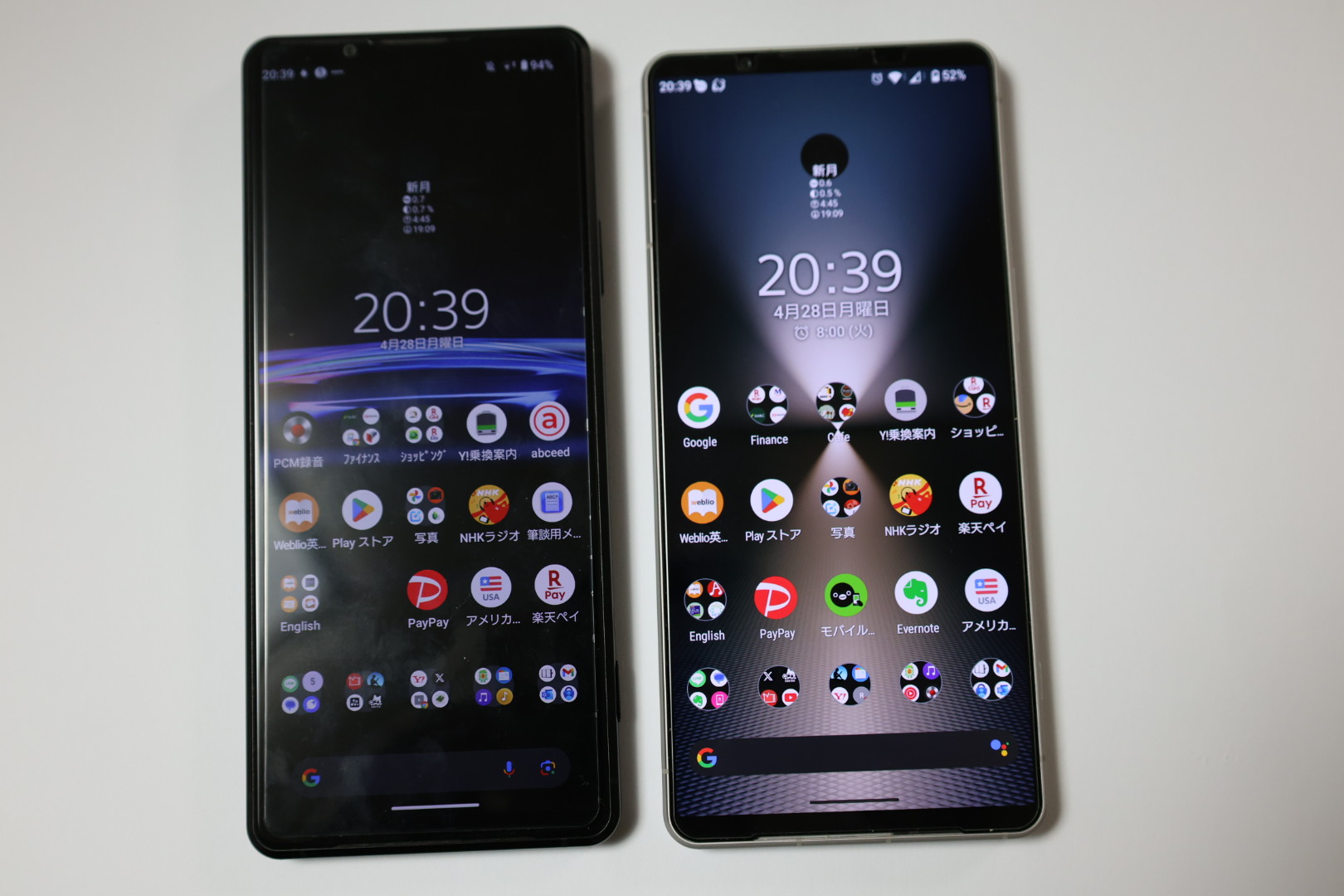
左が旧端末のXperia Pro-i。画面のアスペクト比が21:9の縦長から19.5:9に変更された。解像度は4KからHD+にダウングレードとなったが、私の目では特にネガは感じられず、むしろバッテリーがよく保つようになったほうが嬉しい。
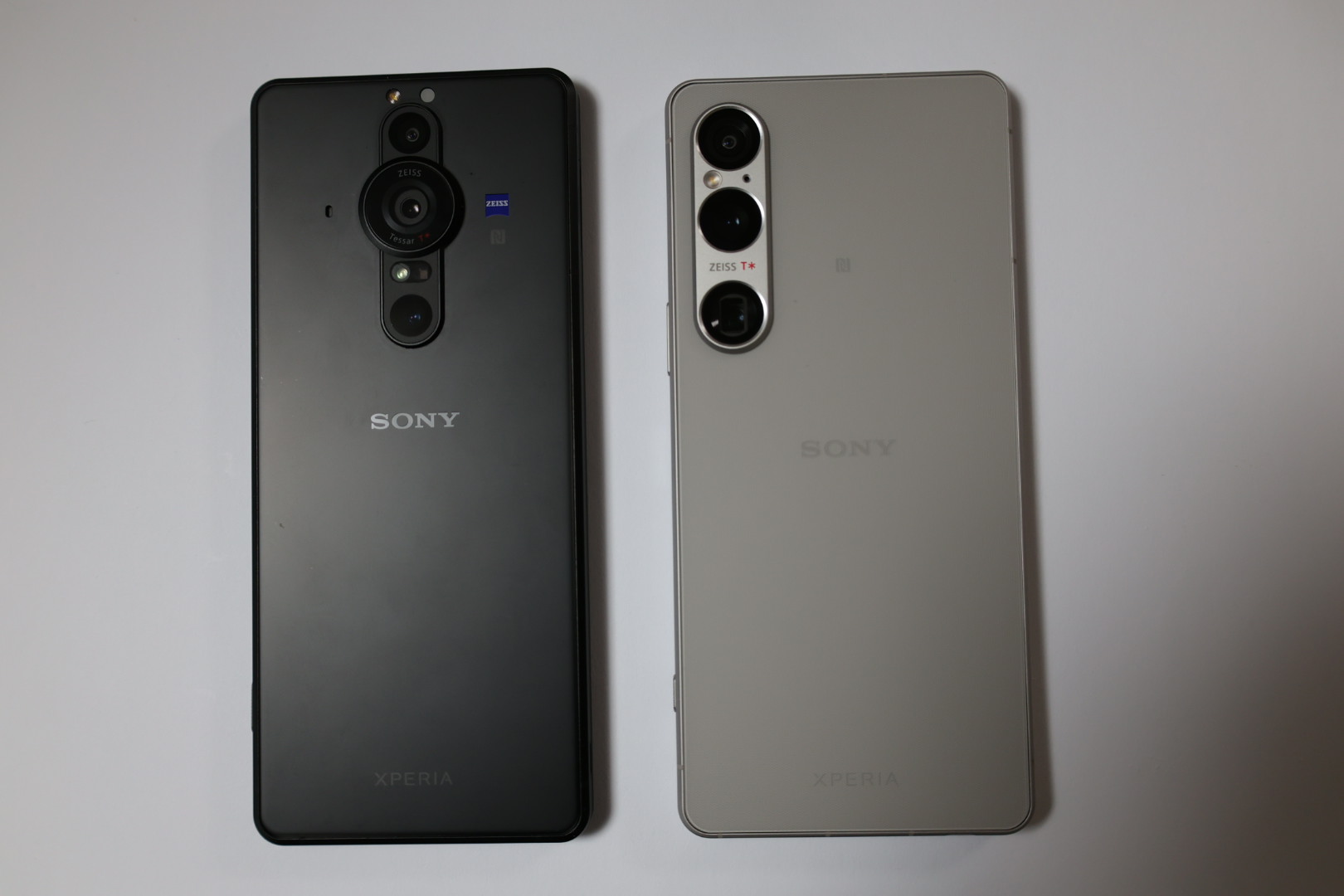
21:9の縦長サイズに長年慣れ親しんでいたせいか、ほんの数ミリとはいえ、横幅が広がって思いのほか持ちずらさを感じている。まあこれは慣れるしかないのだろう。
新しいスマホに変えて、なによりありがたいのは「バッテリがよく保つ」ことだ。旧端末は朝満充電にしていても、日中デスクで充電しないと心もとなかったし、モバイルバッテリーは手放せなかった。新端末については、「いたわり充電」でMAX80%に留めているが、かなり使い込んだなぁという日でも就寝前の時点でおおむね30%以上は残っている。満充電にしておけば、おそらく丸2日保つと思われる。
それ以外にも、画面の明るさとか、カメラの使い勝手とか、Xperia1 Pro-iからの進化は小さくないと実感しているが、正直、ちょっと期待外れだった部分もある。これらについては、もう少し使い込んだところで改めてレポートしたい。
翌週、「じゃんぱら」の渋谷店にXperia Pro-iを売却しに行った。売却を急いだ理由は、GWが明けて新型が発表されると、中古の販売価格、買い取り価格ともに多少の値崩れが予想されるからだ。
購入直後にガラスフィルムを貼り、常時ケースをつけて、丁寧に使っていたにも関わらず、査定は「全般に細かい傷がある」とのこと。結局買い取り額は52500円だった。同じ店でアイパッドを売ったときは、即満額評価だったものだが、やはりアンドロイド端末の下取り・買取りはシブイのかもしれない。
*****************************************
So, I purchased the new Xperia 1 VI just before Golden Week. This time, I was especially careful about transferring my data. Over the past few years, the number of digital membership cards and IDs I use has increased dramatically, and I hadn’t properly recorded all the IDs and passwords (sweat).
When switching devices, if you have a smartphone electronic certificate registered on the old device, you must first revoke it there, then register a new one on the new device. Although there is a manual by the Digital Agency explaining the procedure, it’s typical government work — “clear yet confusing.” Also, I only learned through this process that there are actually two types of electronic certificates: one for user identification and another for digital signatures. The transfer itself wasn’t very complicated, but the system as a whole is so hard to understand that it was very frustrating.
Next, I was cautious with LINE and SUICA because I had painful experiences transferring these in the past. However, this time, maybe due to improvements in the apps themselves, the migration went quite smoothly without much stress.
Also, I had some balance left on Edy besides SUICA (although I hardly used it), so I had to handle transferring that too. With these “Osaifu-Keitai” wallet apps, you must carefully delete each one before selling your old phone, otherwise the shop may refuse to buy it.
Some banking and securities apps required resetting one-time passwords or changing “trusted device” settings.
I also had to transfer balances on various café apps for iD payments, like Doutor, Starbucks, and Tully’s. That wasn’t particularly difficult, though.
Furthermore, I keep music files (over 100 GB) on local storage, which took an extremely long time to transfer.
Although Google’s transfer tool can do most of this, because of the huge amount of data, I connected the old and new phones with a cable and used Sony’s dedicated app “Xperia Transfer.” Even then, it took over an hour to complete. Some apps don’t retain their settings on transfer, so I had to spend extra time configuring them. All in all, it took almost a full day to finish everything.
The left phone in the photo is my old Xperia Pro-i. The screen aspect ratio changed from the tall 21:9 to 19.5:9. The resolution dropped from 4K to HD+, but I don’t notice any negative impact, and I’m actually happier that the battery lasts much longer now.
I was so used to the tall 21:9 screen that even a few millimeters wider feels surprisingly uncomfortable to hold. Well, I guess I just have to get used to it.
What I appreciate most about the new phone is how long the battery lasts. Even when fully charged in the morning, my old phone needed charging at my desk during the day, and I always had to carry a mobile battery pack. With the new phone, I use the “battery care” setting that limits charge to 80%, yet even on heavy-use days, I usually have over 30% left before bed. If fully charged, I think it can last about two full days.
I also feel significant improvements in screen brightness and camera usability compared to the Xperia 1 Pro-i. However, to be honest, there are some areas where it fell a bit short of my expectations. I’ll report on those after using it a bit more.
The following week, I went to the “Janpara” store in Shibuya to sell my Xperia Pro-i. I wanted to sell it quickly because with the new model announcement after Golden Week, both used selling and buying prices were expected to drop somewhat.
Despite always using a glass screen protector and a case carefully, the assessment noted “overall minor scratches.” In the end, I got 52,500 yen for it. When I sold my iPad at the same store, it was immediately appraised at full price, so maybe Android devices just don’t fetch as good resale value.
スマホ買い替え(その2)〜結局Xperia1VIの中古を購入
というわけで、GW前に新しいスマホXpearia1VIを購入したわけだが。今回特に気を使ったのは、データの移行だった。
というのも、気づけばここ数年でデジタル会員証の類が劇的に増えて、そのすべてのIDとパスをきちんと控えていたわけでないからだ(汗)。
*まず、これはヤバいなぁと思ったのは、「マイナポータル」だ。
機種変更の際、古い端末で「スマホ用電子証明書」に登録している場合、こちらをまず失効させ、新しい端末で新たに登録しなおさなければならない。これらの手続き方法はデジタル庁のマニュアルを参照できるのだが、これがまたいかにもお役所の仕事らしく、「わかりやすいようでわかりずらい」のである。また、電子利用証明書には、「利用者証明用電子証明書」と「署名用電子証明書」の2種類あるということも、今回の作業で初めて知った。移行作業自体は大した手間ではなかったのだが、このようにそもそもの仕組み自体がわかりずらいので、非常にストレスがたまった。
*次に気を使ったのが、「LINE」と「SUICA」。どちらも過去の機種変更で痛い思いをしているからだ。しかし、これらについては、アプリ自体の改善も進んでいるのか、それほどストレスを感じずに移行させることができた。
なお、私の場合、SUICA以外にEDYにもいくらか残額が残っていた(実質的に全く使っていないのだが)ので、こちらの移行手続きもしなければならなかった。これら「おさいふケータイ」アプリは、ひとつずつ丁寧に消しておかないと、旧端末を売りに出すときにショップに買い取ってもらえないので、注意が必要だ。
*銀行アプリや証券アプリの中には、ワンタイムパスワードを再設定しなければならなかったり、「信頼できる端末」の設定を変えなければならないアプリもあった。
*ドトールとかスタバとか、タリーズなど、それぞれのiDのカフェのアプリにチャージしてあったので、これらの移行も必要だった(とはいえ、難しいものではなかった。)
*さらに私の場合、ローカルのストレージにも音楽ファイル(100GB超)を入れているので、こちらに移行にひどく時間がかかった。
データの移行は、Googleのツールを使ってもできるが、私の場合、前述のようにとにかくデータ量が大きかったので、有線で新旧スマホを繋いで、「Xperia Transfer」という専用アプリで移行させた。それでも移行には1時間以上かかった。
また、アプリによっては、設定が引き継がれないものがあるので、それらの設定にも時間を要した。結局ほぼ丸一日かかってどうにか仕上がった。
左が旧端末のXperia Pro-i。画面のアスペクト比が21:9の縦長から19.5:9に変更された。解像度は4KからHD+にダウングレードとなったが、私の目では特にネガは感じられず、むしろバッテリーがよく保つようになったほうが嬉しい。
21:9の縦長サイズに長年慣れ親しんでいたせいか、ほんの数ミリとはいえ、横幅が広がって思いのほか持ちずらさを感じている。まあこれは慣れるしかないのだろう。
新しいスマホに変えて、なによりありがたいのは「バッテリがよく保つ」ことだ。旧端末は朝満充電にしていても、日中デスクで充電しないと心もとなかったし、モバイルバッテリーは手放せなかった。新端末については、「いたわり充電」でMAX80%に留めているが、かなり使い込んだなぁという日でも就寝前の時点でおおむね30%以上は残っている。満充電にしておけば、おそらく丸2日保つと思われる。
それ以外にも、画面の明るさとか、カメラの使い勝手とか、Xperia1 Pro-iからの進化は小さくないと実感しているが、正直、ちょっと期待外れだった部分もある。これらについては、もう少し使い込んだところで改めてレポートしたい。
翌週、「じゃんぱら」の渋谷店にXperia Pro-iを売却しに行った。売却を急いだ理由は、GWが明けて新型が発表されると、中古の販売価格、買い取り価格ともに多少の値崩れが予想されるからだ。
購入直後にガラスフィルムを貼り、常時ケースをつけて、丁寧に使っていたにも関わらず、査定は「全般に細かい傷がある」とのこと。結局買い取り額は52500円だった。同じ店でアイパッドを売ったときは、即満額評価だったものだが、やはりアンドロイド端末の下取り・買取りはシブイのかもしれない。
*****************************************
So, I purchased the new Xperia 1 VI just before Golden Week. This time, I was especially careful about transferring my data. Over the past few years, the number of digital membership cards and IDs I use has increased dramatically, and I hadn’t properly recorded all the IDs and passwords (sweat).
When switching devices, if you have a smartphone electronic certificate registered on the old device, you must first revoke it there, then register a new one on the new device. Although there is a manual by the Digital Agency explaining the procedure, it’s typical government work — “clear yet confusing.” Also, I only learned through this process that there are actually two types of electronic certificates: one for user identification and another for digital signatures. The transfer itself wasn’t very complicated, but the system as a whole is so hard to understand that it was very frustrating.
Next, I was cautious with LINE and SUICA because I had painful experiences transferring these in the past. However, this time, maybe due to improvements in the apps themselves, the migration went quite smoothly without much stress.
Also, I had some balance left on Edy besides SUICA (although I hardly used it), so I had to handle transferring that too. With these “Osaifu-Keitai” wallet apps, you must carefully delete each one before selling your old phone, otherwise the shop may refuse to buy it.
Some banking and securities apps required resetting one-time passwords or changing “trusted device” settings.
I also had to transfer balances on various café apps for iD payments, like Doutor, Starbucks, and Tully’s. That wasn’t particularly difficult, though.
Furthermore, I keep music files (over 100 GB) on local storage, which took an extremely long time to transfer.
Although Google’s transfer tool can do most of this, because of the huge amount of data, I connected the old and new phones with a cable and used Sony’s dedicated app “Xperia Transfer.” Even then, it took over an hour to complete. Some apps don’t retain their settings on transfer, so I had to spend extra time configuring them. All in all, it took almost a full day to finish everything.
The left phone in the photo is my old Xperia Pro-i. The screen aspect ratio changed from the tall 21:9 to 19.5:9. The resolution dropped from 4K to HD+, but I don’t notice any negative impact, and I’m actually happier that the battery lasts much longer now.
I was so used to the tall 21:9 screen that even a few millimeters wider feels surprisingly uncomfortable to hold. Well, I guess I just have to get used to it.
What I appreciate most about the new phone is how long the battery lasts. Even when fully charged in the morning, my old phone needed charging at my desk during the day, and I always had to carry a mobile battery pack. With the new phone, I use the “battery care” setting that limits charge to 80%, yet even on heavy-use days, I usually have over 30% left before bed. If fully charged, I think it can last about two full days.
I also feel significant improvements in screen brightness and camera usability compared to the Xperia 1 Pro-i. However, to be honest, there are some areas where it fell a bit short of my expectations. I’ll report on those after using it a bit more.
The following week, I went to the “Janpara” store in Shibuya to sell my Xperia Pro-i. I wanted to sell it quickly because with the new model announcement after Golden Week, both used selling and buying prices were expected to drop somewhat.
Despite always using a glass screen protector and a case carefully, the assessment noted “overall minor scratches.” In the end, I got 52,500 yen for it. When I sold my iPad at the same store, it was immediately appraised at full price, so maybe Android devices just don’t fetch as good resale value.
お気に入りの記事を「いいね!」で応援しよう

[PCネット時計カメラ] カテゴリの最新記事
-
オメガ・スピードマスター・ブロードアロ… 2026年04月14日
-
自宅のネット環境改善(その2)~メッシ… 2026年04月08日
-
自宅のネット環境改善(その3)~メッシュ… 2026年04月08日


【毎日開催】
15記事にいいね!で1ポイント


PR
Comments
shuz1127
@ Re[1]:モーリス・ユトリロ展@SOMPO美術館~その1 Maurice Utrillo Exhibition at the SOMPO Museum — Part 1(11/10)
Henryさん おお、西山美術館に行かれたの…
Henry@ Re:モーリス・ユトリロ展@SOMPO美術館~その1 Maurice Utrillo Exhibition at the SOMPO Museum — Part 1(11/10)
西山美術館、メルカリで無料招待券をお安…
Category
カテゴリ未分類
(11)お知らせ・リンク集
(29)ワイン新着情報
(550)ワインコラム
(345)ワインコラム2(話飲徒然草拾遺集)
(75)ワインコラム3(RWGコラム拾遺集)
(28)都内近郊散策
(311)こんな店に行った
(354)B級グルメ・カフェ
(248)健康
(230)エッセイ
(85)ひとりごと・備忘録
(543)カミサン推薦ネタ
(28)語学・資格・学び直し
(100)山歩き・ハイキング
(124)アクアリウム・ガーデニング
(341)育児・教育
(90)PCネット時計カメラ
(140)音楽・オーディオ
(75)リフォーム引越し
(50)こんなワイン買った
(131)ボルドー
(102)ブルゴーニュ・ジュブレシャンベルタン
(90)ブルゴーニュ・モレサンドニ
(40)ブルゴーニュ・シャンボールミュジニー
(45)ブルゴーニュ・ヴォーヌロマネ・ヴジョ
(56)ブルゴーニュ・NSG
(58)ブルゴーニュ・その他コートドニュイ
(64)ブルゴーニュ・コルトン・ポマール・ヴォルネイ
(30)ブルゴーニュ・ボーヌ周辺
(56)ブル・ピュリニー・シャサーニュ・ムルソー
(21)ブルゴーニュ・その他コートドボーヌ
(27)ブルゴーニュ・裾モノイッキ飲み!
(221)ブルゴーニュ・その他地域
(37)ボジョレー再発見プロジェクト
(32)シャンパーニュ
(195)ロワール・アルザス・ローヌ
(55)その他フランス
(17)イタリア
(83)スペイン・ポルトガル
(38)ニュージーランド・オーストラリア
(51)USA
(43)安泡道場(シャンパーニュ以外)
(37)その他地域・甘口など
(46)日本ワイン
(71)ワイン会・有料試飲
(173) 【onsen】何気に人気…
 New!
ささだあきらさん
New!
ささだあきらさん
ルー・デュモン ボ…
New!
mache2007さん
蒸し暑い日の夕方の…
yonemuさん
エマニュエル・レイ…
hirozeauxさん
元気です!
hidepxさん
みまさかスローライフ musigny0209さん
猫日記
ミユウミリウさん
ワイン&ジョギング … Char@diaryさん
道草日記 旅・釣… 道草.さん
鴨がワインしょって… うまいーちさん
New!
ささだあきらさんルー・デュモン ボ…
New!
mache2007さん蒸し暑い日の夕方の…
yonemuさんエマニュエル・レイ…
hirozeauxさん元気です!
hidepxさんみまさかスローライフ musigny0209さん
猫日記
ミユウミリウさんワイン&ジョギング … Char@diaryさん
道草日記 旅・釣… 道草.さん
鴨がワインしょって… うまいーちさん
Keyword Search
▼キーワード検索
Calendar
© Rakuten Group, Inc.
