
Lightspeed Parent Report Request
Get information about your child’s internet activity on their FCPS laptop
Technology for Families
Tech Support Resources
Fairfax County Public Schools provides families a free service to help you stay informed about your child’s online activity.
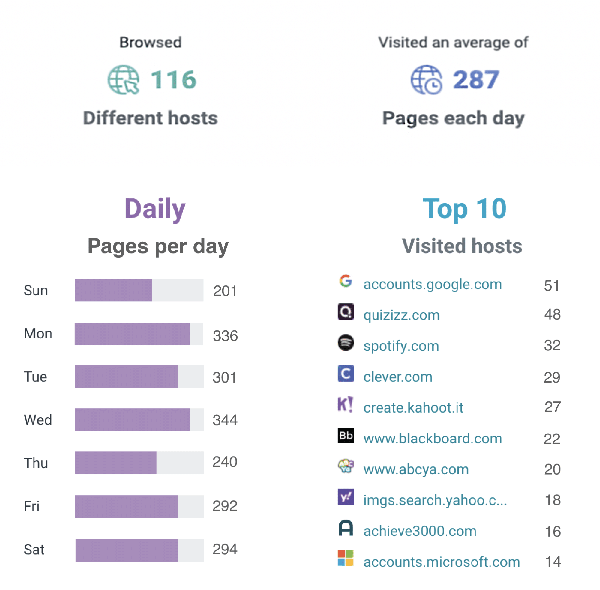
Starting October 12, 2025, parents and caregivers will automatically receive a weekly Lightspeed Student Online Activity Report. This report provides a summary of the websites your child visited during the previous week and is delivered every Sunday to your email directly from Lightspeed, our internet content filter.
The email contains:
- Subject: Filter Portal Weekly Report
- From:
[email protected]
Below is an example of the report:
More Detailed Reports in Parent Portal
If parents wish to get more detailed information, the weekly Student Online Activity Report allows parents to self enroll in the free Lightspeed Parent Portal. Those who sign up for the Parent Portal can log in any time to see more detail about their child’s internet browsing. The portal also allows parents to “pause” access to the internet during non-school hours on the FCPS device. Parents cannot pause the internet during the school day.
Example of Parent Portal:

By default the “All” tab is displayed, which shows all sites your child attempted to access each day, whether they were blocked or not. You can filter the results by activity type using the “Allowed” or “Blocked” tabs. Allowed sites are those that were successfully accessed by your child. Blocked sites are those sites your child was prevented from accessing based on our district’s filtering policies.
For more information please review the Lightspeed Parent Portal Guide.
Frequently Asked Questions
- Check your Spam or Junk folder. The email will have the subject line Filter Portal Weekly Report and will come from [email protected] .
- Confirm with your child’s school they have the correct email address on file in SIS.
- Confirm with your child’s school your SIS account status to ensure you are an authorized recipient.
Click the Unsubscribe link at the bottom of the Lightspeed Student Online Activity Report email. You will still be able to log in to the Lightspeed Parent Portal if you’ve set up an account. Only the weekly emails will stop.
Please complete a Parent Technology Support Request and select “Lightspeed” in the Application section. It may take up to two weeks before you begin receiving the reports again.
The weekly Lightspeed reports will be sent to the email address on file in our Student Information System (SIS). You can reach out to your child’s school to confirm they have the correct email address in the system.
You’ll receive a separate weekly Lightspeed Student Online Activity Report for each child. If you set up a Parent Portal account, all children will be listed in the account.
We encourage you to have a conversation with your child. If additional information is needed, please contact your child’s school.
Access to Technology
Access to computer equipment and Internet services through free and discounted services.
Shared Responsibility for Technology Use (Digital Citizenship)
Ensuring that students learn to use technology safely, responsibly and ethically is a shared responsibility.
Digital Citizenship Student Curriculum
In FCPS we educate students to become digital citizens who are able to think critically about the opportunities and challenges of the digital world and use technology responsibly to learn, create, and participate.

